Home/GST Phone Lookup Guides/GSTN Number Search: How to Verify Any GSTIN Online, Step by Step
GSTN Number Search: How to Verify Any GSTIN Online, Step by Step
GSTN number search explained: check any GSTIN online, read the 15-character format, confirm status and legal name, and spot fake GST numbers before you pay.
GST Identification Number
27ABCDE1234F1Z0
- Legal nameSample Traders Pvt Ltd
- StateMaharashtra (27)
- RegistrationActive
- Phone+91 98XXX XXXXX
- Emailc****@example.com
Illustrative result. Request a sample format for live records.
Reading time 20 min
Last reviewed October 2026
GSTN number search is the quickest way to confirm that a GST identification number printed on an invoice, quotation or vendor form actually belongs to the business that gave it to you. In a few seconds you can see whether the number exists, who it is registered to, where that business operates, what kind of taxpayer it is and whether the registration is still active. For anyone who buys from suppliers, sells to registered buyers or files GST returns, this one check protects input tax credit, keeps invoices clean and filters out fake or borrowed numbers before money changes hands.
This guide walks through everything you need: what a GSTIN is and how it differs from GSTN, how the 15 characters are built, why verification matters, how to run a search step by step, how to read each field in the result, what every status means, how to search by PAN or by name, how to spot and report a fake number, and what a GST record does not tell you. Read it once and you will be able to verify any GST number with confidence.
Quick answer
- A GSTIN is a 15-character, PAN-based ID given to every GST-registered business, one per state.
- A GSTN number search shows legal name, trade name, address, constitution, taxpayer type, registration date and status.
- Characters 3 to 12 of a valid GSTIN always equal the PAN of the registered person.
- Only trade with, and claim credit on invoices from, registrations that show as Active.
- The public record never shows the owner’s mobile number, email or bank account.
What Is a GSTIN, and Is It the Same as GSTN?
GSTIN stands for Goods and Services Tax Identification Number. It is the unique registration number allotted to every person or business registered under GST in India. Whenever a registered supplier raises a tax invoice, files a return, generates an e-way bill or an e-invoice, the GSTIN is the identity that ties the transaction to the correct taxpayer.
GSTN, strictly speaking, is the Goods and Services Tax Network, the body that runs the technology behind the GST system, including the official portal where taxpayers register, file and pay. In everyday speech, though, people say “GSTN number” when they mean GSTIN, and search engines treat the two as the same request. So when someone types GSTN number search, they want exactly what this guide covers: a lookup of a GST identification number to confirm who it belongs to.
Under the earlier indirect tax system, a business could hold separate registration numbers for excise, service tax and state VAT. GST replaced that patchwork with a single registration number per state. That is the reason the GSTIN carries so much weight today: one number now stands for the entire indirect tax identity of a business within a state.
GST Identification Number Format Explained
Every GSTIN follows the same fixed pattern of 15 alphanumeric characters. Before you even open a search page, you can catch many errors by checking the shape of the number against this structure. If a number does not follow the pattern below, it cannot be a valid GSTIN, and there is no point searching further.
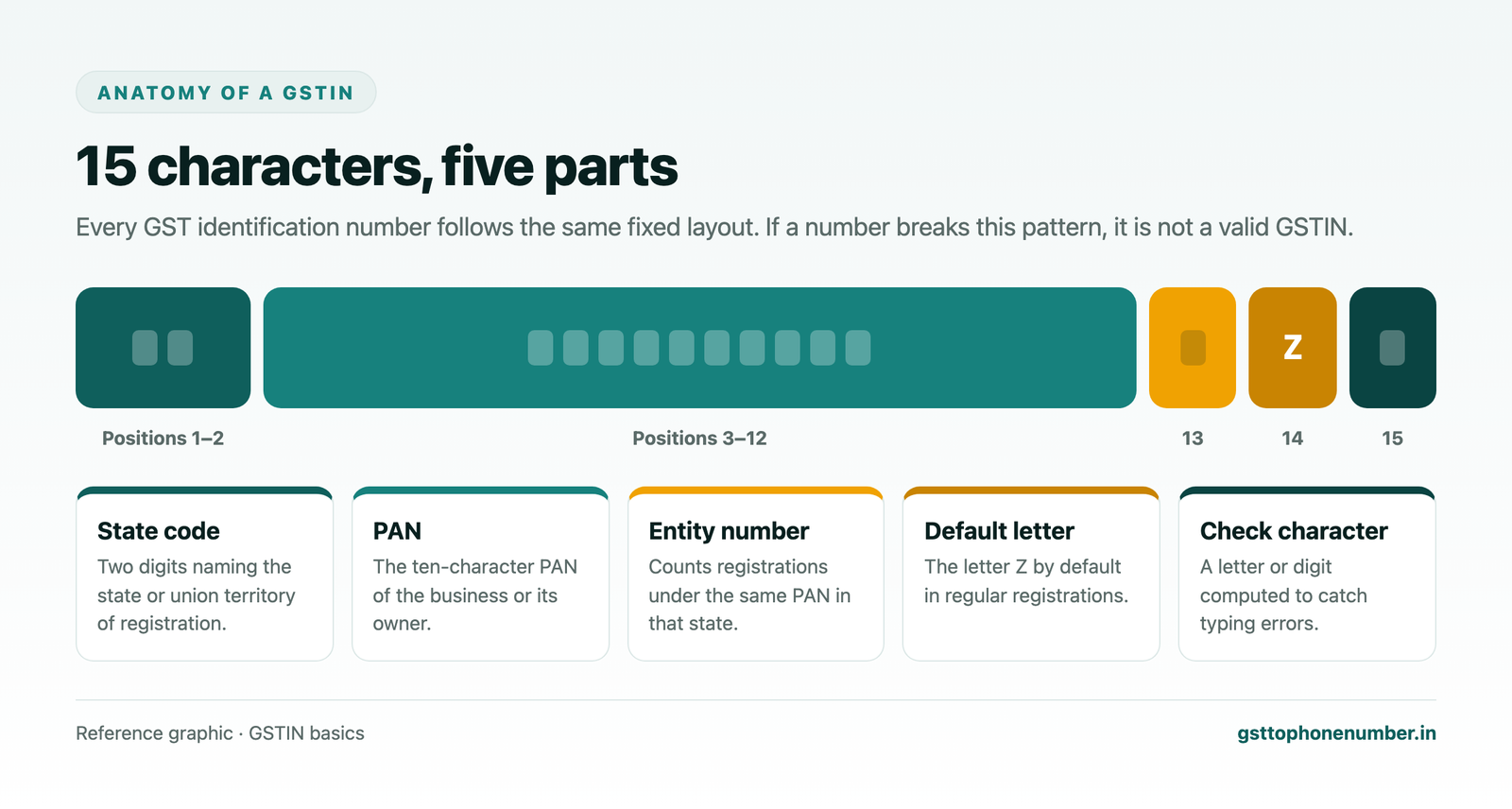
The first two characters are digits representing the state or union territory where the business is registered. Each state has its own code, so the same business operating in two states will have two GSTINs that begin with different pairs of digits. If the state code on a GSTIN does not match the state printed in the supplier’s address, that alone is a reason to look closer.
Characters three to twelve are the ten-character PAN of the registered person. For a company this is the company’s own PAN; for a proprietorship it is the owner’s personal PAN; for a partnership firm or LLP it is the firm’s PAN. This is the most useful quick test available to you: compare these ten characters with the PAN on the vendor’s documents. They must match exactly.
The thirteenth character is the entity number. It shows how many registrations the same PAN holds within that state, starting from 1 and moving to letters once digits run out. Most single-registration businesses carry 1 here. A higher value simply means the same PAN has more than one registration in that state, which is common for businesses with separate verticals.
The fourteenth character is the letter Z by default for regular registrations. Certain special categories can carry a different letter, but for the everyday suppliers most businesses deal with, a Z in this position is what you should expect to see.
The fifteenth and final character is a check code, which may be a letter or a digit. It is calculated from the first fourteen characters using a fixed formula, so if anyone mistypes a single character the check code no longer fits. Good accounting software validates this automatically, which is why a correctly shaped but mistyped number is often rejected the moment it is entered.
The five parts of a GSTIN
2-digit state code10-character PANEntity numberDefault letter ZCheck characterWhy You Should Verify Every GST Number
A GSTIN is public information by design. The law expects registered businesses to print it on every invoice and display it at their place of business precisely so that customers and suppliers can check it. Treating verification as a routine step, rather than something you do only when a deal feels suspicious, is what keeps your books safe.
The first reason is input tax credit. You can only claim credit for GST paid on purchases when the supplier is genuinely registered, the invoice carries a valid GSTIN, and the supplier reports the sale in their own return. An invoice carrying a cancelled, suspended or non-existent number can lead to credit being reversed later, with interest, long after the payment has gone out.
The second reason is accurate invoicing and e-invoicing. When you sell to a registered buyer, you must quote their GSTIN correctly so that the sale reaches their account and they can claim credit. A wrong buyer GSTIN creates mismatches on both sides, rejected e-invoices and awkward corrections at the end of the month.
The third reason is fraud prevention. Fake invoicing rings rely on borrowed, cancelled or fabricated GST numbers to pass on credit that was never backed by real tax payments. Businesses that pay such invoices can find themselves caught in the resulting investigations. A ten-second lookup before onboarding a new supplier is the cheapest protection available.
Finally, verification simply saves time. A number that is checked at the start of a relationship does not need to be chased later when a return fails to reconcile. Purchase teams, accounts staff and auditors all work faster when every GSTIN in the vendor master has been confirmed once and recorded.
Need the contact behind a GSTIN?Get the sample format with verified business contact fields.
How to Do a GSTN Number Search Step by Step
The search itself is short. What matters is doing each step deliberately, so that you are verifying the right number and reading the result correctly. Here is the process that works for a single supplier or buyer.
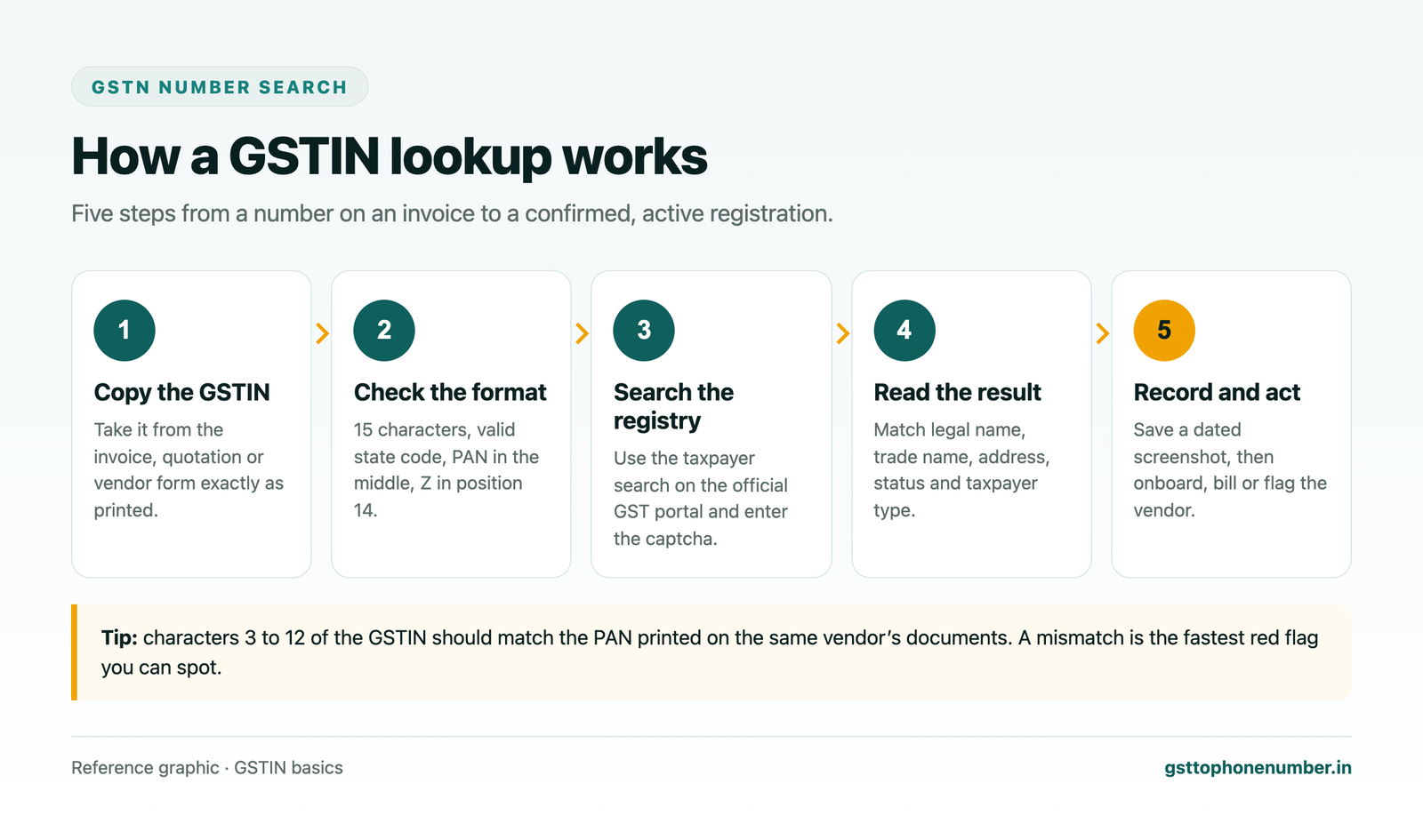
Start by copying the GSTIN exactly as it appears. On printed or handwritten invoices, characters such as 0 and O, 1 and I, or 5 and S are easy to confuse. If the number is hard to read, ask the supplier to send it in writing rather than guessing, because a wrong guess may land on a real but unrelated business.
Next, run the format check described above. Count the characters, look at the first two digits, and compare characters three to twelve with the PAN you have on file. This takes a few seconds and catches the majority of typing mistakes before you search.
Then open the taxpayer search on the official GST portal. You do not need to log in for a basic GSTIN lookup. Select the option to search by GSTIN or UIN, type in the number, complete the captcha and submit. If the number is valid, the registration details appear on screen. If it is not, the page tells you that no record was found.
Finally, read the result field by field, compare it with the invoice in front of you, and save a dated screenshot or printout. That saved record is useful evidence if the registration status changes later or if an auditor asks how the supplier was checked.
What Details You Get After a GSTIN Search
A successful GSTN number search returns the core public record of the registration. Knowing what each field means helps you decide quickly whether the supplier is who they claim to be.
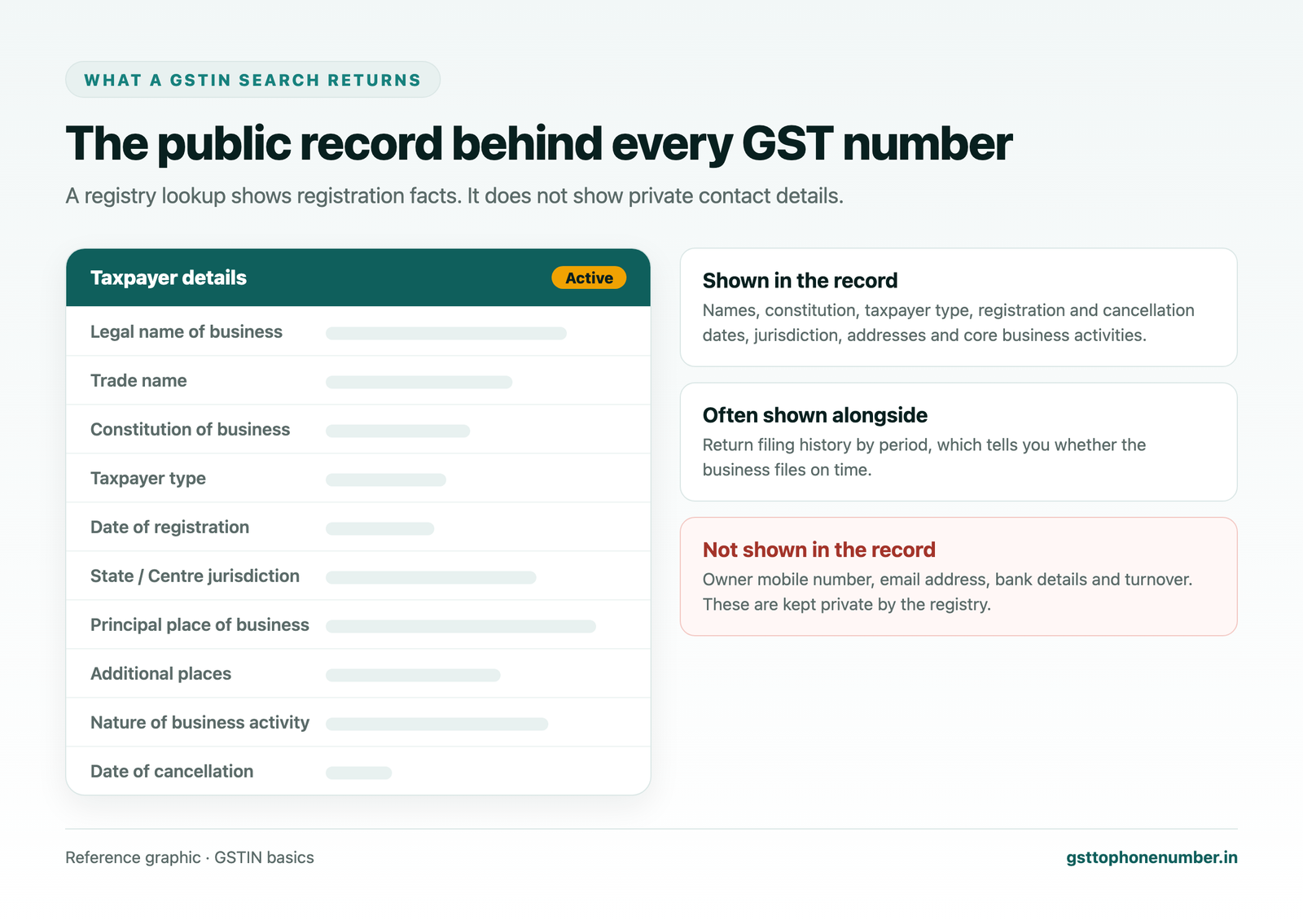
The legal name of business is the name on the PAN, the name the tax department actually knows. For a company it is the registered company name; for a proprietorship it is usually the owner’s own name. The trade name is the brand or shop name the business uses in the market. The two often differ, and that is normal. What matters is that the name printed on your invoice matches one of them.
Constitution of business tells you the legal form: proprietorship, partnership, LLP, private or public limited company, trust, society, government department and so on. If an invoice presents itself as coming from a limited company but the record shows a proprietorship, ask why.
Taxpayer type shows whether the business is a regular taxpayer, a composition taxpayer, a casual taxpayer, an input service distributor or another category. This matters because a composition taxpayer cannot charge GST on its invoices or pass on input tax credit. If a composition dealer has charged tax on your bill, the credit is not available to you.
Date of registration and, where relevant, date of cancellation tell you the window during which the GSTIN was valid. An invoice dated after the cancellation date cannot support a credit claim, even if the number was perfectly valid a year earlier.
The state and centre jurisdiction show which tax office handles the registration. The principal place of business and any additional places of business give the registered addresses. Compare these with the address on the invoice and the location from which goods are being dispatched.
Most results also list the nature of business activities, such as wholesale, retail, manufacturing, office or warehouse, and offer a view of return filing history. A supplier that has registered as a trader but invoices you for manufacturing services, or one with many missed return periods, deserves a second look before a large order.
Match these on every invoice
- Legal or trade name
- Constitution of business
- Taxpayer type
- Registration date
- GSTIN status
- Principal address
- State code vs billing state
- Return filing regularity
Understanding GSTIN Status: Active, Suspended, Cancelled and More
The status field is the single most important line in the result. It tells you whether the registration can be relied on today. Read it before anything else, and recheck it for regular suppliers from time to time, because a status can change at any point in a business relationship.
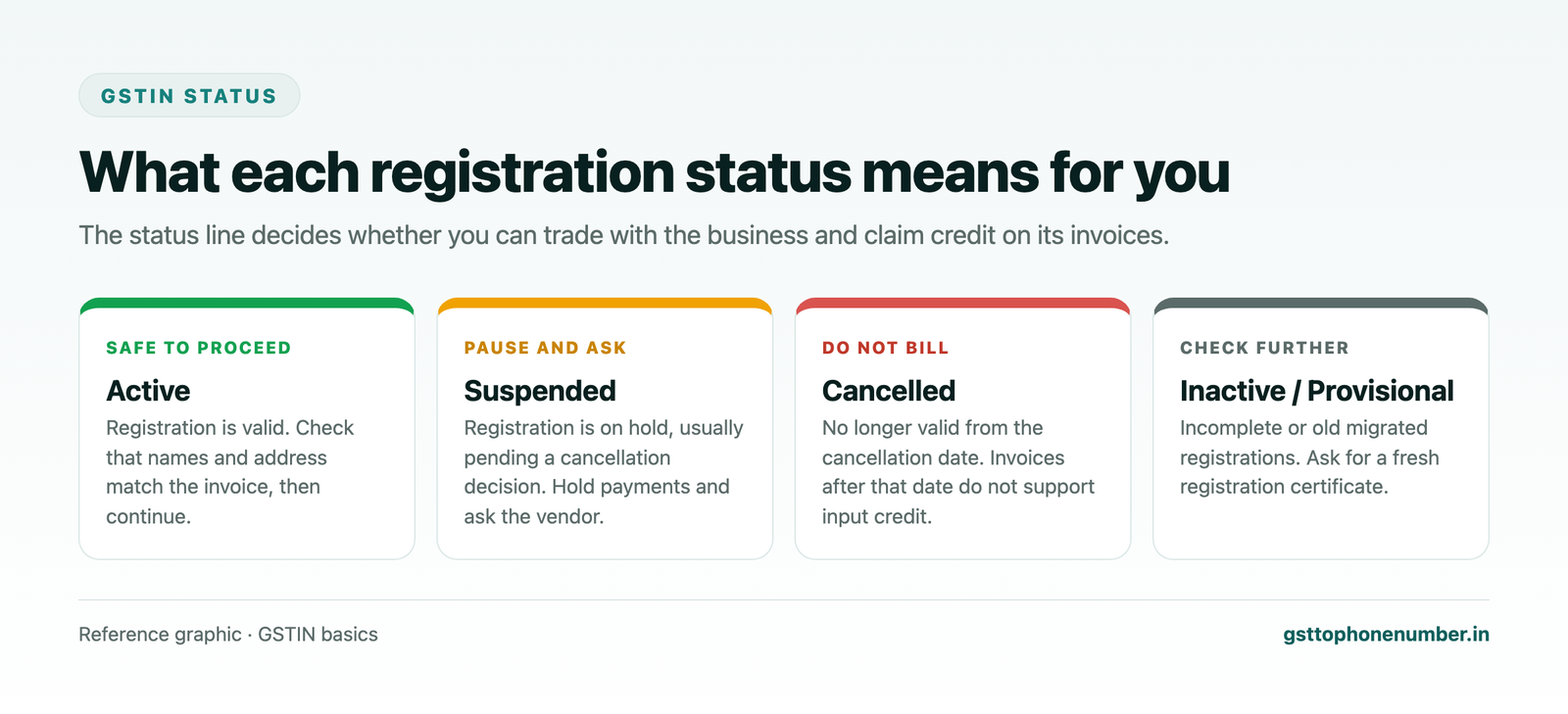
Active means the registration is valid and in force. You can trade with the business and, as long as the supplier reports your purchase in their return, claim credit on its invoices. Active is the status you want to see, but it is not the end of the check: names and addresses still need to match.
Suspended usually appears when a registration is in the process of being cancelled, either because the business applied for cancellation or because the tax officer started proceedings, often for non-filing of returns. A suspended taxpayer cannot issue tax invoices during that period. Pause new orders and payments until the supplier shows that the issue is resolved.
Cancelled means the registration has ended from the date shown. Any invoice dated after that date does not carry valid GST, and you should not claim credit on it. If a cancelled supplier still sends you tax invoices, stop and ask for an explanation in writing.
Inactive or provisional statuses mostly relate to older registrations that were migrated into GST and never completed, or to records that are incomplete. Treat them with caution and ask the supplier for a current registration certificate before relying on the number.
GST Number Search by PAN
Sometimes you know a business’s PAN but not its GSTIN, or you want to see every registration a PAN holds. The official GST portal offers a search by PAN for exactly this. Enter the PAN, complete the captcha, and the portal lists all GSTINs linked to it across states, along with the status of each one.
This is useful in several situations. A supplier that operates from more than one state will have a separate GSTIN for each, and you need the one that matches the state the goods are dispatched from. A buyer may give you an outdated GSTIN from a state where they have since closed operations. And for your own business, a search by PAN is the quickest way to spot any registration you never applied for, which is a warning sign that your PAN has been misused.
Once you have the list, you can open any individual GSTIN from it and run the full lookup described above to see names, addresses, taxpayer type and status for that particular registration.
GST Number Search by Business Name
Searching by name is harder than searching by number, because many businesses share similar trade names and the registry is organised around GSTIN and PAN rather than names. When you only know a business name, the practical route is to start from something more precise: ask the business for its GSTIN directly, find it printed on an earlier invoice, quotation, letterhead or packaging, or locate the PAN and run a search by PAN.
If you do find a candidate GSTIN through a name, always confirm it with a full GSTIN lookup and check the legal name, state and address. Two businesses with nearly identical trade names in different cities are common, and choosing the wrong one creates exactly the kind of mismatch verification is meant to prevent.
Can You Find the Owner Name and Address From a GST Number?
Yes, to a point. The legal name shown in a GSTIN search is the name tied to the PAN, which for a proprietorship is the owner’s own name. For partnerships and companies, the legal name is the entity’s name rather than an individual’s. The registered principal place of business and any additional places of business appear in the same result, so a GSTIN search does give you a verified business address.
This is often all you need for compliance: the legal name and address on your purchase records should match what the registry says. It also helps with practical tasks such as confirming a delivery address or checking that a new customer actually operates from the city they mentioned.
What a GST Number Search Does Not Show
It is just as important to know the limits of the public record. A GSTN number search does not show the owner’s mobile number, personal email address, bank account details, turnover figures or tax paid. Those details are submitted during registration but are kept private by the system and are not displayed to the public.
That gap matters for sales and purchase teams. Confirming a supplier’s registration tells you they are genuine; it does not tell you who to call to place an order, follow up on a delivery or chase a pending payment. Businesses that need a reachable contact for a list of GSTINs usually rely on separately compiled business contact data that is matched back to each GSTIN and its legal name, rather than expecting the tax registry to provide it.
How to Spot a Fake GST Number
Most fake or misused GST numbers fail a simple check. The trick is to run the checks every time, not only when something feels off. Here are the warning signs worth watching for on any invoice.
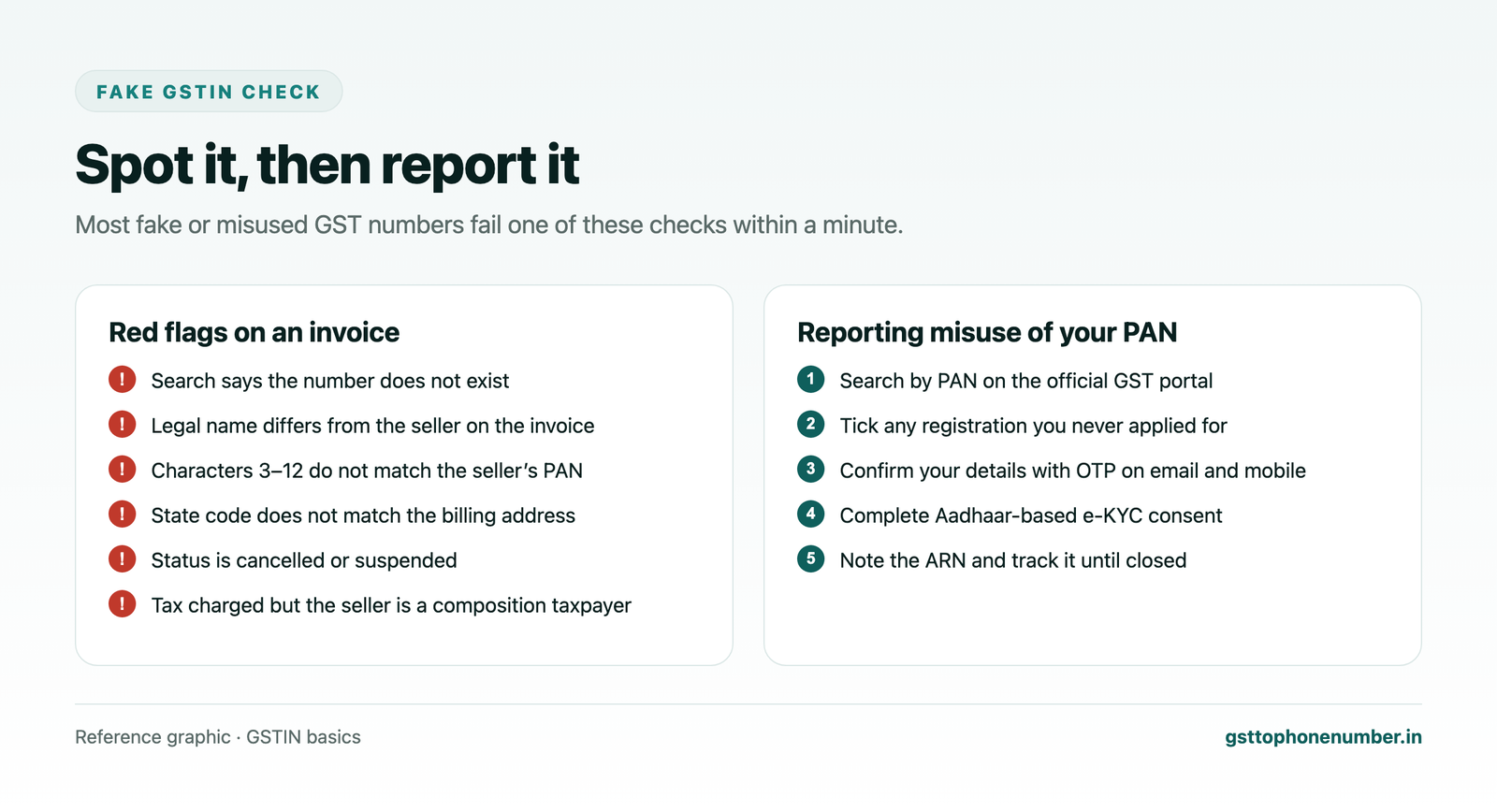
The clearest sign is a search that returns no record at all. That means the number does not exist in the registry, either because it was mistyped or because it was invented. Ask the supplier for a copy of their registration certificate and search again.
The next sign is a name mismatch. If the legal name and trade name in the record have nothing to do with the business on the invoice, the supplier may be using someone else’s GSTIN. Similarly, if characters three to twelve do not match the PAN on the supplier’s other documents, the number belongs to a different person.
Location mismatches are another clue. A GSTIN whose state code points to one state, attached to an invoice that ships from another state with no additional place of business registered there, needs an explanation. So does a supplier that charges GST while the record shows it as a composition taxpayer, because composition dealers are not permitted to collect tax on their invoices.
Finally, watch the status. Cancelled and suspended numbers are frequently reused on invoices by businesses that have closed or been stopped by the department. A quick search every time a regular supplier sends a large invoice catches this before payment.
Want to see real match quality?See the sample format for your own GST numbers.
How to Report a Fake GSTIN or Misuse of Your PAN
If you come across a fake GST number on an invoice, the right course is to stop the transaction, keep copies of everything you received and alert the GST authorities through the official helpdesk and grievance channels listed on the GST portal, so that they can take action against the number.
If you discover that someone has taken a GST registration using your PAN without your knowledge, the official portal provides a dedicated reporting route. The process is designed so that only the genuine PAN holder can raise the complaint, and it generally runs in the following order.
Each GSTIN you report gets its own application reference number, and you can follow its progress through the Track ARN option on the portal without logging in. Older registrations that were never fully migrated from the earlier tax system may not be reportable through this route; for those, raise a grievance through the portal’s support channels instead.
Acting quickly matters. A registration taken on your PAN can be used to issue fake invoices in your name, and the sooner it is flagged, the easier it is to show that you had no part in it.
Benefits of Verifying GSTIN Before Every Transaction
Building verification into your routine pays off in several ways. It confirms the authenticity of any GSTIN you receive, whether from a long-standing supplier or a first-time buyer. It lets you read an unclear number on a handwritten invoice with certainty instead of guessing. It keeps you away from vendors using borrowed or fake numbers, and it stops GST fraud at the very start of a transaction rather than at the audit stage.
Verification also helps your trading partners. When you notice that a supplier has quoted the wrong GSTIN, or that a buyer’s registration has moved to a different state, you can point it out early and help them correct their records before returns are filed. That goodwill makes month-end reconciliation smoother for everyone involved.
Best Practices for Businesses That Check GSTINs Regularly
If your team deals with dozens or hundreds of suppliers and customers, a few habits make verification reliable without slowing work down. First, verify every GSTIN at the moment of onboarding and store the result, including the date and a screenshot, in the vendor or customer master. Do not let a new party into your system on an unchecked number.
Second, recheck active suppliers periodically, for example every quarter, and always before releasing a large payment. Statuses change, and the only way to know is to look again. Third, enable GSTIN format validation in your billing or accounting software so that mistyped numbers are rejected at entry rather than discovered during return filing.
Fourth, compare the PAN embedded in the GSTIN with the PAN on the supplier’s other documents every single time. It is the fastest, most reliable check you have. And fifth, keep a short written policy that says what the team should do when a search shows a mismatch, a suspended status or no record, so that decisions are consistent and quick.
Verification routine
- Verify at onboarding
- Save a dated screenshot
- Recheck every quarter
- Recheck before large payments
- Validate format in software
- Match PAN on every check
Common Mistakes When Searching a GST Number
The most frequent mistake is a simple typing error. Confusing the letter O with zero or the letter I with one changes the check character and produces a no-record result, which people sometimes misread as proof of a fake number. Re-read the number carefully before drawing conclusions.
Another common mistake is stopping at the word Active. A registration can be active and still belong to someone other than the business on your invoice. Always compare names and addresses, not just status.
People also forget that one business can hold many GSTINs. Searching a supplier’s head office GSTIN does not confirm the registration of the branch that actually invoiced you. Use the GSTIN printed on the specific invoice. Finally, many teams verify once and never again. A supplier that was active when onboarded two years ago may have been cancelled since, so periodic rechecks are part of the job.
Final Thoughts
A GSTN number search takes less than a minute, yet it protects your input tax credit, keeps your invoices accurate and shuts out fake suppliers before they cost you money. Learn the 15-character format, check the PAN inside it, read the legal name, taxpayer type and status with care, and keep a dated record of every check. Make it a habit at onboarding and before every large payment, and the GST identity of every business you deal with will always be something you have confirmed, not something you have assumed.
Have a list of GSTINs?Send a few and we will return matching contact fields.
- What Is a GSTIN, and Is It the Same as GSTN?
- GST Identification Number Format Explained
- Why You Should Verify Every GST Number
- How to Do a GSTN Number Search Step by Step
- What Details You Get After a GSTIN Search
- Understanding GSTIN Status: Active, Suspended, Cancelled and More
- GST Number Search by PAN
- GST Number Search by Business Name
- Can You Find the Owner Name and Address From a GST Number?
- What a GST Number Search Does Not Show
- How to Spot a Fake GST Number
- How to Report a Fake GSTIN or Misuse of Your PAN
- Benefits of Verifying GSTIN Before Every Transaction
- Best Practices for Businesses That Check GSTINs Regularly
- Common Mistakes When Searching a GST Number
- Final Thoughts
Related GST number search guides
Frequently Asked Questions
Is it necessary to pay to get a GST number?
No. Applying for GST registration on the official portal and receiving a GSTIN carries no government fee. Costs arise only if you choose to hire a professional to prepare and file the application for you.
When is a GSTIN allotted?
A GSTIN is allotted once the registration application has been processed and approved by the tax officer. The applicant then receives the 15-character GSTIN along with a registration certificate on the portal.
Is it mandatory to mention GSTIN on invoices?
Yes. A registered person must print their GSTIN on every tax invoice and bill of supply, and on a B2B invoice the buyer’s GSTIN must also be quoted. The registration certificate must be displayed at every place of business.
How do I get a GST identification number?
Submit the registration application in Form GST REG-01 on the official GST portal with the required documents, such as PAN, proof of address, identity proof and bank details. After verification by an officer, the GSTIN is allotted.
Can one business hold multiple GSTINs?
Yes. A business needs a separate GSTIN for each state or union territory from which it makes taxable supplies, and it can hold more than one registration in the same state for separate business verticals. All of them share the same PAN.
Can I find the owner's name from a GST number?
Yes. A GSTIN search shows the legal name and trade name of the business. For a proprietorship, the legal name is usually the owner’s own name; for companies and firms it is the entity’s name.
How can I check whether a GSTIN is active?
Run a GSTIN search on the official portal and read the status field in the result. It will show Active, Suspended, Cancelled or another status, along with the cancellation date where applicable.
Can I get a company's address from its GSTIN?
Yes. The search result shows the principal place of business and any additional places of business registered under that GSTIN.
How do I check if a company is GST registered?
Search its GSTIN on the official portal. If you only know the PAN, use the search by PAN to list every registration linked to it. If no record appears, the business is not registered under that number.
Does a GSTIN search show the owner's phone number or email?
No. Mobile numbers, email addresses and bank details given at registration are kept private and do not appear in the public search result.
What should I do if a GSTIN search shows no record?
First recheck the number for typing errors, especially O and zero or I and one. If it still shows no record, ask the supplier for their registration certificate and do not claim credit on the invoice until the number is confirmed.
Why does the PAN inside the GSTIN matter?
Characters 3 to 12 of every GSTIN are the PAN of the registered person. If they do not match the PAN on the supplier’s other documents, the GSTIN belongs to someone else, and that is a strong sign of misuse.
 GST To Phone Number
We help sales, procurement and compliance teams turn a GST registration number into a verified, reachable business contact.
Company
Get Sample Format
Send us a few GSTINs and we will return the matching contact fields so you can judge the data before you buy.
© 2026 GST To Phone Number. All rights reserved.
Disclaimer: GST To Phone Number is an independent data service. We are not affiliated with, endorsed by or connected to the Goods and Services Tax Network, the Central Board of Indirect Taxes and Customs, or any government department. GSTIN verification should always be confirmed against the official GST portal. Contact data is provided for legitimate business use and must be used in line with applicable telecom, privacy and data-protection rules.