Home/GST Phone Lookup Guides/Find Phone Using GST Number on Your Smartphone in Minutes
Find Phone Using GST Number on Your Smartphone in Minutes
Find phone using GST number on your smartphone alone: a quick routine to verify the GSTIN, search the trade name nearby, check the number and save it properly.
GST Identification Number
27ABCDE1234F1Z0
- Legal nameSample Traders Pvt Ltd
- StateMaharashtra (27)
- RegistrationActive
- Phone+91 98XXX XXXXX
- Emailc****@example.com
Illustrative result. Get sample format for live records.
Reading time 4 min
Last reviewed October 2026
Find phone using GST number is often a job you need to do away from a desk: standing at a supplier’s gate, sitting in a client meeting, or checking a new dealer before handing over goods. You have a GSTIN on a bill or a visiting card and a smartphone in your hand. With a simple routine you can verify the registration, find a likely number, check it and save it, usually within a few minutes and without any special app.
This guide gives that routine step by step, with tips for doing each step quickly on a small screen.
Quick answer
- Verify the GSTIN first in the phone’s browser using the public taxpayer search.
- Copy the trade name and pincode; they drive every later search.
- Use the maps app to find the business at its registered address.
- Check the number’s chat profile before calling.
- Save the contact with the GSTIN in the notes field.
Step 1: Open the Public Search
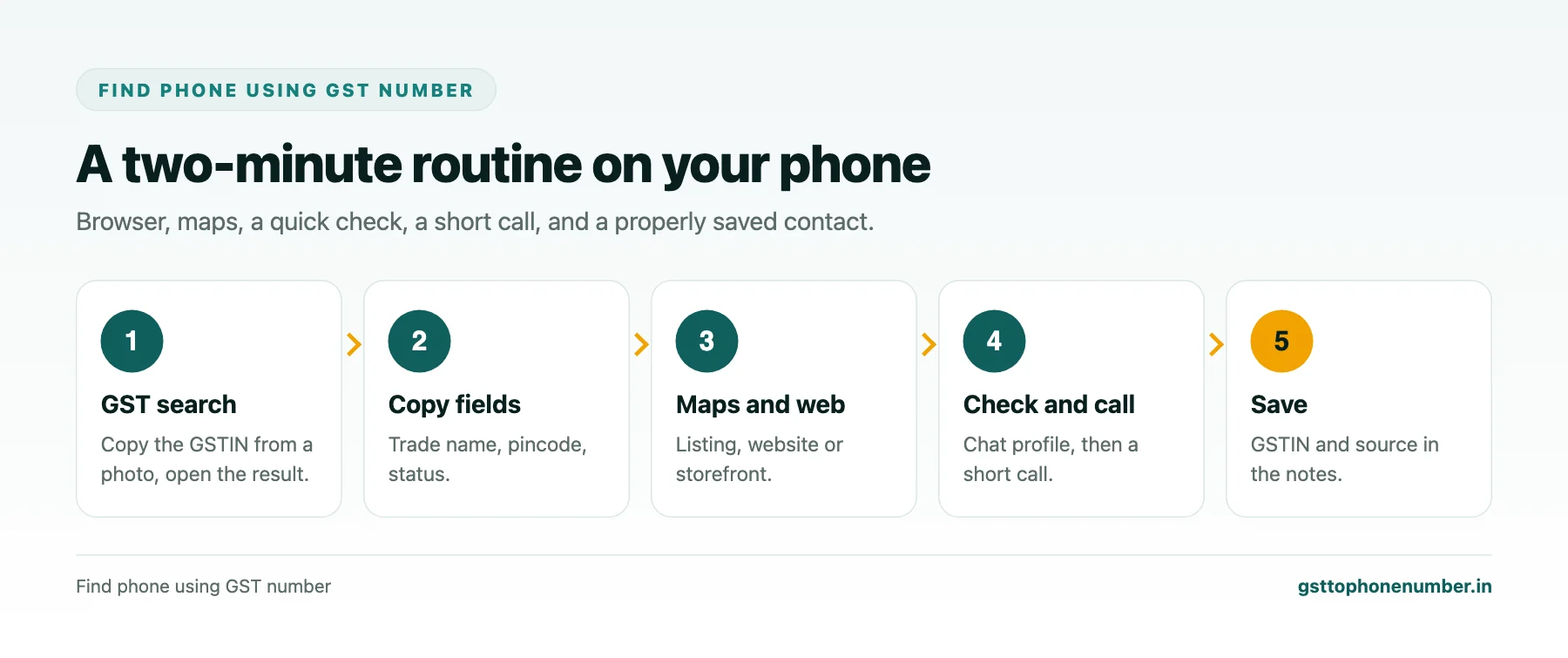
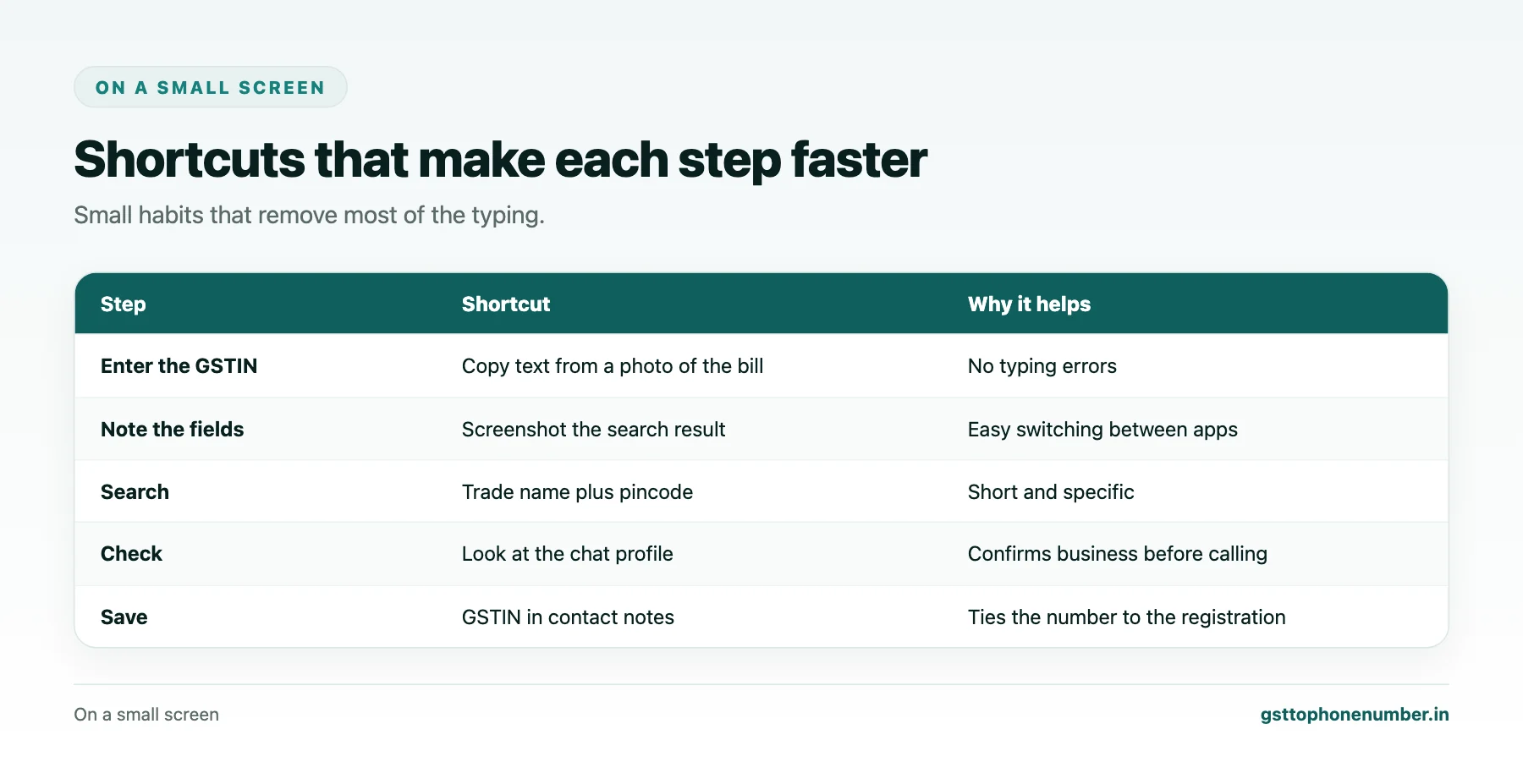
In your phone’s browser, open the official GST portal and use the search taxpayer option. Typing a fifteen-character GSTIN on a phone keyboard is error-prone, so copy it from a message or photo where possible: most phones can pick text out of a photo of a bill. Complete the captcha and open the result.
Step 2: Note the Key Fields
On the result screen, long-press to copy the trade name, then note the legal name, status and the pincode from the principal place of business. A quick screenshot of the result is useful too, since you will switch between apps. If the status is cancelled or suspended, stop here and think about whether you still want to deal with this business today.
Step 3: Search the Maps App
Paste the trade name into the maps app, add the pincode or locality, and search. Look at results near the registered address. Open the listing and check the category, photos of the shop front and recent reviews. Many listings show a call button with the business’s number. If you are physically at the address, the map will also confirm you are at the right building.
Need the contact behind a GSTIN?Get the sample format with verified business contact fields.
Step 4: Try a Web Search
If the map shows nothing, search the trade name with the city in the browser. Look for the business’s website, a marketplace storefront or a social page. On the website, the contact page and footer usually show a phone. Check the address against the GST record before trusting it.
Step 5: Check the Number Before Calling
Save the number temporarily and look at its chat profile. A business profile with the same trade name and locality is a good sign. If the number came from a listing created by customers, keep in mind it may be old. For anything involving payment, confirm through a second source.
Step 6: Make a Short Call
Call and ask for the business by its trade name. Introduce yourself in one sentence and state your purpose. Confirm the legal name or GSTIN if you need it for an invoice. Keep it brief; a small business may be serving customers.
Want to see real match quality?See the sample format for your own GST numbers.
Step 7: Save It Properly
Create a contact using the trade name and city, for example “Sharma Electricals Pune”. In the notes field, paste the GSTIN, the legal name, where you found the number and today’s date. Later, anyone you share the contact with will know exactly which registration it belongs to.
When You Are at the Premises
If you are standing at the address, the quickest route of all is the signboard, a visiting card from the counter, or simply asking whoever is there. Photograph the board for your records. This is also the moment to confirm the business actually operates where the GST record says.
Small Habits That Save Time
Keep the GST search page bookmarked on your home screen, use the photo-text feature to avoid typing GSTINs, and save contacts with the GSTIN in notes every time. After a few lookups the whole routine becomes a two-minute habit.
Have a list of GSTINs?Send a few and we will return matching contact fields.
Related guides
Find GST Business Phone Number with a Public Footprint Audit: a related guide.
Find Mobile Number with GSTIN and Confirm It Is a Business Line: a related guide.
Find GST Business Mobile Number for Small Shops and Traders: a related guide.
Find Firm Phone Number by GSTIN When the Trade Name Differs: a related guide.
Frequently Asked Questions
How do I find phone using GST number on my smartphone?
Search the GSTIN on the GST portal in your browser, copy the trade name and pincode, search them in the maps app or on the web, check the number’s chat profile, then call and save it.
Do I need a special app?
No. A browser, the maps app and your phone’s contacts are enough.
How do I avoid typing errors in the GSTIN?
Copy it from a message, or use your phone’s feature that picks text out of a photo of the bill.
What if the maps app finds nothing?
Search the trade name with the city on the web for a website, storefront or social page.
How should I save the contact?
Use the trade name and city as the contact name, and put the GSTIN, legal name, source and date in the notes.
What if I am at the business's premises?
Use the signboard or a visiting card, and confirm the business operates at the registered address.
 GST To Phone Number
We help sales, procurement and compliance teams turn a GST registration number into a verified, reachable business contact.
Company
Get Sample Format
Send us a few GSTINs and we will return the matching contact fields so you can judge the data before you buy.
© 2026 GST To Phone Number. All rights reserved.
Disclaimer: GST To Phone Number is an independent data service. We are not affiliated with, endorsed by or connected to the Goods and Services Tax Network, the Central Board of Indirect Taxes and Customs, or any government department. GSTIN verification should always be confirmed against the official GST portal. Contact data is provided for legitimate business use and must be used in line with applicable telecom, privacy and data-protection rules.