Home/GST Mobile Number Guides/Find Mobile Number with GSTIN and Confirm It Is a Business Line
Find Mobile Number with GSTIN and Confirm It Is a Business Line
Find mobile number with GSTIN, then confirm it is really the business’s line: read business chat profiles, payee names and other signals against the GST record.
GST Identification Number
27ABCDE1234F1Z0
- Legal nameSample Traders Pvt Ltd
- StateMaharashtra (27)
- RegistrationActive
- Phone+91 98XXX XXXXX
- Emailc****@example.com
Illustrative result. Get sample format for live records.
Reading time 4 min
Last reviewed October 2026
Find mobile number with GSTIN searches usually end with a candidate number: something from a listing, an old invoice, a forwarded message or a colleague’s notes. The harder question is whether that mobile genuinely belongs to the business on the GST record, or to a former employee, an agent, a relative, or someone pretending to be the business. Most business mobiles today run a business chat profile and sit behind payment accounts, and both leave signals you can read before you rely on the number.
This guide covers those signals, how to compare them with the GST record, and how much weight each deserves.
Quick answer
- A candidate number needs confirming before you save or trust it.
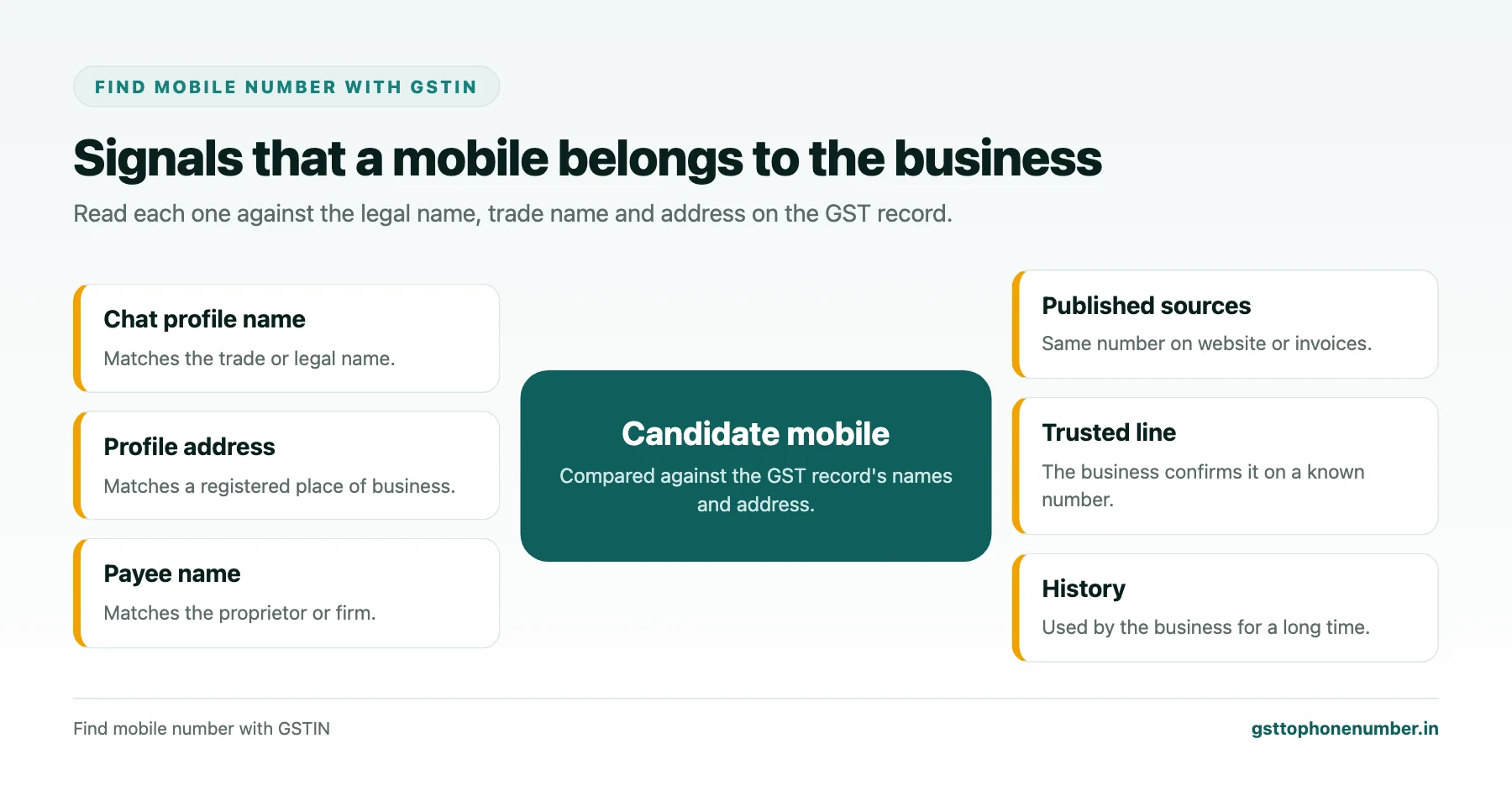
- Business chat profiles often show a business name, category, address and hours.
- The payee name shown before a digital payment reveals who holds the account.
- Compare every signal with the legal name, trade name and address on the GST record.
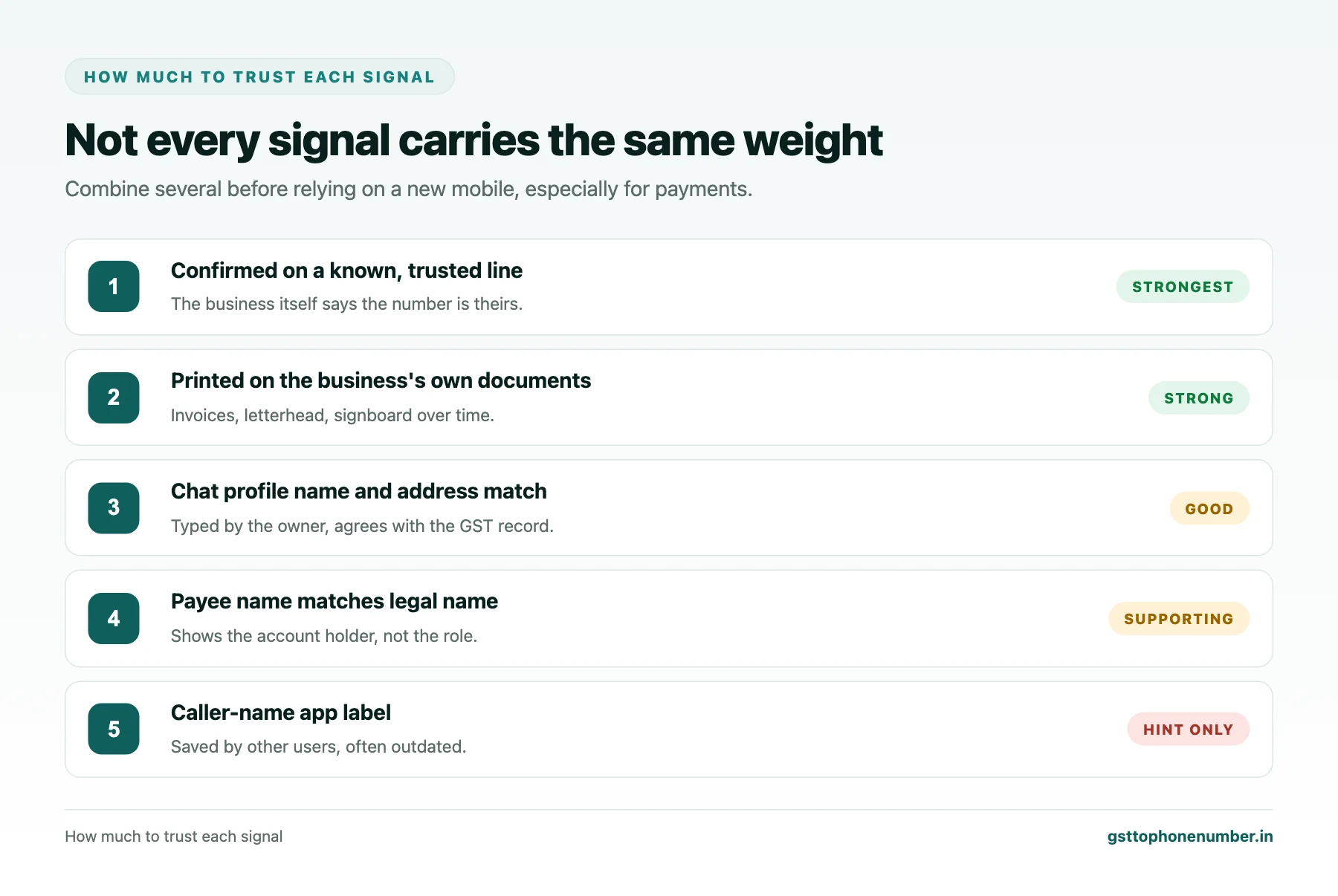
- No single signal proves ownership; agreement between several does.
Why Confirmation Matters
A wrong number wastes a call. A number controlled by the wrong person can cost much more: payment requests from a “supplier’s new number” are a common fraud, and messages sent to a former employee leak business information. Checking that a mobile belongs to the business protects both sides.
Business Chat Profiles
Save the number and look at its chat profile. Business profiles commonly display the business name, a category, an address, opening hours, a website and sometimes a product catalogue. Compare the name with the trade name and legal name on the GST record, and the address with the principal or additional place of business. A personal profile with just a first name is not proof of anything either way; many small owners use personal accounts for business.
Payee Names
If you trade with the business and will pay it digitally, the payment app shows the account holder’s name when you enter a mobile or payment address, before any money moves. For a proprietor this is usually the owner’s own name, which should match the legal name on the GST record. A mismatch does not always mean fraud, since staff sometimes collect payments, but it means you should confirm before paying.
Need the contact behind a GSTIN?Get the sample format with verified business contact fields.
Cross-Checking With Published Sources
See whether the same number appears on the business’s website, map listing, invoices or signboard. A number that appears in one place only, especially a message received out of the blue, deserves more caution than a number printed on the business’s own documents for years.
Asking the Business Directly
The simplest confirmation is a call to a number you already trust, such as the landline on the website or the contact you have dealt with before, asking whether the new mobile is theirs. This is essential whenever the new number is linked to a change in bank details or an urgent payment request.
Signals That Need Care
Caller-name apps show names that users have saved, which may be nicknames or outdated. Profile pictures can be copied. A business name in a chat profile is typed by whoever set it up and is not verified unless the platform marks it so. Treat these as hints, not proof.
Want to see real match quality?See the sample format for your own GST numbers.
Recording the Confirmation
When you save the mobile against the GSTIN, note which signals agreed and the date you checked: for example “chat profile name and address match, number on invoice”. Your colleagues can then see how well established the number is without repeating the work.
Respecting the Number Once Confirmed
Confirming a number is not permission to market to it. Use it for the business relationship it was given for, and follow the business’s preferences on calls versus messages.
Have a list of GSTINs?Send a few and we will return matching contact fields.
Related guides
Find Mobile Number with GST Number for Online Orders and Deliveries: a related guide.
Find GST Business Mobile Number for Small Shops and Traders: a related guide.
Find GST Business Phone Number with a Public Footprint Audit: a related guide.
Find vendor mobile number by GST number: a related guide.
Frequently Asked Questions
How do I find mobile number with GSTIN and know it is genuine?
Get a candidate from published sources or your records, then compare its chat profile and payee name with the GST record and confirm on a line you already trust.
What does a business chat profile show?
Usually the business name, category, address, hours and website, which you can compare with the GST record.
Is the payee name a reliable check?
It shows who holds the account. For proprietors it should match the legal name; mismatches need confirming.
Can caller-name apps confirm ownership?
No. Their labels are saved by users and can be wrong or outdated.
What if the new number came with a bank detail change?
Always confirm on a known, trusted line before paying.
Should I record how I confirmed the number?
Yes. Note the signals that agreed and the date checked.
 GST To Phone Number
We help sales, procurement and compliance teams turn a GST registration number into a verified, reachable business contact.
Company
Get Sample Format
Send us a few GSTINs and we will return the matching contact fields so you can judge the data before you buy.
© 2026 GST To Phone Number. All rights reserved.
Disclaimer: GST To Phone Number is an independent data service. We are not affiliated with, endorsed by or connected to the Goods and Services Tax Network, the Central Board of Indirect Taxes and Customs, or any government department. GSTIN verification should always be confirmed against the official GST portal. Contact data is provided for legitimate business use and must be used in line with applicable telecom, privacy and data-protection rules.