Home/GST Mobile Number Guides/Find GST Registered Mobile Number for Your Own Registration
Find GST Registered Mobile Number for Your Own Registration
Find GST registered mobile number on your own GSTIN, change it when staff or SIMs change, and recover portal access when the old number is lost.
GST Identification Number
27ABCDE1234F1Z0
- Legal nameSample Traders Pvt Ltd
- StateMaharashtra (27)
- RegistrationActive
- Phone+91 98XXX XXXXX
- Emailc****@example.com
Illustrative result. Get sample format for live records.
Reading time 4 min
Last reviewed October 2026
Find GST registered mobile number is a question many business owners ask about their own registration, usually at an awkward moment. A return is due, the portal wants a verification code, and nobody in the office knows which phone receives it. Perhaps the number belonged to an accountant who left, a consultant you no longer use, or a SIM that was lost. This guide is for the taxpayer: how to find which mobile is on your registration, how to change it, and what to do when you can no longer receive messages on the old one.
It does not cover finding other businesses’ registered numbers. Those are deliberately kept private, for the same reasons you will want yours protected.
Quick answer
- The registered mobile belongs to the primary authorised signatory on your GSTIN.
- You can see it in the authorised signatory details after logging in.
- Old OTP messages and registration acknowledgements also show where codes go.
- You change it through a non-core amendment, verified with OTPs on the new number.
- If you have lost access, the jurisdictional officer can update the signatory’s contact details.
Why the Registered Mobile Matters
The mobile entered at registration receives one-time passwords for logging in where extra verification applies, for filing returns with an electronic verification code, for amendments and for password resets. If it reaches the wrong person, you depend on them for every filing. If it reaches nobody, you may be unable to file on time.
Finding It When You Can Log In
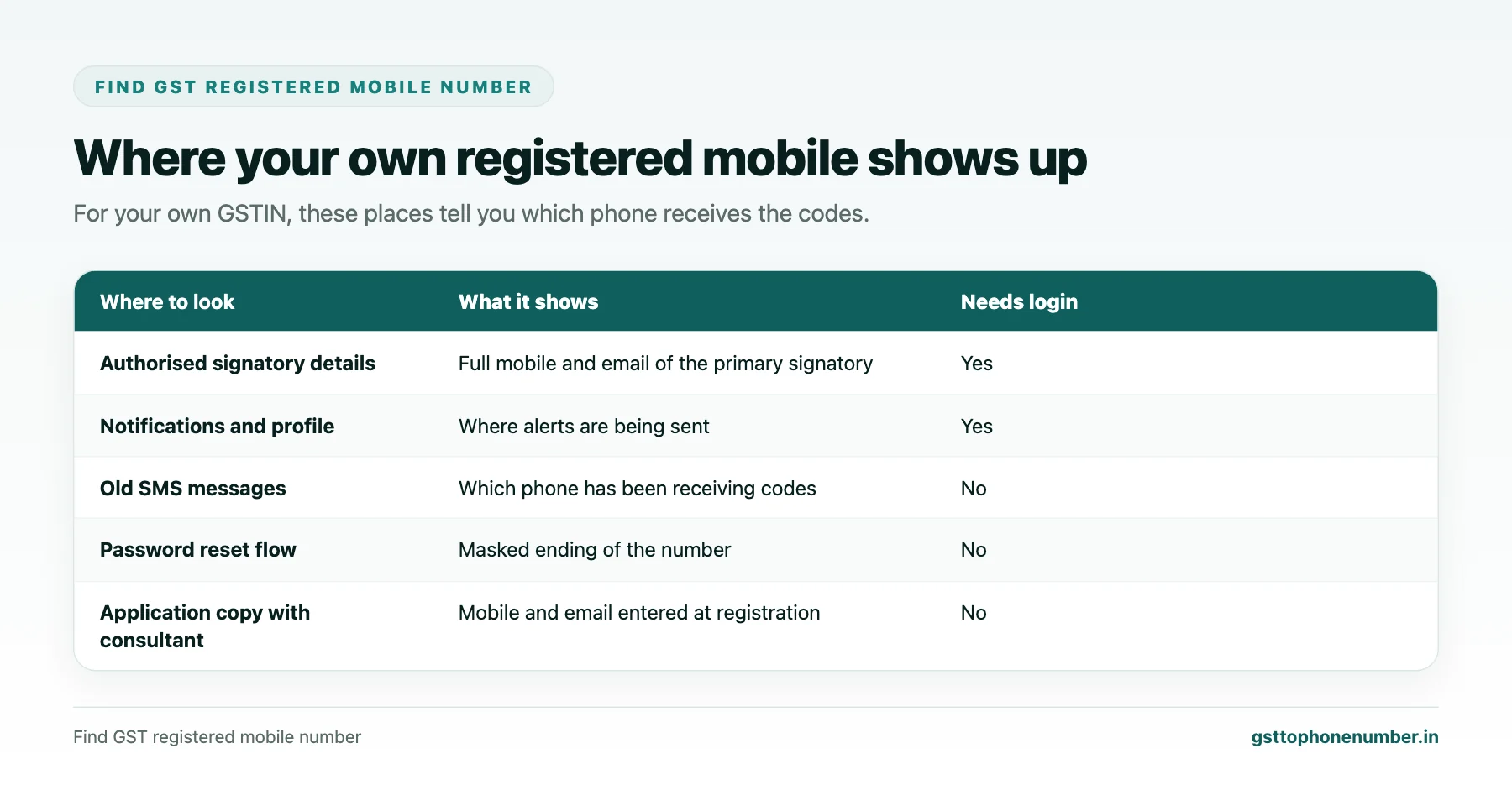
Log in to the GST portal and open the registration amendment section for non-core fields, then view the authorised signatory details. The primary signatory’s mobile and email are shown there. You can view without submitting any change.
Your profile area and recent notifications also show the email and phone that alerts are being sent to, which helps confirm it.
Finding It When You Cannot Log In
Search old SMS messages for codes and alerts from the GST system; the phone that holds them is the registered one. The acknowledgement and emails received at registration show the email used, and your consultant may have a copy of the application. If you remember the username, the password reset flow will tell you that a code was sent and usually shows the masked ending of the number, enough to identify which phone it is.
Need the contact behind a GSTIN?Get the sample format with verified business contact fields.
Changing the Registered Mobile
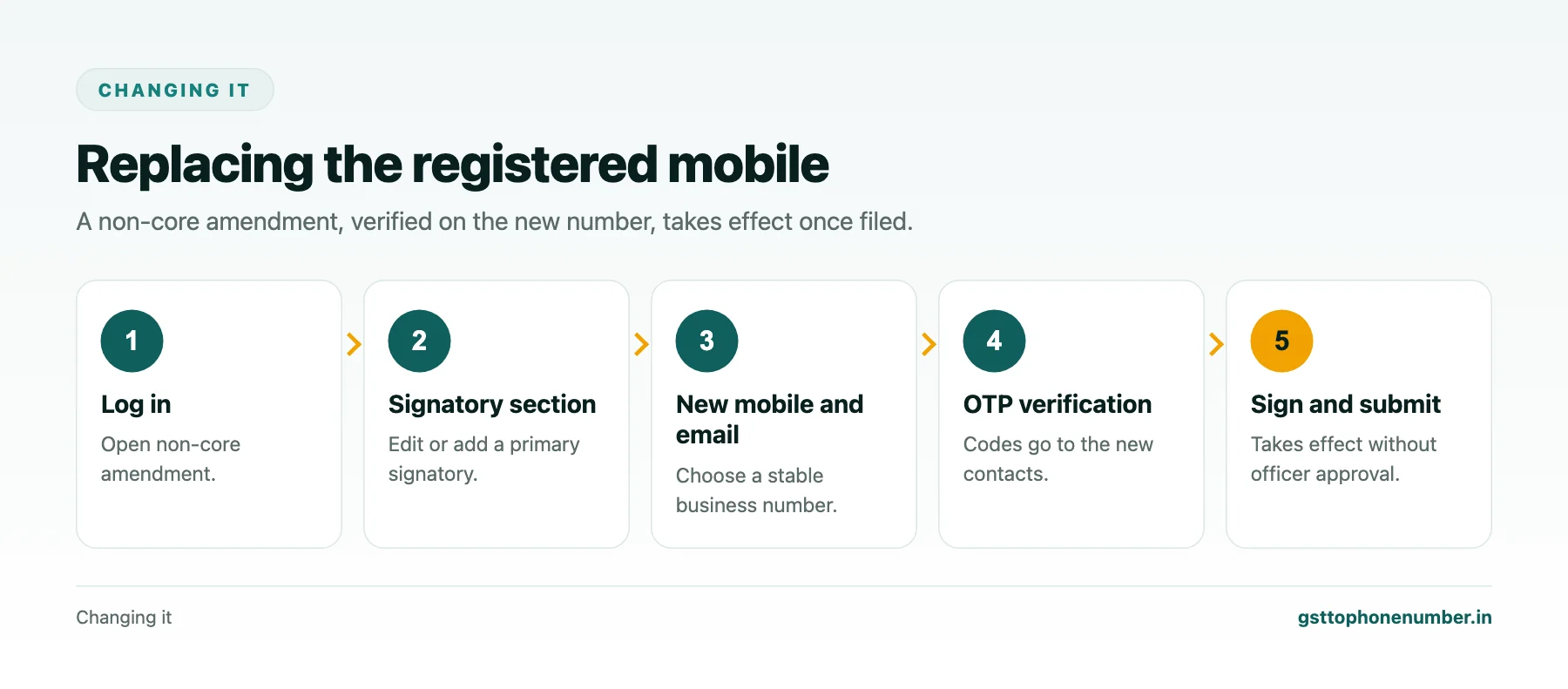
To change it, file a non-core amendment of registration. In the authorised signatory section, either edit the primary signatory’s mobile and email or add a new signatory and mark them as primary. The new mobile and email are verified by OTP before you can proceed, and the application is signed electronically. Non-core amendments do not need an officer’s approval and take effect once filed.
Choosing the New Number
Choose a number the business will keep, ideally a company-owned connection held by the owner or a senior person, not a personal number of a junior employee. A dedicated connection used only for compliance messages also makes it easy to spot a code you did not request.
When the Old Number Is Lost
If the SIM is lost but the number is yours, the quickest fix is to get a replacement SIM for the same number from the telecom provider, then log in normally. If the number belonged to someone who has left and you cannot reach them, and you cannot receive codes at all, you can apply to your jurisdictional tax officer to update the primary authorised signatory’s email and mobile. You will need to establish your identity and authority, for example with the PAN, identity proof and a request on the business letterhead.
Want to see real match quality?See the sample format for your own GST numbers.
Keeping It Under Control
Review authorised signatories when anyone leaves, and once a year in any case. If a consultant files your returns, let them be an additional signatory, but keep the primary mobile with the business. Never share the codes you receive with anyone who calls asking for them; the GST department does not ask for OTPs on the phone.
A Note on Privacy
Your registered mobile is not shown in the public search, and the helpdesk will not disclose it to callers. That protection only works if you keep the number secure on your side: avoid printing it as the sales line, and keep it separate from numbers you publish for customers.
Have a list of GSTINs?Send a few and we will return matching contact fields.
Related guides
Frequently Asked Questions
How do I find GST registered mobile number for my own GSTIN?
Log in and view the authorised signatory details in the non-core amendment section, which show the primary signatory’s mobile and email.
Can I find it without logging in?
Check old SMS codes from the GST system, the registration emails, or the masked number shown in the password reset flow.
How do I change the registered mobile?
File a non-core amendment, edit or replace the primary authorised signatory, and verify the new mobile and email by OTP.
Does changing the mobile need officer approval?
No. Non-core amendments take effect once filed.
What if the old number belonged to someone who left?
Get a replacement SIM if the number is the business’s own; otherwise apply to the jurisdictional officer to update the signatory’s contact details.
Can I find another business's registered mobile the same way?
No. Registered mobiles are private and only visible to the taxpayer after login.
 GST To Phone Number
We help sales, procurement and compliance teams turn a GST registration number into a verified, reachable business contact.
Company
Get Sample Format
Send us a few GSTINs and we will return the matching contact fields so you can judge the data before you buy.
© 2026 GST To Phone Number. All rights reserved.
Disclaimer: GST To Phone Number is an independent data service. We are not affiliated with, endorsed by or connected to the Goods and Services Tax Network, the Central Board of Indirect Taxes and Customs, or any government department. GSTIN verification should always be confirmed against the official GST portal. Contact data is provided for legitimate business use and must be used in line with applicable telecom, privacy and data-protection rules.