Home/GST Mobile Number Guides/Check Company Mobile From GSTIN: Does This Number Really Belong to Them?
Check Company Mobile From GSTIN: Does This Number Really Belong to Them?
Check company mobile from GSTIN records before you rely on it: confirm the person works there, their role, and whether the mobile is company-issued or personal.
GST Identification Number
27ABCDE1234F1Z0
- Legal nameSample Traders Pvt Ltd
- StateMaharashtra (27)
- RegistrationActive
- Phone+91 98XXX XXXXX
- Emailc****@example.com
Illustrative result. Request a sample format for live records.
Reading time 6 min
Last reviewed October 2026
Check company mobile from GSTIN data whenever a mobile number becomes important. A visiting card from a trade fair, a lead form on your website, a referral from a colleague or a number copied from an email signature may all claim to reach someone at a particular company. Before you send that number a quotation, add it to your customer system as the decision maker or share it with your sales team, it is worth confirming three things: that the person exists, that they work at the company named by the GSTIN, and that they hold the role you think they do.
Unlike a company’s office landline, a mobile number is tied to a person, and people move between companies, change roles and sometimes overstate both. This guide shows how to build enough evidence to rely on a company mobile, without making the person on the other end feel interrogated.
Quick answer
- A mobile reaches a person, not a company, so verify the person-company link.
- The GSTIN gives you the legal name, places of business and constitution to test against.
- An email reply from the company’s own domain is strong evidence of employment.
- A colleague confirming the person and role through the office line is stronger still.
- Record whether the mobile is company-issued or personal, because that changes how you use it.
Why a Company Mobile Needs Its Own Check
Most mistakes with company mobiles fall into three groups. The person has left the company, but the number still sits on old cards and lists. The person works at a related business, such as a distributor, consultant or sister company, and the number has been recorded against the wrong GSTIN. Or the person works at the company but in a different role from the one recorded, so calls about purchasing reach someone in logistics.
Each of these produces wasted effort, and the first can also produce a privacy problem: continuing to contact someone’s personal mobile about a company they no longer work for is unwelcome and hard to justify.
Start From the GST Record
Run a public taxpayer search on the GSTIN and note the legal name, trade name, constitution, principal place of business and any additional places of business. These details let you test what the person tells you. Someone who works at the company should know which city the main office is in, which plants or branches exist, and what the company calls itself in the market.
The constitution also matters. In a proprietorship or small partnership, the mobile you hold may belong to the owner, which is a different situation from a mobile belonging to one of several employees at a large company. In a company or LLP, the corporate registry lists directors or designated partners, so you can check whether a person who claims to be a director actually appears there.
Evidence That Links a Mobile to the Company
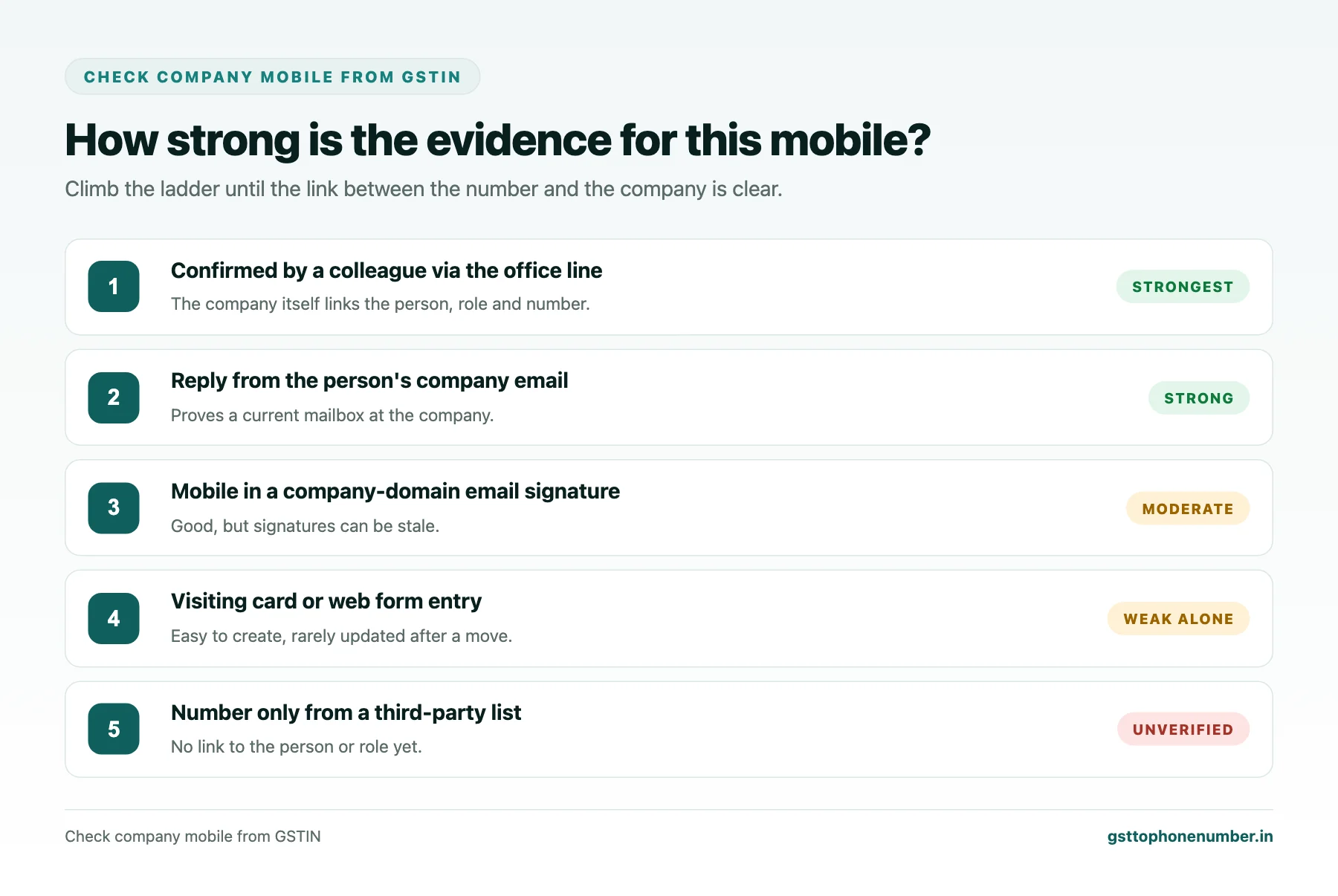
Some evidence is weak and some is strong. A visiting card is weak on its own, because cards are cheap to print and are rarely updated when people leave. A number in an email signature is better when the email comes from the company’s own domain. A reply to a message you sent to the person’s company email address, confirming the mobile, is stronger again, because it proves the person controls a mailbox at that company today.
The strongest evidence comes from the company itself. Calling the office number you found independently and asking for the person by name, or asking a known contact at the company to confirm their colleague’s role and number, links the mobile to the company with little room for doubt.
Need the contact behind a GSTIN?Get the sample format with verified business contact fields.
Confirming the Role
Knowing that someone works at a company is not the same as knowing they decide what you need decided. A short, honest question usually settles it: ask who handles the area you are calling about and whether they are the right person or should introduce you to someone else. People generally appreciate being asked rather than assumed.
For larger deals, it is reasonable to confirm the role through a second person, such as the accounts department for payment terms or the plant head for technical approval. Record the confirmed role and the date in your system, not the role printed on an old card.
Company-Issued or Personal?
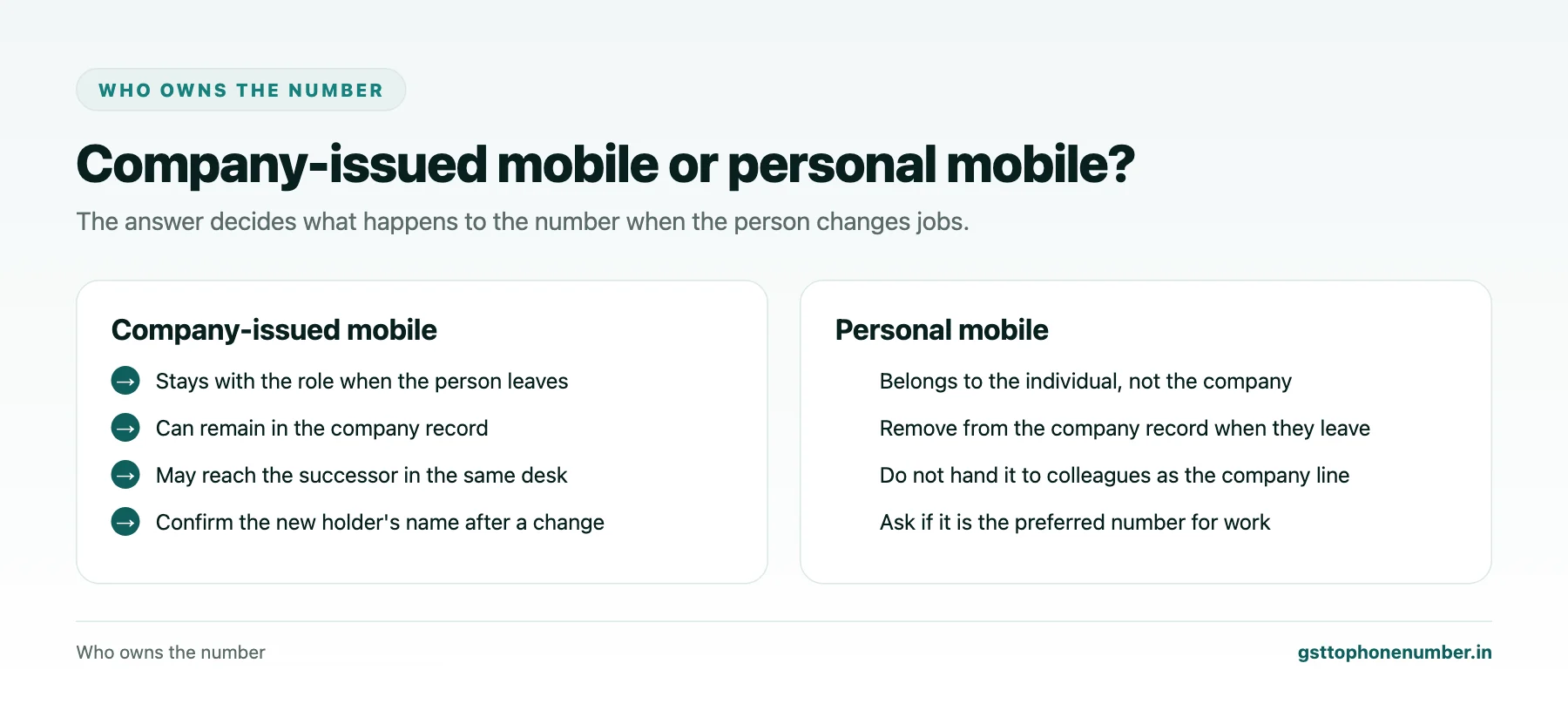
Many people in Indian businesses use a single mobile for work and personal life, especially in smaller firms. Others carry a company-issued number that stays with the role when they leave. The distinction matters for how you use and keep the number.
A company-issued mobile can reasonably stay in your records against the role, and when the person leaves, the number may reach their successor. A personal mobile belongs to the individual. When they leave the company, it should be removed from the company’s record and not passed to your colleagues as the company’s contact. If you are unsure, it is fine to ask whether the number is the best one for work matters.
Doing the Check Without Offending Anyone
Most people you check are genuine, and the routine should feel like ordinary business courtesy. Sending a short email to the person’s company address to confirm the meeting or quotation, and asking them to reply with their preferred number, achieves verification without any awkwardness. Calling the office to ask for someone by name is something visitors and suppliers do every day.
Avoid challenging people with questions that sound like an investigation. The goal is to know your records are right, not to catch anyone out.
Want to see real match quality?See the sample format for your own GST numbers.
When the Check Fails
If the office has never heard of the person, if the email domain does not match the company, or if the person turns out to work at a distributor or consultant, update your records honestly. Move the number to the correct business if you know it, mark it as unverified if you do not, and never leave it attached to the company as if it were confirmed.
If the check suggests impersonation, for example someone using the company’s name to request goods or payments, warn the company through its verified office number and keep a record of what was said.
Keeping Company Mobiles Current
People move on. Set a reminder to reconfirm key contacts once in a while, especially before large orders or payment discussions, and update records whenever an email bounces or a call reaches someone new. A short list of verified, current company mobiles is far more useful than a long list nobody is sure about.
Have a list of GSTINs?Send a few and we will return matching contact fields.
Related guides
Check Business Phone From GST Number When a Caller Claims to Be Someone: a related guide.
Discover business contact from GSTIN: a related guide.
Frequently Asked Questions
How do I check company mobile from GSTIN information?
Use the GST record to test basic facts, then link the person to the company through a reply from their company email or a confirmation via the company’s office line.
Does the GST record list a company's employees?
No. It shows the legal and trade names, constitution and places of business. For companies and LLPs, the corporate registry lists directors or designated partners.
Is a visiting card enough to trust a mobile number?
Not on its own. Cards are easy to print and rarely updated, so confirm through the company’s email domain or office.
Why does it matter whether a mobile is company-issued?
A company-issued number stays with the role, while a personal number belongs to the individual and should be removed from the company record when they leave.
How do I confirm someone's role?
Ask who handles the matter you are calling about, and for larger deals confirm through a second person such as accounts or the plant head.
What if the company says the person does not work there?
Update your records, mark the number as unverified or move it to the correct business, and warn the company if impersonation seems likely.
 GST To Phone Number
We help sales, procurement and compliance teams turn a GST registration number into a verified, reachable business contact.
Company
Get Sample Format
Send us a few GSTINs and we will return the matching contact fields so you can judge the data before you buy.
© 2026 GST To Phone Number. All rights reserved.
Disclaimer: GST To Phone Number is an independent data service. We are not affiliated with, endorsed by or connected to the Goods and Services Tax Network, the Central Board of Indirect Taxes and Customs, or any government department. GSTIN verification should always be confirmed against the official GST portal. Contact data is provided for legitimate business use and must be used in line with applicable telecom, privacy and data-protection rules.