Home/GST Contact Search Guides/Find Dealer Contact Number by GSTIN to Map and Verify Your Channel
Find Dealer Contact Number by GSTIN to Map and Verify Your Channel
Find dealer contact number by GSTIN to map your sales channel: verify each dealer’s registration and territory, reach sub-dealers and spot fake ones.
GST Identification Number
27ABCDE1234F1Z0
- Legal nameSample Traders Pvt Ltd
- StateMaharashtra (27)
- RegistrationActive
- Phone+91 98XXX XXXXX
- Emailc****@example.com
Illustrative result. Get sample format for live records.
Reading time 5 min
Last reviewed October 2026
Find dealer contact number by GSTIN is a routine task for brands and manufacturers that sell through distributors, dealers and retailers. A channel sales team needs to reach every dealer with scheme announcements, price changes and new launches. A distributor’s claims for incentives list the retailers it sold to, each with a GSTIN. A customer calls to ask whether a shop calling itself an authorised dealer really is one. In each case the GSTIN is the firmest identifier available, and the dealer’s contact has to be found, verified and kept current.
This guide covers channel mapping from the manufacturer’s side: building a dealer map keyed on GSTIN, checking each dealer’s registration and territory, finding and confirming contacts for dealers and sub-dealers, and using the same data to spot fake or unauthorised dealers.
Quick answer
- Key every dealer in your channel map on its GSTIN, not its shop name.
- The state code and address confirm whether a dealer sits in its assigned territory.
- Distributors’ claims and secondary sales data reveal sub-dealers you have never met.
- Confirm each dealer contact directly and record its role.
- Check claims of authorised dealership against your own verified map.
Why Channel Teams Need a GSTIN-Keyed Map
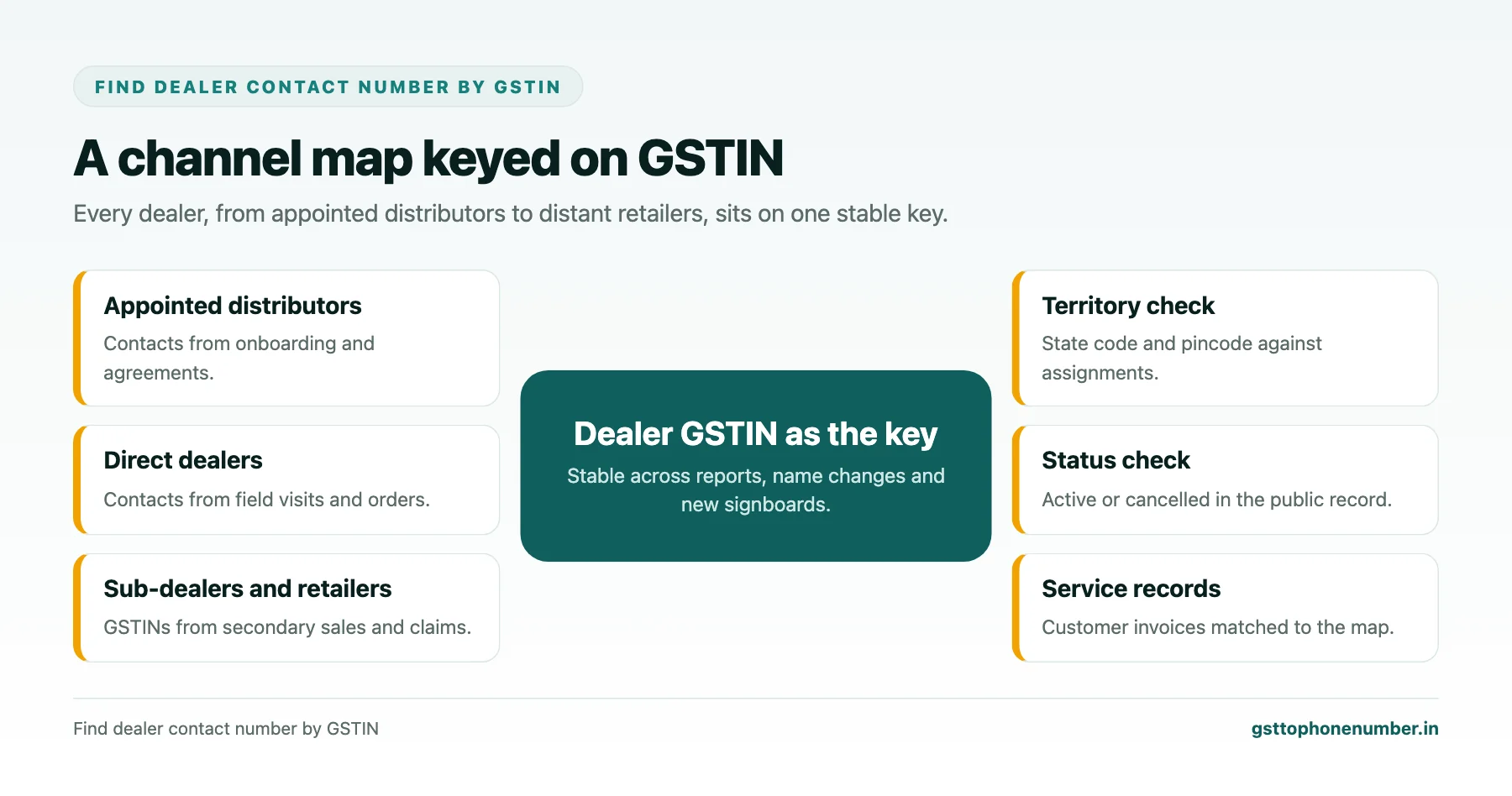
Dealer lists built from names drift quickly. Shops change trade names, distributors spell customers differently in every report, and the same retailer appears three times under three versions of its name. A GSTIN does not change with a new signboard, so a map keyed on GSTINs stays consistent across distributor reports, incentive claims and your own records.
It also links directly to the public registration, which tells you whether the dealer is active, where it is registered and what kind of business it is.
Building the Dealer Map
Start with the dealers you appoint directly, collecting their GSTINs at onboarding. Then add the dealers and retailers your distributors sell to, from secondary sales reports and incentive claims. Clean and validate every GSTIN, group by PAN to see dealers with branches, and record for each the trade name, address, pincode, distributor served by and the date first seen.
Over time the map shows your real reach: how many active retailers carry your products in each district, which distributors serve whom, and where there are gaps.
Checking Registration and Territory
For each dealer, the public search confirms status, constitution, principal and additional places of business and business activities. The state code and pincode tell you whether a dealer sits inside the territory assigned to its distributor. A dealer registered far outside that territory may indicate distributors selling across boundaries, which your channel policy may or may not allow.
Watch for cancelled registrations among active claim lists. A distributor claiming incentives on sales to retailers whose registrations were cancelled months earlier deserves a closer look.
Need the contact behind a GSTIN?Get the sample format with verified business contact fields.
Finding and Confirming Dealer Contacts
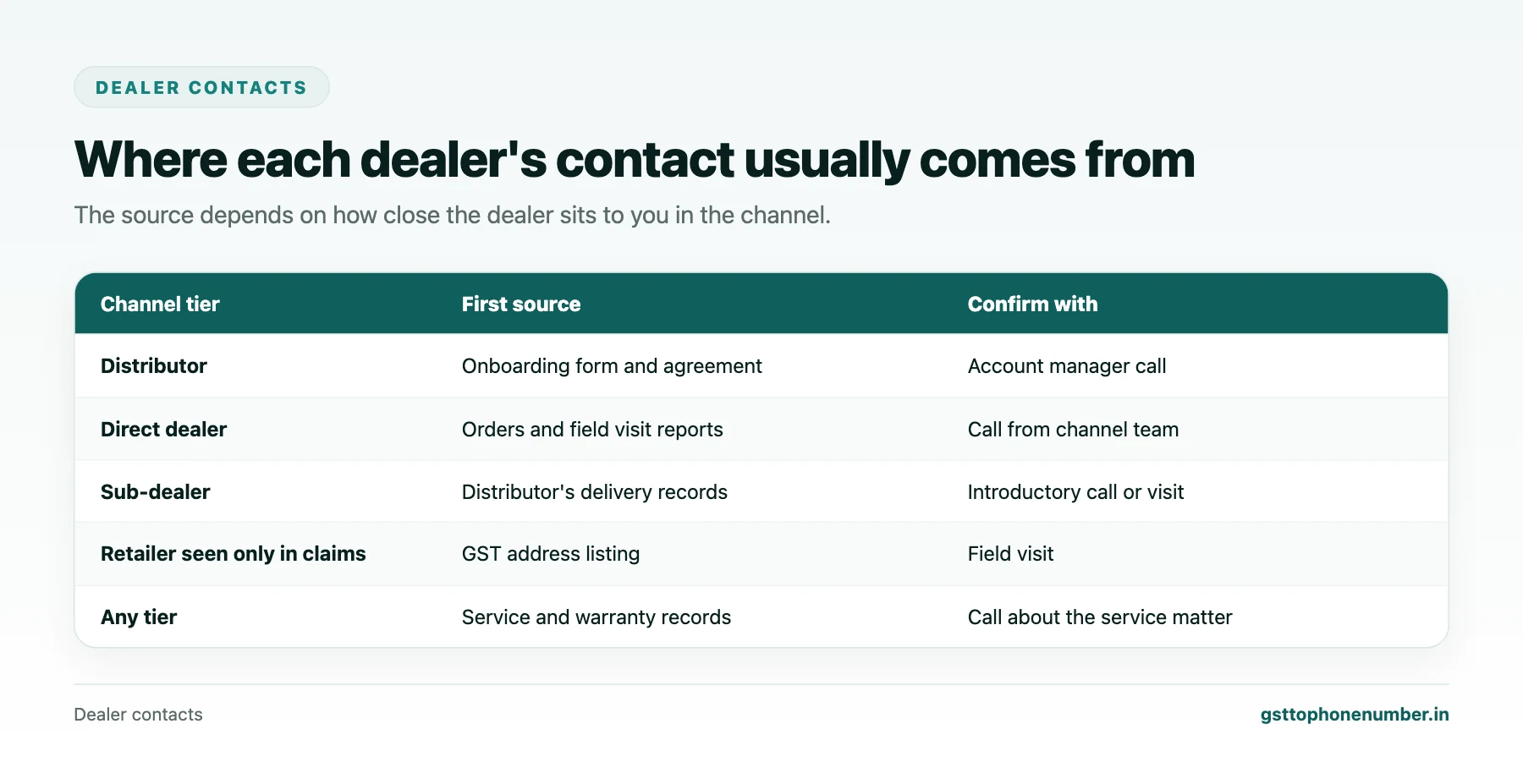
For dealers you appointed, contacts come from onboarding forms and agreements. For sub-dealers reached through distributors, start by asking the distributor, which often has phone numbers from deliveries and collections. Your field sales team’s visit reports, your service and warranty records, and listings at the dealer’s GST address fill remaining gaps.
Confirm each contact with a short call introducing your company and the purpose, such as a scheme or training invitation. Record the owner’s or purchase person’s number, and a shop line if there is one, against the dealer’s GSTIN with the date and who confirmed it.
Spotting Fake or Unauthorised Dealers
Customers sometimes buy from shops that claim to be authorised dealers but are not, and then expect warranty service. When a customer or service centre asks whether a shop is genuine, check its GSTIN against your channel map. A shop missing from the map, or present only as a distant sub-dealer, may not be authorised to make the claims it makes.
Equally, a dealer’s details on a customer invoice can confirm that a sale went through an authorised channel. Matching invoice GSTINs to your map is a simple way to validate warranty claims.
Communicating With the Channel
With confirmed contacts, channel communication becomes reliable. Scheme announcements, price lists and training invitations reach the right people, and you can measure who received and acted on them. For messages to many dealers, follow the rules for commercial messaging and record each dealer’s agreement to receive updates.
Treat dealer mobiles, often owners’ personal numbers, with care: use them for channel business, keep them inside the teams that need them, and remove them when a dealer leaves your channel.
Want to see real match quality?See the sample format for your own GST numbers.
Using the Map to Find Gaps and Opportunities
A complete map shows more than who your dealers are; it shows where they are not. Count active dealers per district or pincode cluster and compare with market potential. Districts with many retailers of similar products but few of yours point to recruitment opportunities. Clusters where one distributor serves almost every dealer may be at risk if that distributor falters.
The map also helps judge distributors fairly. A distributor whose sub-dealer base grows steadily, with active registrations inside its territory, is building the channel. One whose claims rely on a shifting set of distant or cancelled registrations needs a conversation.
Keeping the Map Current
Dealers join and leave, change ownership and open branches. Refresh the map from each month’s secondary sales data, recheck registrations periodically, and update contacts whenever a call or visit shows a change. A map maintained this way becomes one of the most valuable assets a channel team has.
Have a list of GSTINs?Send a few and we will return matching contact fields.
Related guides
Discover Mobile Number From GST Number When You Enter a New Territory: a related guide.
Frequently Asked Questions
How do I find dealer contact number by GSTIN across my channel?
Build a map keyed on dealer GSTINs from onboarding, secondary sales and claims, then source contacts from distributors, field visits and service records and confirm each by call.
Why key dealers on GSTIN rather than name?
Names change and are spelled differently in every report. The GSTIN stays the same and links to the public registration.
How can GST data show territory issues?
The state code and pincode show where a dealer is registered, so you can see whether it sits within its distributor’s assigned area.
What does a cancelled registration in claims data mean?
Sales being claimed to a retailer whose registration is cancelled deserve review, as the retailer may have closed.
How do I check whether a shop is an authorised dealer?
Look for its GSTIN in your channel map. Shops missing from the map may not be authorised.
Can I message all dealers in bulk?
Yes, following commercial messaging rules and with each dealer’s agreement to receive updates recorded.
 GST To Phone Number
We help sales, procurement and compliance teams turn a GST registration number into a verified, reachable business contact.
Company
Get Sample Format
Send us a few GSTINs and we will return the matching contact fields so you can judge the data before you buy.
© 2026 GST To Phone Number. All rights reserved.
Disclaimer: GST To Phone Number is an independent data service. We are not affiliated with, endorsed by or connected to the Goods and Services Tax Network, the Central Board of Indirect Taxes and Customs, or any government department. GSTIN verification should always be confirmed against the official GST portal. Contact data is provided for legitimate business use and must be used in line with applicable telecom, privacy and data-protection rules.