Home/GST Mobile Number Guides/Extract Company Mobile From GSTIN-Linked E-Invoice Data You Already Hold
Extract Company Mobile From GSTIN-Linked E-Invoice Data You Already Hold
Extract company mobile from GSTIN-linked e-invoices: the seller and buyer blocks carry optional phone and email fields, often already in your billing system.
GST Identification Number
27ABCDE1234F1Z0
- Legal nameSample Traders Pvt Ltd
- StateMaharashtra (27)
- RegistrationActive
- Phone+91 98XXX XXXXX
- Emailc****@example.com
Illustrative result. Get sample format for live records.
Reading time 5 min
Last reviewed October 2026
Extract company mobile from GSTIN-linked records you already hold before you look anywhere else, and e-invoices are one of the richest of those records. Since electronic invoicing became mandatory for businesses above the notified turnover threshold, a large share of business-to-business invoices in India pass through the invoice registration portal in a standard structured format. That format includes the GSTIN, legal name and address of both seller and buyer, and it also provides optional fields for a phone number and an email address for each party. Many businesses fill them in.
This guide explains where those fields sit, how to find them in the e-invoice data your billing or accounting system already stores, how to extract them by GSTIN, and how to judge and use what you find. It is aimed at accounts, operations and data teams in companies that issue or receive e-invoices.
Quick answer
- The standard e-invoice format has seller and buyer blocks with GSTIN, names and address.
- Each block also has optional phone and email fields.
- Your billing system usually stores the JSON or the fields behind every e-invoice.
- Extracting by GSTIN gives you contacts tied to real transactions.
- Check how current each number is before relying on it.
Why E-Invoices Are a Good Source
E-invoices are created for real transactions between registered businesses. Every one carries the GSTINs of both parties, so any contact detail inside it is already linked to the right registration. Unlike scraped directories, the data was entered by the parties themselves, or by their systems, in the course of doing business.
Because e-invoices are generated continuously, they also carry dates. A phone number that appeared on an e-invoice last month is far more likely to be current than one in a directory updated years ago.
Where the Contact Fields Sit
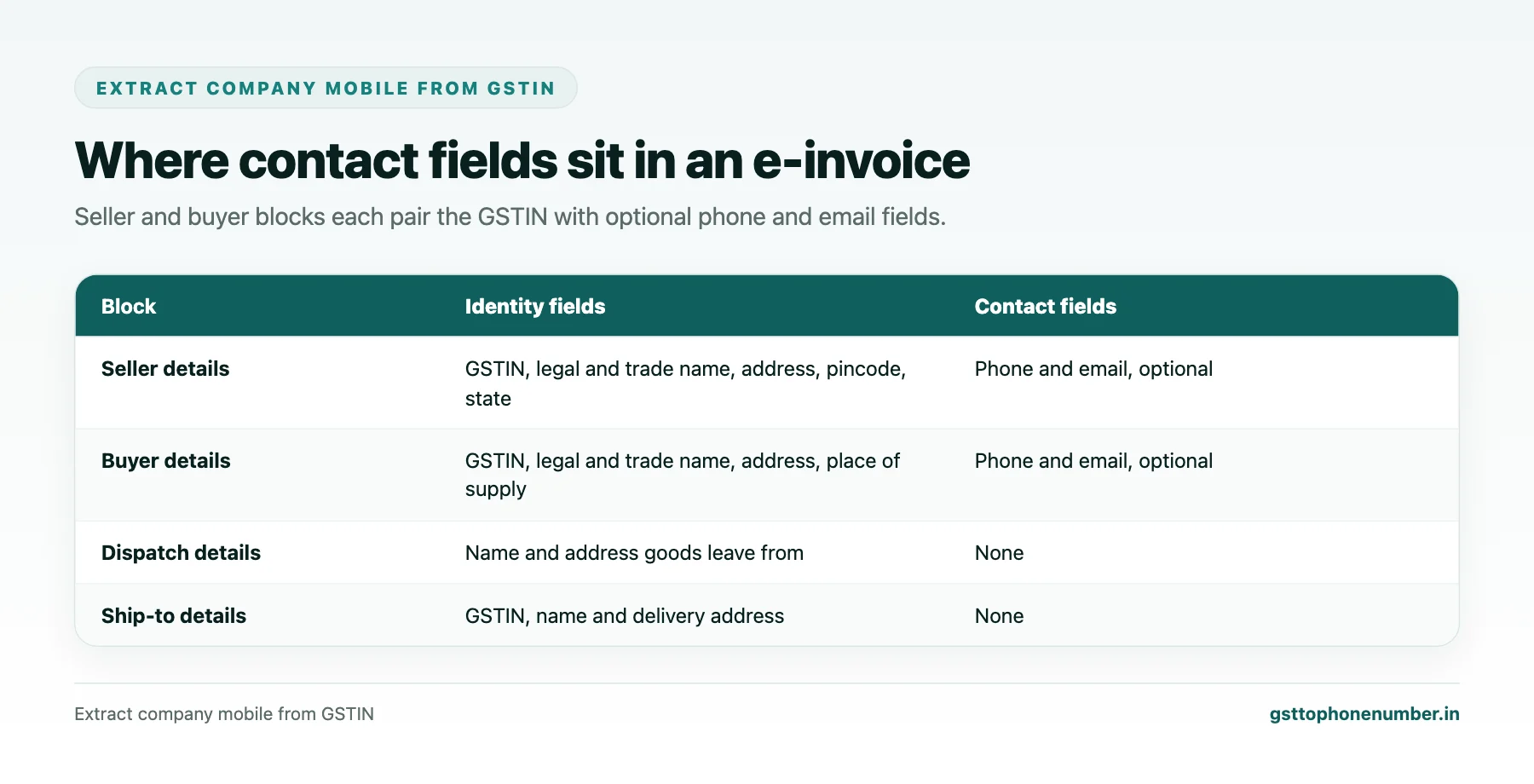
The standard schema groups invoice data into blocks. The seller details block holds the seller’s GSTIN, legal name, trade name, address lines, location, pincode, state code, and optional phone and email fields. The buyer details block holds the same kinds of fields for the buyer, plus the place of supply. Other blocks cover dispatch and shipping addresses, item lines and values.
The phone and email fields are optional, so not every invoice carries them. Businesses that maintain good master data in their billing software tend to fill them consistently, because the software populates them automatically from the party master for every invoice.
Finding the Data in Your Own Systems
If you issue e-invoices, your billing or accounting software prepares the invoice data, sends it for registration and stores the signed response with the invoice reference number and QR code. The buyer’s phone and email in that data came from your own customer master. If you receive e-invoices, the documents sent by your suppliers include their seller block, and your purchase or document management system may store the structured data or at least the printed invoice with the QR code.
Ask your software administrator or provider how to export e-invoice data in structured form for a date range. Many systems can export the JSON or a report with the party fields.
Need the contact behind a GSTIN?Get the sample format with verified business contact fields.
Extracting by GSTIN
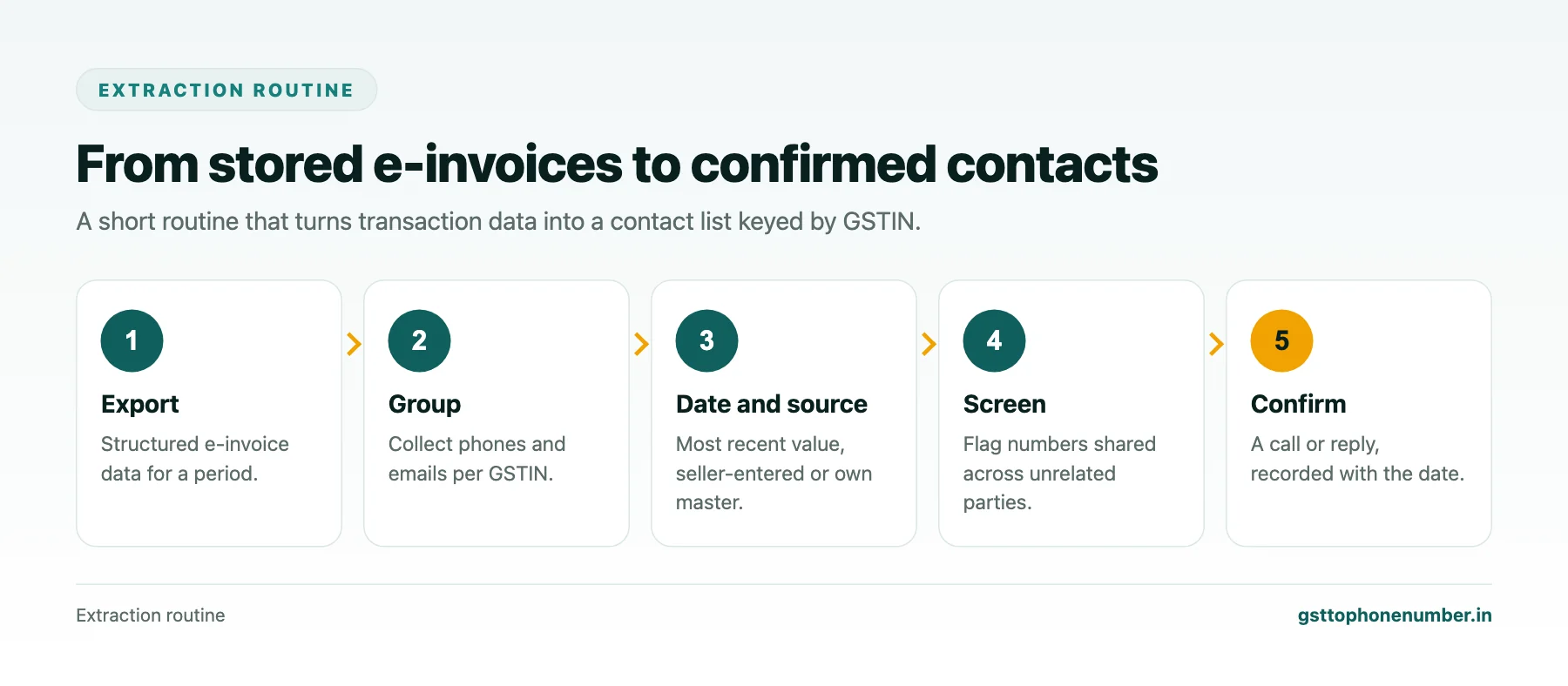
Once you have the data, group it by GSTIN. For each counterparty, collect every phone and email that appears in its seller or buyer block across all invoices, along with the invoice date. Keep the most recent value as the likely current one, but keep the history: a number that has appeared on every invoice for years is more trustworthy than one that appeared once.
Note which side each value came from. A supplier’s phone taken from its own seller block was entered by the supplier’s system and is likely to be the supplier’s official number. A customer’s phone taken from your buyer block came from your own records, so it is only as good as your customer master.
Judging What You Find
Some values will be accountants’ or software providers’ numbers, entered when the system was set up and never changed. Watch for one number appearing in the seller block of many unrelated suppliers, which suggests a shared service provider. Some values will be generic, such as a reception line or an accounts email, which is often exactly what you need for invoice and payment matters.
As always, a short confirmation call or reply settles whether a number is current. Record the confirmation with the date.
Improving Your Own E-Invoice Contacts
The same logic works in reverse. If your customers and suppliers extract contacts from your e-invoices, make sure your own seller block carries an accounts phone and email that you monitor. Clean contact fields on your e-invoices reduce misdirected queries and speed up payments.
Keep your customer master current too. Every correction you make to a buyer’s phone flows into future e-invoices, so the master and the invoices improve together.
Want to see real match quality?See the sample format for your own GST numbers.
Using Extracted Contacts Appropriately
Contacts found in e-invoices were shared for the purpose of the transaction: billing, delivery and payment. They are well suited to those matters and to ongoing account management with that counterparty. Using them for unrelated marketing, or sharing them outside your organisation, goes beyond the purpose for which they were provided and should be avoided.
Limits of This Source
E-invoices cover only businesses that are required to issue them and only transactions where you were a party. Smaller suppliers below the threshold issue ordinary invoices, and businesses you have never traded with will not appear at all. For those, other sources described elsewhere in these guides apply. Within its scope, though, e-invoice data is one of the most reliable contact sources a company has.
Have a list of GSTINs?Send a few and we will return matching contact fields.
Related guides
Extract Mobile Number From GSTIN Party Ledgers in Your Accounting Software: a related guide.
Extract Contact Number From GSTIN Trails in E-Way Bills and Transport Papers: a related guide.
Extract Phone Number From GST Number Data on Scanned Invoices: a related guide.
Get Phone Number from GSTN Records You Already Hold: a related guide.
Find Contact Number With GST Number to Recover Missing Input Tax Credit: a related guide.
Extract Company Phone From GSTIN Using the Company’s Own Website: a related guide.
Frequently Asked Questions
Can I extract company mobile from GSTIN-linked e-invoices?
Often, yes. The standard e-invoice format has optional phone and email fields in the seller and buyer blocks, next to each party’s GSTIN.
Are phone and email mandatory in e-invoices?
No. They are optional fields, so coverage depends on whether each business fills them in its billing system.
Where is e-invoice data stored?
Usually in your billing or accounting software, which prepares invoices, registers them and stores the signed response. Ask your administrator how to export it.
Which values are most trustworthy?
Numbers that appear consistently across many recent invoices, and seller-block values entered by the counterparty’s own system.
Can I use these contacts for marketing?
They were shared for the transaction, so use them for billing, delivery, payments and account management rather than unrelated marketing.
What are the limits of this source?
It covers only businesses that issue e-invoices and only counterparties you have transacted with.
 GST To Phone Number
We help sales, procurement and compliance teams turn a GST registration number into a verified, reachable business contact.
Company
Get Sample Format
Send us a few GSTINs and we will return the matching contact fields so you can judge the data before you buy.
© 2026 GST To Phone Number. All rights reserved.
Disclaimer: GST To Phone Number is an independent data service. We are not affiliated with, endorsed by or connected to the Goods and Services Tax Network, the Central Board of Indirect Taxes and Customs, or any government department. GSTIN verification should always be confirmed against the official GST portal. Contact data is provided for legitimate business use and must be used in line with applicable telecom, privacy and data-protection rules.