Home/GST Mobile Number Guides/Extract Mobile Number From GSTIN Party Ledgers in Your Accounting Software
Extract Mobile Number From GSTIN Party Ledgers in Your Accounting Software
Extract mobile number from GSTIN party ledgers in accounting software: export the party master, fix duplicates, pull mobiles hidden in addresses and clean up.
GST Identification Number
27ABCDE1234F1Z0
- Legal nameSample Traders Pvt Ltd
- StateMaharashtra (27)
- RegistrationActive
- Phone+91 98XXX XXXXX
- Emailc****@example.com
Illustrative result. Get sample format for live records.
Reading time 5 min
Last reviewed October 2026
Extract mobile number from GSTIN records in your accounting software and you tap the longest-running contact database most businesses have. Every customer and supplier you have ever invoiced or paid has a party ledger, and most accounting packages used in India provide fields in that ledger for the GSTIN, the state, the address, a contact person, phone, mobile and email. Over years of use, those ledgers fill up with contacts. They also fill up with duplicates, half-completed entries and mobiles typed into the wrong field.
This guide shows how to export party ledger data, extract mobiles by GSTIN, deal with the common mess, and feed the cleaned contacts back into the ledgers so the next export is better. It is written for accountants, accounts managers and anyone asked to produce a contact list from the books.
Quick answer
- Party ledgers usually hold GSTIN, address, contact person, phone, mobile and email fields.
- Export the party master or ledger list with all contact fields included.
- Expect duplicates, missing GSTINs and mobiles typed into address lines.
- Group by GSTIN to merge duplicate ledgers for the same party.
- Fix the source ledgers, not just the exported sheet.
What a Party Ledger Typically Holds
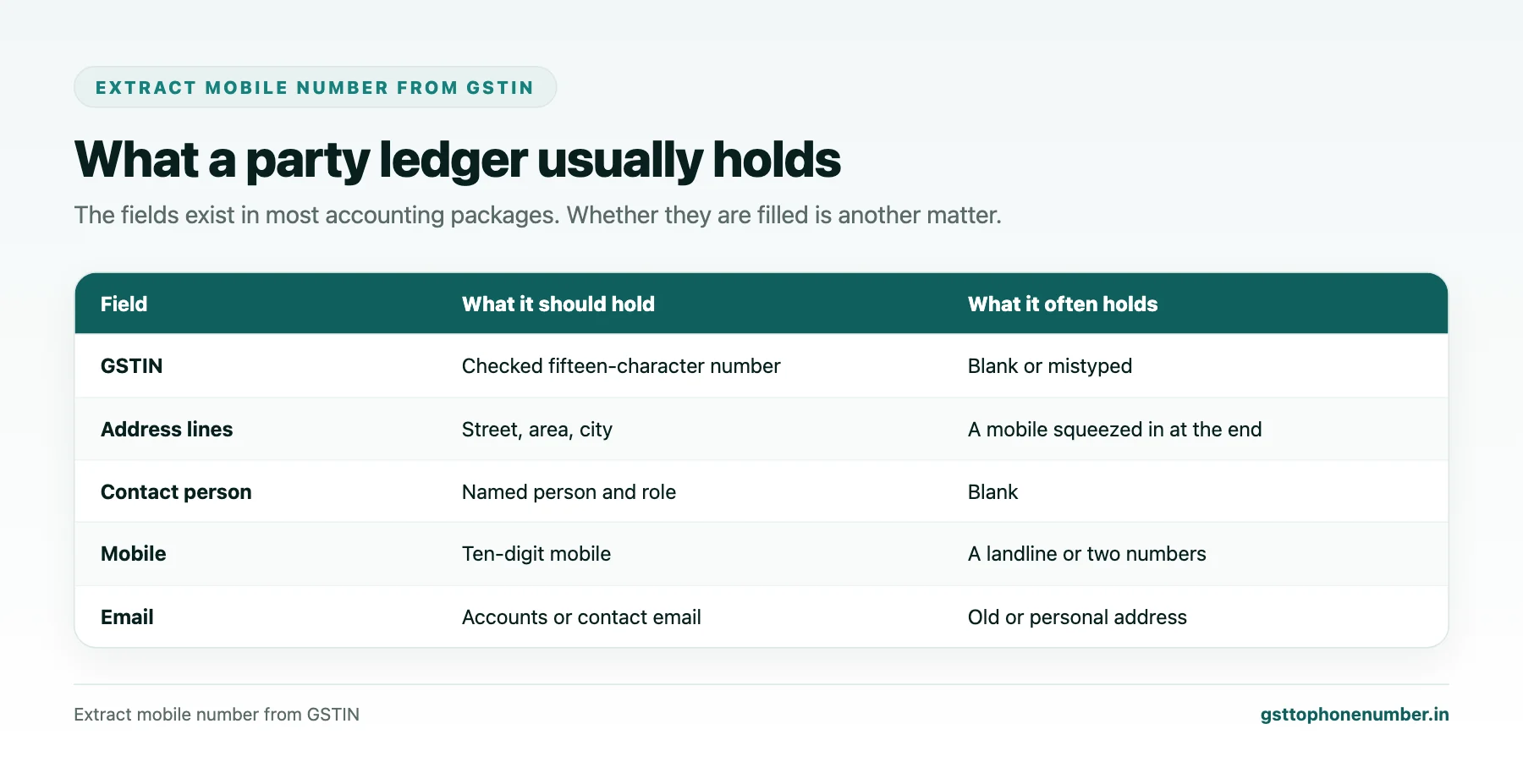
When a customer or supplier is created in accounting software, the ledger master usually captures the party’s name, mailing name, address, state, pincode, country, GST registration type, GSTIN, and contact details such as contact person, phone, mobile, fax and email. Some packages add multiple contact persons or a separate delivery address.
Which fields are filled depends on who created the ledger and how careful they were. Ledgers created during GST registration checks tend to have accurate GSTINs. Ledgers created in a hurry during a sale may have a name, a mobile scribbled into the address, and nothing else.
Exporting the Data
Most accounting packages can display a list of ledgers under the sundry debtors and sundry creditors groups with selected fields, and export that list to a spreadsheet. Choose a report or display configuration that includes the GSTIN, address lines, contact person, phone, mobile and email fields. If your package cannot show all fields in one report, export the ledger masters in a structured format your administrator can convert.
Export customers and suppliers separately, or keep a column that says which group each ledger belongs to, because the same business can be both.
The Mess You Will Find
Expect several recurring problems. Duplicate ledgers exist for the same party, created at different times with slightly different names. Some ledgers have no GSTIN, either because the party was unregistered at the time or because nobody entered it. Mobiles appear in the wrong place: in an address line, after the party name, or in the phone field with a landline in the mobile field. Old ledgers of parties that closed years ago still sit alongside active ones.
None of this is unusual. It is the natural result of many people creating ledgers over many years.
Need the contact behind a GSTIN?Get the sample format with verified business contact fields.
Extracting Mobiles by GSTIN
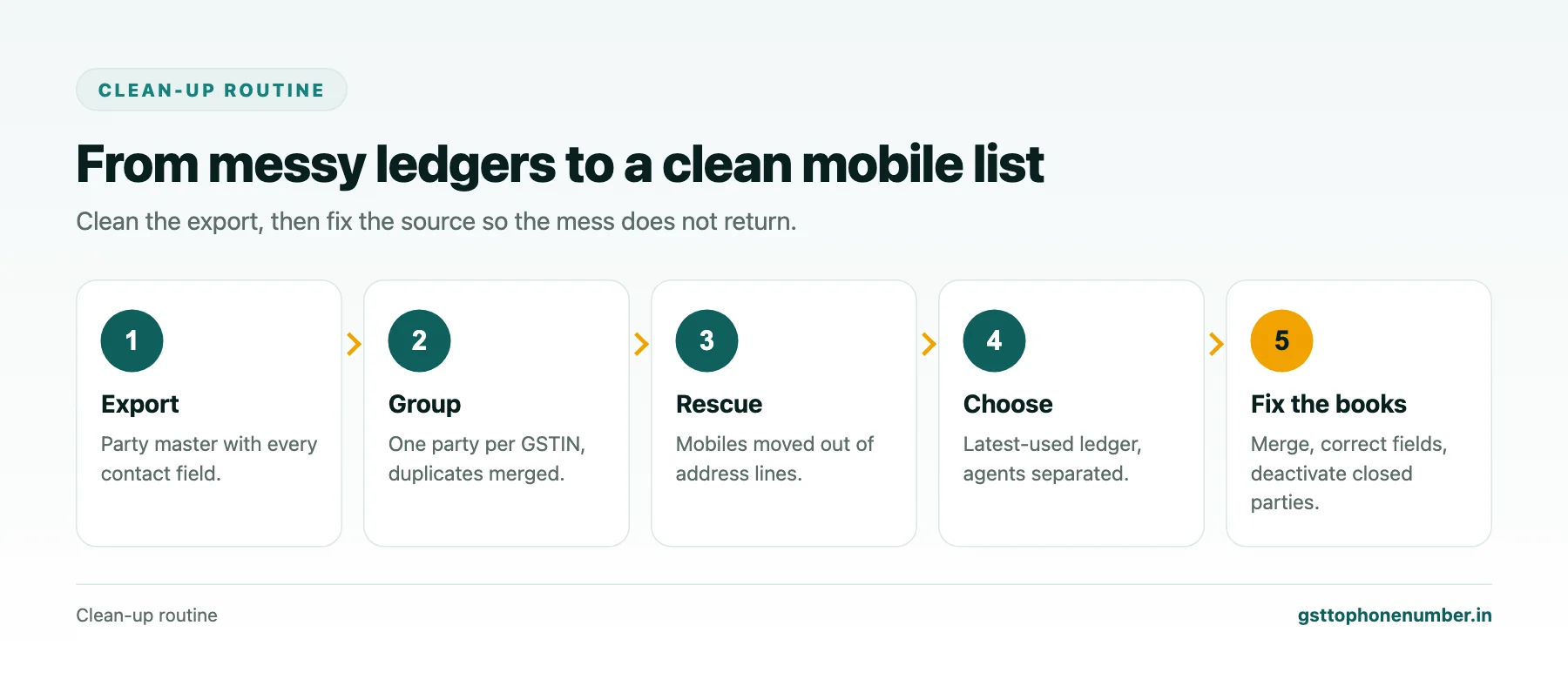
Start with ledgers that have a GSTIN. Clean the GSTIN column into upper case without spaces, and group ledgers by it. Where several ledgers share one GSTIN, they are duplicates of one party; collect all mobiles from all of them.
Then scan every contact-bearing field, including address lines and the party name, for ten-digit numbers beginning with 6 to 9 after removing spaces, hyphens, a leading zero or the country code. Move any mobile found in the wrong field into a clean mobile column. Keep the landlines separately.
For ledgers without a GSTIN, try to recover it from invoices issued to or received from the party, or from the public search by name and address, before deciding whether to include them.
Deciding Which Mobile Is Current
When duplicates give several mobiles for one GSTIN, use the ledger’s last transaction date as a guide: the ledger used most recently is likely to hold the current contact. Numbers that appear in many ledgers for unrelated parties belong to agents or accountants and should be separated. Where real doubt remains, a quick call settles it.
Fixing the Books, Not Just the Sheet
The extracted sheet is useful today, but the books will produce the same mess next time unless the ledgers themselves are fixed. Merge or deactivate duplicate ledgers according to your accounting policy, move mobiles into the correct fields, add missing GSTINs and mark ledgers of closed parties as inactive. Agree a simple rule for creating new ledgers: GSTIN checked against the public search, mobile in the mobile field, email in the email field, contact person named.
Want to see real match quality?See the sample format for your own GST numbers.
Keeping Accounting Data Appropriately Restricted
Party ledgers sit inside the accounting system for good reasons: they are used for invoicing and payments, and they contain personal numbers of proprietors and staff. When you extract them for another team, share only the fields that team needs, keep the export in a controlled location and delete working copies when the task is done.
Using the Extracted List
Mobiles from party ledgers belong to businesses you already deal with, so they are well suited to account management, collections, delivery coordination and service messages about existing relationships. For promotional campaigns, apply the same consent and preference rules as any other list. And record the source as “accounting ledger” with the extraction date, so users know where the number came from.
Have a list of GSTINs?Send a few and we will return matching contact fields.
Related guides
Check Contact Number From GST Number When Your Systems Disagree: a related guide.
Extract Contact Number From GST Number Records Hidden in Your Own Mailbox: a related guide.
Extract Company Mobile From GSTIN-Linked E-Invoice Data You Already Hold: a related guide.
Find Contact Number With GSTIN When a Salesperson Leaves With the Contacts: a related guide.
Extract Phone Number From GSTIN Lists With Spreadsheet Formulas: a related guide.
Find Vendor Contact by GSTIN with a Proper Onboarding Form: a related guide.
Frequently Asked Questions
How do I extract mobile number from GSTIN records in accounting software?
Export the party master for debtors and creditors with GSTIN and contact fields, group by GSTIN and collect mobiles from every field.
Why are mobiles found in address lines?
People creating ledgers often type a mobile wherever there is space. Scan address lines and party names for ten-digit numbers starting 6 to 9.
How do I handle duplicate ledgers?
Group by GSTIN to see them, take the mobile from the most recently used ledger, and merge or deactivate duplicates in the books.
What about ledgers without a GSTIN?
Recover the GSTIN from invoices or the public search by name and address before deciding whether to include them.
Should I fix the export or the ledgers?
Both, but fixing the ledgers matters more, because otherwise the next export will have the same problems.
Can I use ledger mobiles for marketing?
They suit existing relationships. For promotional campaigns, apply consent and preference rules as for any list.
 GST To Phone Number
We help sales, procurement and compliance teams turn a GST registration number into a verified, reachable business contact.
Company
Get Sample Format
Send us a few GSTINs and we will return the matching contact fields so you can judge the data before you buy.
© 2026 GST To Phone Number. All rights reserved.
Disclaimer: GST To Phone Number is an independent data service. We are not affiliated with, endorsed by or connected to the Goods and Services Tax Network, the Central Board of Indirect Taxes and Customs, or any government department. GSTIN verification should always be confirmed against the official GST portal. Contact data is provided for legitimate business use and must be used in line with applicable telecom, privacy and data-protection rules.