Home/GST Contact Search Guides/Extract Contact Number From GST Number Records Hidden in Your Own Mailbox
Extract Contact Number From GST Number Records Hidden in Your Own Mailbox
Extract contact number from GST number trails in your own email: search the GSTIN, read signatures and attachments, and mine out-of-office replies for backups.
GST Identification Number
27ABCDE1234F1Z0
- Legal nameSample Traders Pvt Ltd
- StateMaharashtra (27)
- RegistrationActive
- Phone+91 98XXX XXXXX
- Emailc****@example.com
Illustrative result. Get sample format for live records.
Reading time 5 min
Last reviewed October 2026
Extract contact number from GST number trails in your own mailbox before paying anyone to look it up. Almost every business relationship produces email: a quotation request, a registration certificate sent during vendor onboarding, a purchase order, an invoice, a payment advice, a query about a mismatch. Many of those emails mention the GSTIN somewhere, in the body, the subject, an attachment or the sender’s signature, and the same emails very often carry phone numbers. The contact you need may be sitting a search away.
This guide shows how to search a mailbox effectively by GSTIN and related details, where in an email thread phone numbers tend to appear, how attachments and automatic replies help, and how to move what you find into a proper record so the next person does not have to search again.
Quick answer
- Search your mailbox for the full GSTIN, the trade name and the PAN.
- Email signatures are the richest source of direct numbers.
- Attachments such as quotations, invoices and certificates often carry phone numbers.
- Out-of-office replies frequently name a colleague and their number.
- Copy what you find into your contact system with the date and source.
Why Your Mailbox Beats Many Lookups
Numbers in your mailbox came from the business itself, in the course of dealing with you. They usually belong to the people you actually dealt with, rather than to a general switchboard. They are dated, because every email has a date. And there is no question of permission or purpose: the business shared them with you for exactly the kind of contact you want to make.
The only problem is that they are scattered across threads and colleagues’ mailboxes. A disciplined search fixes that.
Searching by GSTIN and Its Parts
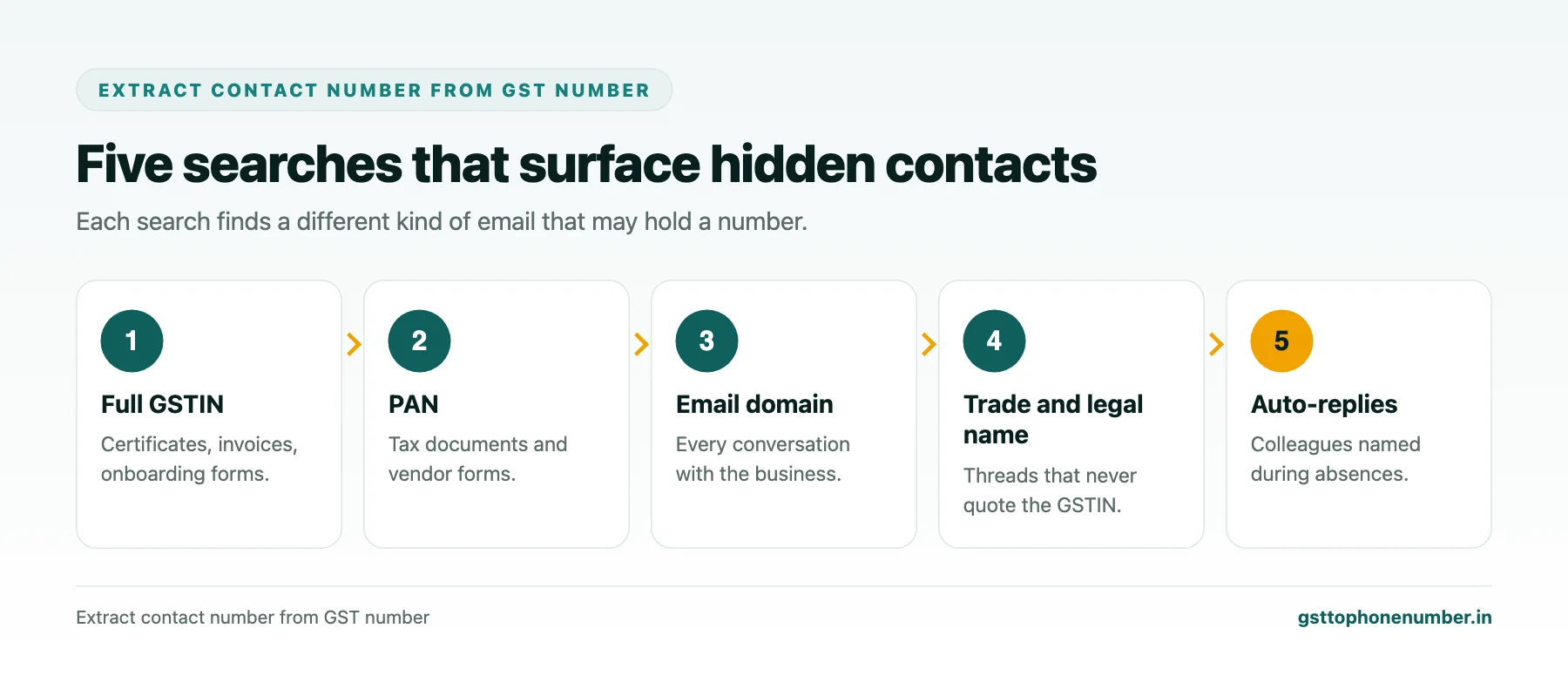
Start with the full fifteen-character GSTIN in quotes. It finds emails where the number appears in the body or in searchable attachments, such as onboarding forms, invoices and certificates. Next, search for the PAN, characters three to twelve, which catches documents that mention the PAN without the GSTIN, such as some vendor forms and tax documents.
Then search for the trade name and the legal name, and for the business’s email domain if you know it. Combine terms with the sender field to find every email from that business. Search shared and departmental mailboxes as well as your own, because accounts and purchase teams often hold the longest history.
Reading Email Signatures
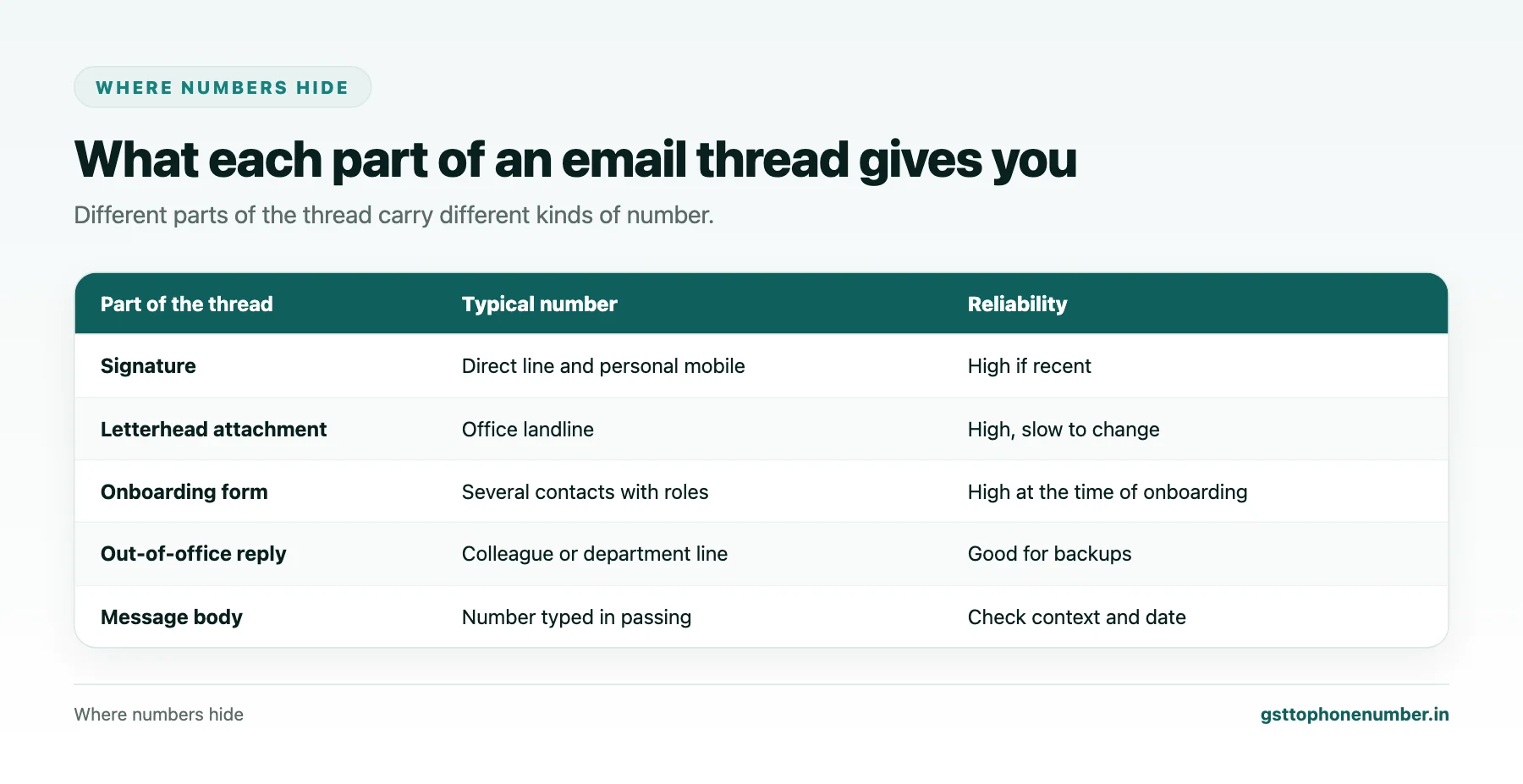
Signatures are where people put their direct lines and mobiles. Look at the most recent emails from each person at the business, because signatures change when people change roles or numbers. Note the name, designation, direct line, mobile and any office number, and compare the office number’s city code with the GST address.
Pay attention to signatures of different people at the same business. The sales contact, the accounts contact and the dispatch contact may each have given their own numbers, and between them they map the business’s internal routing for you.
Need the contact behind a GSTIN?Get the sample format with verified business contact fields.
Reading Attachments
Quotations, proforma invoices, tax invoices, purchase orders and registration certificates usually carry the business’s letterhead or footer with a phone number and address. Vendor onboarding forms often list several contacts with roles. Because attachments are formal documents, their numbers tend to be office lines rather than personal mobiles.
Check the date of each document and prefer the most recent, especially if the business has moved since your first dealings.
Mining Out-of-Office Replies
Automatic replies are an underused source. When a contact is away, their out-of-office message often says who to contact instead and gives that person’s number or email. Search your mailbox for automatic replies from the business’s domain. Each one may reveal a colleague, a department line or a mobile you did not have.
These backups are valuable precisely because they are the routes the business itself chose for urgent matters.
Moving Numbers Into a Proper Record
A number found in an email is only useful to colleagues if it leaves the mailbox. Add each number to your contact system against the business’s GSTIN, with the person’s name and role, the email it came from and its date. If the contact system allows, link the source email so anyone can see the context.
Do this as a routine whenever you handle a business’s email, not only when you need a number urgently. A few seconds per email keeps your records far more complete than any occasional clean-up.
Want to see real match quality?See the sample format for your own GST numbers.
Handling Personal Mobiles Found in Email
Signatures often include personal mobiles. They were shared with you for business, so use them for business matters with that person, during reasonable hours. Do not add them to marketing lists or share them outside the team that deals with the business. When the person leaves the business, remove or relabel their mobile so it is not used as the business’s number.
When the Mailbox Comes Up Empty
If no email mentions the GSTIN or the business, you have probably never dealt with it, or dealt with it only through a colleague who has left. Check former colleagues’ archived mailboxes if your organisation keeps them, then move on to the business’s website, public listings or a contact data source matched to the GSTIN.
Have a list of GSTINs?Send a few and we will return matching contact fields.
Related guides
Extract Mobile Number From GST Number Details in Chats, Order Forms and Cards: a related guide.
Extract Phone Number From GST Number Data on Scanned Invoices: a related guide.
Find Contact Number With GSTIN When a Salesperson Leaves With the Contacts: a related guide.
Check Contact Number From GST Number When Your Systems Disagree: a related guide.
Extract Mobile Number From GSTIN Party Ledgers in Your Accounting Software: a related guide.
Frequently Asked Questions
How can I extract contact number from GST number records in my email?
Search your mailbox for the full GSTIN, the PAN, the business’s email domain and its names, then read signatures, attachments and automatic replies.
Why search the PAN as well as the GSTIN?
Some documents mention only the PAN, which is characters three to twelve of the GSTIN, so a PAN search finds extra emails.
Which part of an email gives the best number?
Recent signatures usually give direct lines and mobiles; letterhead attachments give office landlines.
How do out-of-office replies help?
They often name a colleague or department and give a number for urgent matters, which makes a useful backup contact.
What should I do with numbers I find?
Add them to your contact system against the GSTIN, with the person, role, source email and date.
Can I use personal mobiles found in signatures for marketing?
No. They were shared for business with that person, so use them only for that relationship.
 GST To Phone Number
We help sales, procurement and compliance teams turn a GST registration number into a verified, reachable business contact.
Company
Get Sample Format
Send us a few GSTINs and we will return the matching contact fields so you can judge the data before you buy.
© 2026 GST To Phone Number. All rights reserved.
Disclaimer: GST To Phone Number is an independent data service. We are not affiliated with, endorsed by or connected to the Goods and Services Tax Network, the Central Board of Indirect Taxes and Customs, or any government department. GSTIN verification should always be confirmed against the official GST portal. Contact data is provided for legitimate business use and must be used in line with applicable telecom, privacy and data-protection rules.