Home/GST Mobile Number Guides/Extract Mobile Number From GST Number Details in Chats, Order Forms and Cards
Extract Mobile Number From GST Number Details in Chats, Order Forms and Cards
Extract mobile number from GST number details people already send you in chat orders, forms and visiting cards, and pair each mobile with its GSTIN.
GST Identification Number
27ABCDE1234F1Z0
- Legal nameSample Traders Pvt Ltd
- StateMaharashtra (27)
- RegistrationActive
- Phone+91 98XXX XXXXX
- Emailc****@example.com
Illustrative result. Get sample format for live records.
Reading time 5 min
Last reviewed October 2026
Extract mobile number from GST number details that customers and suppliers already send you every day, and you may never need a lookup at all. A retailer places an order in a chat message and adds “GST no.” and a mobile at the end. A new dealer fills in an order form with both. A buyer at a trade fair hands over a visiting card with a GSTIN printed under the address and two mobiles beneath it. In each case the GSTIN and the mobile arrive together, from the business itself. The work is capturing them accurately and pairing them correctly.
This guide covers the informal sources where GST numbers and mobiles travel together, how to recognise both reliably in messy text, how to pair the right mobile with the right GSTIN when several appear, and how to move the results into a record your whole team can use.
Quick answer
- Chat orders, order forms and visiting cards often carry a GSTIN and a mobile together.
- A GSTIN has a fixed fifteen-character pattern that software can recognise.
- An Indian mobile is ten digits starting with 6 to 9, often written with spaces or a prefix.
- When several numbers appear, pair them by position, label and context.
- Validate the GSTIN and record the mobile with its source and date.
Where GSTINs and Mobiles Travel Together
Business chat is now a common ordering channel for small traders. Orders often end with the buyer’s firm name, GST number and a mobile for delivery. Order and dealer application forms, on paper or online, ask for both. Visiting cards of small manufacturers and traders frequently print the GSTIN alongside phone numbers. Trade fair enquiry slips and lead forms collect them as standard fields.
These sources share two strengths: the details came straight from the business, and they came with a clear purpose, usually an order or an enquiry. They also share a weakness: the text is informal, inconsistent and easy to misread.
Recognising a GSTIN in Messy Text
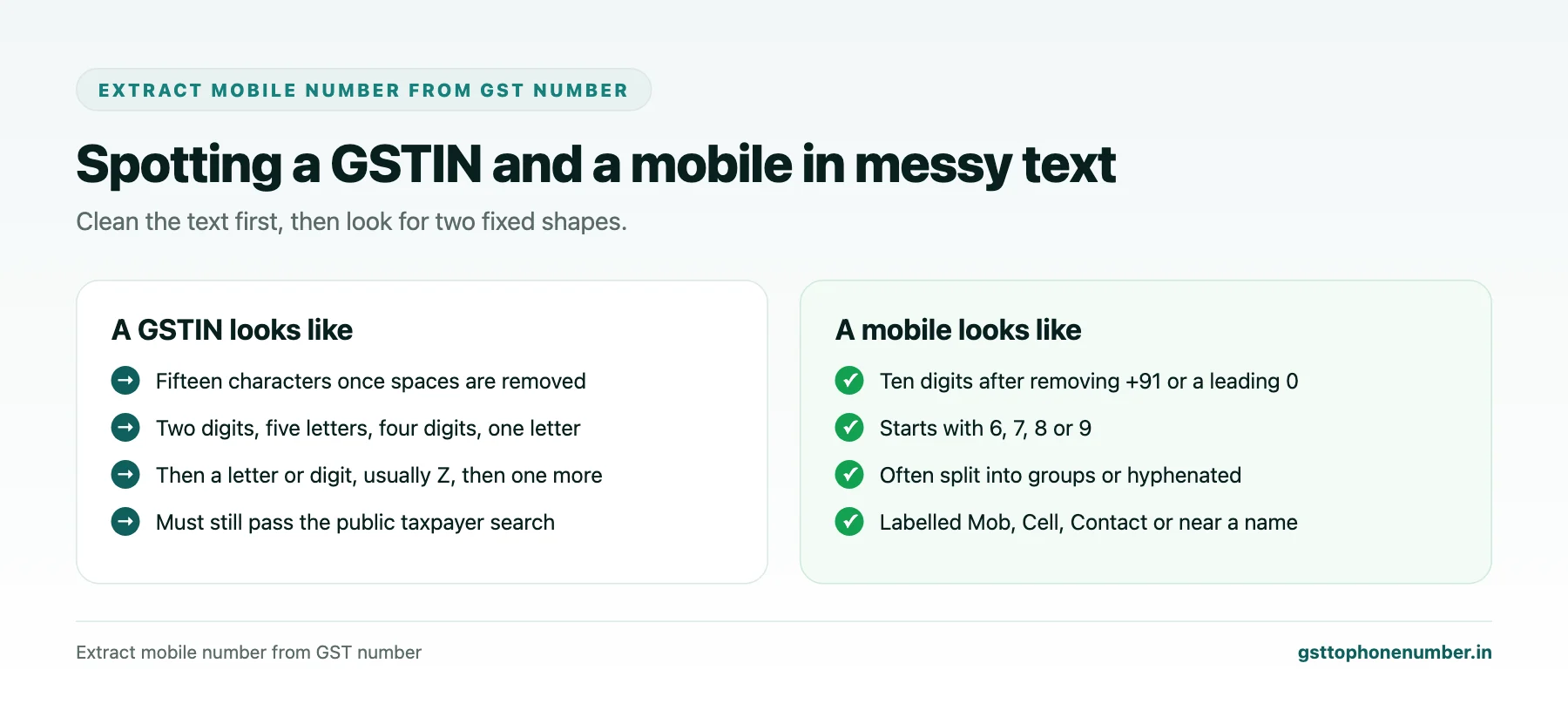
A GSTIN follows a fixed pattern: two digits, five letters, four digits, one letter, one letter or digit, the letter Z in most cases, and a final letter or digit. People write it with spaces, in lower case, after labels such as “GST”, “GSTIN” or “GST No.”, and occasionally with a missing or extra character.
Spreadsheet formulas and most text tools can search for this pattern once spaces are removed and the text is converted to upper case. Anything that matches the pattern should still be checked with the public taxpayer search, because the pattern catches shape, not existence.
Recognising a Mobile Number
Indian mobiles are ten digits beginning with 6, 7, 8 or 9. In chats and cards they appear in many forms: with +91 or 0 in front, split into groups of five, separated by hyphens, or written with spaces after every few digits. Clean the text by removing spaces, hyphens and brackets, strip a leading +91 or 0, and look for ten-digit runs that begin with 6 to 9.
Be careful with other ten-digit strings, such as order numbers or bank account fragments, which can look like mobiles. Context, such as a label like “Mob” or “Contact” or a position near the name, separates them.
Need the contact behind a GSTIN?Get the sample format with verified business contact fields.
Pairing the Right Mobile With the Right GSTIN
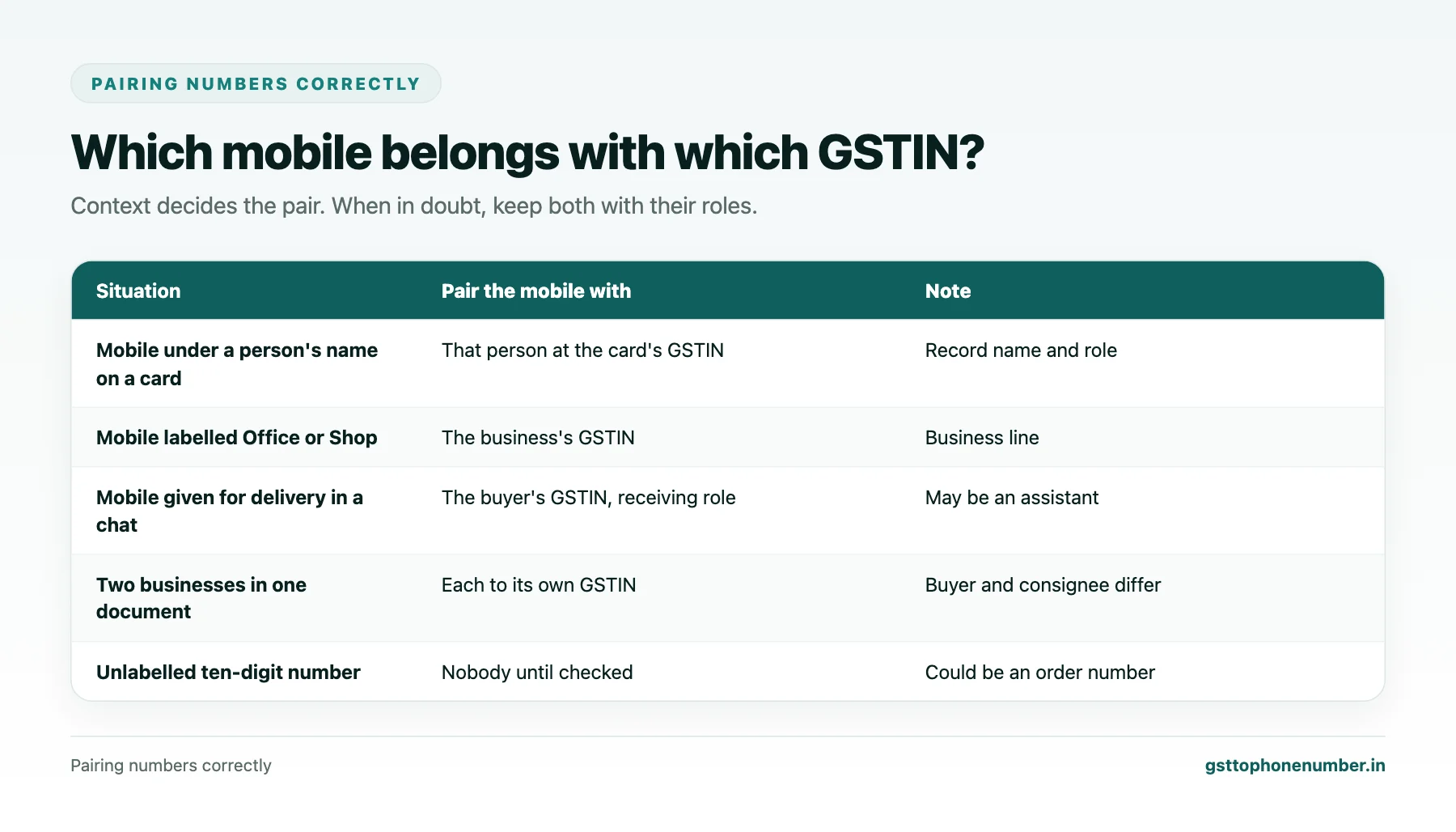
A single message or card may contain several numbers. Pair them using position, labels and names. On a card, the mobile printed under a person’s name belongs to that person; one printed beside “Office” belongs to the business. In a chat, the mobile given “for delivery” may belong to a shop assistant rather than the owner.
When a document mentions two businesses, such as a buyer and a consignee, make sure each mobile goes with the right GSTIN. Getting this wrong attaches one business’s mobile to another’s registration, which is worse than leaving the field empty.
Visiting Cards and Phone Cameras
Phone cameras and scanning apps can read printed text from visiting cards and forms. The results are good but not perfect: zero and the letter O, one and the letter I, five and S are common confusions, and they matter in GSTINs. After scanning, apply the GSTIN and mobile patterns, then check every GSTIN with the public search. If a GSTIN fails, try the common substitutions before giving up.
For trade fairs, scan cards the same day, while you can still remember who gave which card and what they wanted.
Recording What You Extract
Store each pair in your contact system: GSTIN, mobile, the person’s name and role if known, the source, such as chat order or trade fair card, and the date. Keep a copy or link to the original where your systems allow. If the same GSTIN appears later with a different mobile, keep both and note which is newer.
Want to see real match quality?See the sample format for your own GST numbers.
Consent and Courtesy
Details shared in an order or at a fair were given for that order or enquiry. Use the mobile to fulfil the order, follow up the enquiry and maintain the relationship. Before adding the number to broadcast messages or campaigns, ask for agreement, ideally in the same chat or conversation where the number was given, and record it.
Keeping the Process Simple
The best capture process is one your team actually follows. A shared sheet or a simple form in your contact system, filled in whenever an order or card arrives, is enough to start. Over time, the GSTIN-mobile pairs collected this way become one of the most accurate contact sources you have, because every one came directly from the business.
Have a list of GSTINs?Send a few and we will return matching contact fields.
Related guides
Extract Contact Number From GST Number Records Hidden in Your Own Mailbox: a related guide.
Extract Phone Number From GST Number Data on Scanned Invoices: a related guide.
Extract Mobile Number From GSTIN Party Ledgers in Your Accounting Software: a related guide.
Find Mobile Number with GSTIN and Confirm It Is a Business Line: a related guide.
Get Mobile Using GST Number on Field Sales Routes: a related guide.
Check Mobile Number Using GSTN Records: a related guide.
Frequently Asked Questions
Where can I extract mobile number from GST number details I already receive?
From chat orders, order and dealer forms, visiting cards and trade fair enquiry slips, where businesses often give both together.
How do I recognise a GSTIN in text?
Remove spaces, convert to upper case and look for fifteen characters in the fixed pattern, then confirm with the public taxpayer search.
How do I recognise an Indian mobile?
After removing spaces, hyphens and a leading +91 or 0, look for ten digits starting with 6, 7, 8 or 9.
What if a card has two mobiles?
Pair each by position and label, such as under a person’s name or beside Office, or keep both with their roles.
Are scanned visiting cards reliable?
Mostly, but scanners confuse 0 and O, 1 and I, 5 and S. Check every GSTIN with the public search.
Can I add these mobiles to broadcast lists?
Ask for agreement first, ideally in the same chat or conversation, and record it.
 GST To Phone Number
We help sales, procurement and compliance teams turn a GST registration number into a verified, reachable business contact.
Company
Get Sample Format
Send us a few GSTINs and we will return the matching contact fields so you can judge the data before you buy.
© 2026 GST To Phone Number. All rights reserved.
Disclaimer: GST To Phone Number is an independent data service. We are not affiliated with, endorsed by or connected to the Goods and Services Tax Network, the Central Board of Indirect Taxes and Customs, or any government department. GSTIN verification should always be confirmed against the official GST portal. Contact data is provided for legitimate business use and must be used in line with applicable telecom, privacy and data-protection rules.