Home/GST Contact Search Guides/Find Vendor Contact by GSTIN with a Proper Onboarding Form
Find Vendor Contact by GSTIN with a Proper Onboarding Form
Find vendor contact by GSTIN the reliable way, by asking for it on a vendor onboarding form: which fields to include, which proofs to collect, who approves.
GST Identification Number
27ABCDE1234F1Z0
- Legal nameSample Traders Pvt Ltd
- StateMaharashtra (27)
- RegistrationActive
- Phone+91 98XXX XXXXX
- Emailc****@example.com
Illustrative result. Get sample format for live records.
Reading time 4 min
Last reviewed October 2026
Find vendor contact by GSTIN is a search many purchase and accounts teams repeat endlessly, because contacts were never captured properly when the vendor was first set up. A salesperson’s mobile ends up in someone’s phone, the accounts email is in an old thread, and nobody knows whom to call about a payment. The reliable fix is not a better search; it is a vendor onboarding form that asks the vendor for the right contacts, checks them against the GSTIN, and records them in the vendor master from day one.
This guide sets out what such a form should contain, what proofs to collect, and how approvals should work so that contact details stay trustworthy.
Quick answer
- Collect contacts from the vendor directly, on a structured form.
- Ask for separate contacts for sales, accounts and escalation.
- Verify the GSTIN and match the legal name and address before approval.
- Confirm bank details and key phone numbers independently.
- Separate the person who enters vendor data from the person who approves it.
Why a Form Beats a Search
A vendor who fills in a form chooses which numbers to give you and for what purpose, so the contacts are current and consented. A search finds whatever is public, which may be a salesperson who has left or a general line that never reaches accounts. The form also creates a record that auditors can follow.
Identity Fields
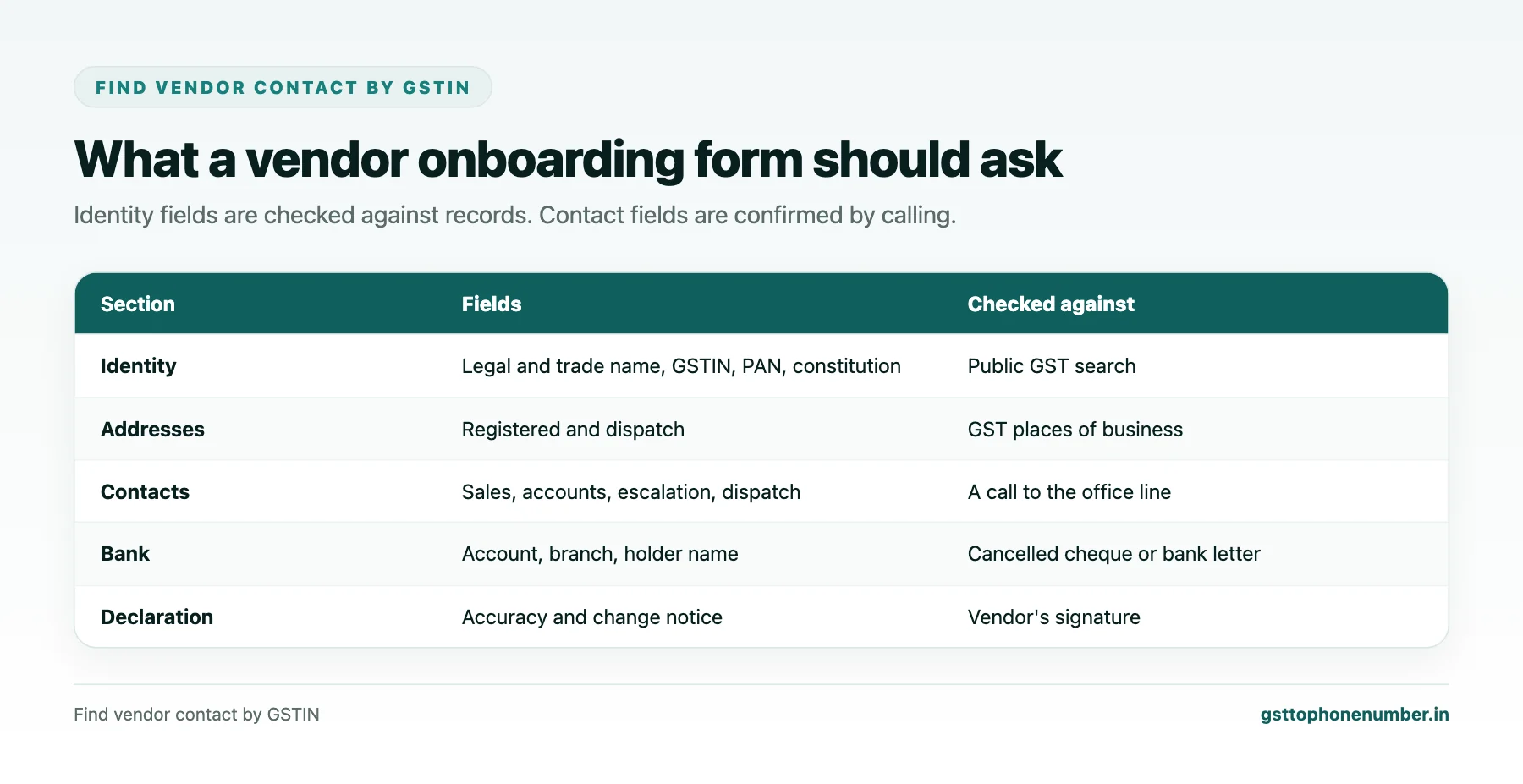
Ask for the legal name, trade name, GSTIN for each state you will buy from, PAN, constitution of business, and registered and dispatch addresses. For companies and LLPs, add the corporate identity number; for small enterprises, the Udyam registration number if they have one. These fields let you verify the vendor and apply the right tax and payment rules.
Contact Fields
Ask for named contacts with role, mobile, landline and email for at least three purposes: sales and orders, accounts and payments, and an escalation contact such as the owner or a manager. Add a dispatch contact for goods vendors. Ask for a general office number and email that do not depend on one person.
Need the contact behind a GSTIN?Get the sample format with verified business contact fields.
Proofs to Collect
Typical proofs are the GST registration certificate, PAN card, a cancelled cheque or bank letter for the payment account, and for companies, the incorporation certificate. Keep copies with the vendor record. Ask the vendor to sign or digitally confirm that the information is correct and that they will inform you of changes.
Checks Before Approval
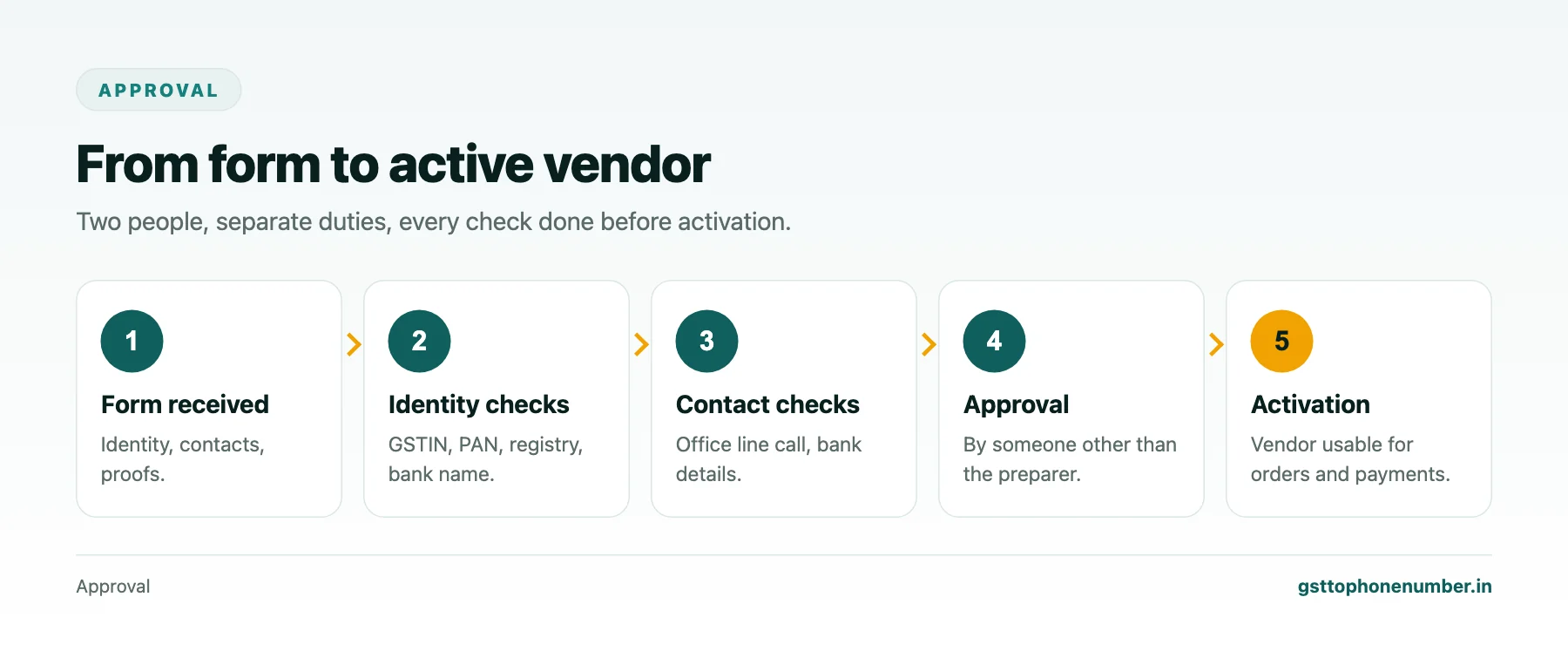
Verify the GSTIN in the public search: the legal name, address and status must match the form. Check that the bank account holder name matches the legal name. Call the accounts contact on the landline or office number given, not only the mobile, and confirm the bank details verbally. For companies, check the corporate registry for status and directors.
Separating Duties
The person who enters vendor details should not be the person who approves them, and neither should be able to change bank details alone. Changes to contacts or bank accounts later should follow the same checks as onboarding. This separation is one of the strongest defences against payment fraud.
Want to see real match quality?See the sample format for your own GST numbers.
Keeping the Form Usable
Keep the form short enough that vendors complete it, ideally online with validation for GSTIN format and phone numbers. Pre-fill the legal name and address from the GSTIN where your system allows, so the vendor only confirms them. Mark which fields are mandatory, and explain why you need each contact.
After Onboarding
Ask vendors to update contacts through the same form, never by an informal message. Review contacts for active vendors once a year. The vendor master then becomes the one place anyone in the company looks for a vendor contact, and the endless searching stops.
Have a list of GSTINs?Send a few and we will return matching contact fields.
Related guides
Find vendor mobile number by GST number: a related guide.
Find vendor phone number by GST number: a related guide.
Find Supplier Contact by GSTIN While Sourcing New Manufacturers: a related guide.
Frequently Asked Questions
How do I find vendor contact by GSTIN reliably?
Ask the vendor for named contacts on an onboarding form, verify the GSTIN and other identity fields against public records, and confirm the key numbers by calling the office line.
Which contacts should the form ask for?
Sales, accounts, an escalation contact such as the owner, a dispatch contact for goods, and a general office number and email.
What proofs should I collect?
The GST certificate, PAN, a cancelled cheque or bank letter, and for companies, the incorporation certificate.
Why call the office line rather than the mobile?
It ties the confirmation to the business rather than one person and helps prevent fraud.
Who should approve a new vendor?
Someone other than the person who entered the details, and neither should change bank details alone.
How should vendors update their contacts?
Through the same form and checks, never by an informal message.
 GST To Phone Number
We help sales, procurement and compliance teams turn a GST registration number into a verified, reachable business contact.
Company
Get Sample Format
Send us a few GSTINs and we will return the matching contact fields so you can judge the data before you buy.
© 2026 GST To Phone Number. All rights reserved.
Disclaimer: GST To Phone Number is an independent data service. We are not affiliated with, endorsed by or connected to the Goods and Services Tax Network, the Central Board of Indirect Taxes and Customs, or any government department. GSTIN verification should always be confirmed against the official GST portal. Contact data is provided for legitimate business use and must be used in line with applicable telecom, privacy and data-protection rules.