Home/GST Phone Lookup Guides/Extract Phone Number From GSTIN Lists With Spreadsheet Formulas
Extract Phone Number From GSTIN Lists With Spreadsheet Formulas
Extract phone number from GSTIN lists in a spreadsheet: formulas to check GSTIN shape, pull the PAN and state, clean phones and join your sources by GSTIN.
GST Identification Number
27ABCDE1234F1Z0
- Legal nameSample Traders Pvt Ltd
- StateMaharashtra (27)
- RegistrationActive
- Phone+91 98XXX XXXXX
- Emailc****@example.com
Illustrative result. Get sample format for live records.
Reading time 4 min
Last reviewed October 2026
Extract phone number from GSTIN lists in a spreadsheet when you have contacts scattered across several sheets and no specialised software. Most offices have the pieces already: a list of GSTINs you care about, an export of party ledgers, a sheet from the sales team and perhaps a file from a data provider. A few well-chosen formulas can clean the GSTINs, derive useful columns from them, normalise every phone number and join all the sources together by GSTIN, giving you one tidy list in an afternoon.
This guide sets out a spreadsheet-first method with working formulas. The examples use common spreadsheet functions and assume the GSTIN is in column A of each sheet; adjust the references to your own layout. No macros or add-ons are needed.
Quick answer
- Clean every GSTIN to upper case without spaces before doing anything else.
- Derive the state code and PAN with simple text formulas.
- Check the GSTIN’s shape with a length and character test.
- Normalise phones to ten digits so duplicates and joins work.
- Join sources on the cleaned GSTIN, never on names.
Step One: Clean the GSTIN Column
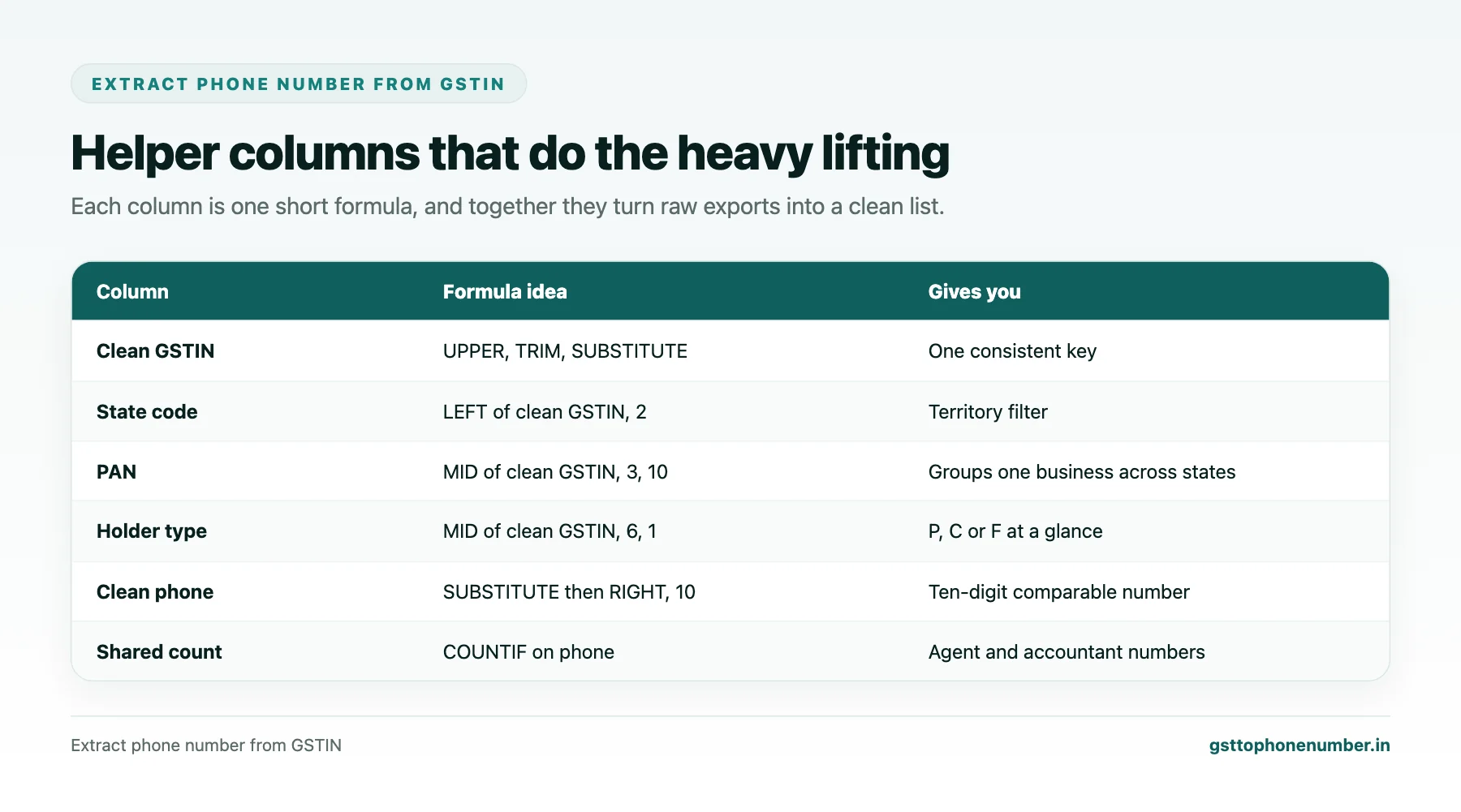
GSTINs copied from emails, PDFs and portals pick up spaces, line breaks and lower-case letters. In a helper column, use a formula such as =UPPER(TRIM(SUBSTITUTE(A2,” “,””))) to remove spaces and convert to upper case. If text came from web pages, wrap the cell in CLEAN to strip hidden characters as well.
Use the cleaned column for every later step. Keep the original column untouched so you can trace any change.
Step Two: Derive the State Code and PAN
Two simple formulas add a great deal of information. =LEFT(B2,2) gives the state code, which you can look up against a small table of state codes to show the state name. =MID(B2,3,10) gives the PAN, which groups registrations of the same business across states.
The holder type is also easy to extract: =MID(B2,6,1) returns the sixth character of the GSTIN, the fourth of the PAN, where P indicates an individual, C a company and F a firm. That column lets you filter proprietorships from companies in one click.
Step Three: Check the Shape
A quick shape test catches most typing errors. =LEN(B2)=15 checks the length. =ISNUMBER(–LEFT(B2,2)) checks that the state code is numeric, and =ISNUMBER(–MID(B2,8,4)) checks the four digits inside the PAN. Combine them with AND to produce a single valid-shape column.
Rows that fail the shape test need correcting from the source document. Rows that pass still need confirming with the public taxpayer search for anything important, because a well-shaped number can still be wrong.
Need the contact behind a GSTIN?Get the sample format with verified business contact fields.
Step Four: Normalise Phone Numbers
Phone numbers need the same treatment. In a helper column, strip spaces, hyphens, brackets and plus signs with nested SUBSTITUTE functions, then take the last ten digits with =RIGHT(cleaned,10). This removes a leading 0 or 91 in one move. A test such as =AND(LEN(C2)=10,ISNUMBER(–C2)) confirms ten digits, and =LEFT(C2,1) shows whether the number starts with 6 to 9, the mobile range.
Format the phone column as text before pasting data into it, so the spreadsheet does not convert long numbers to scientific notation or drop leading zeros.
Step Five: Join the Sources by GSTIN
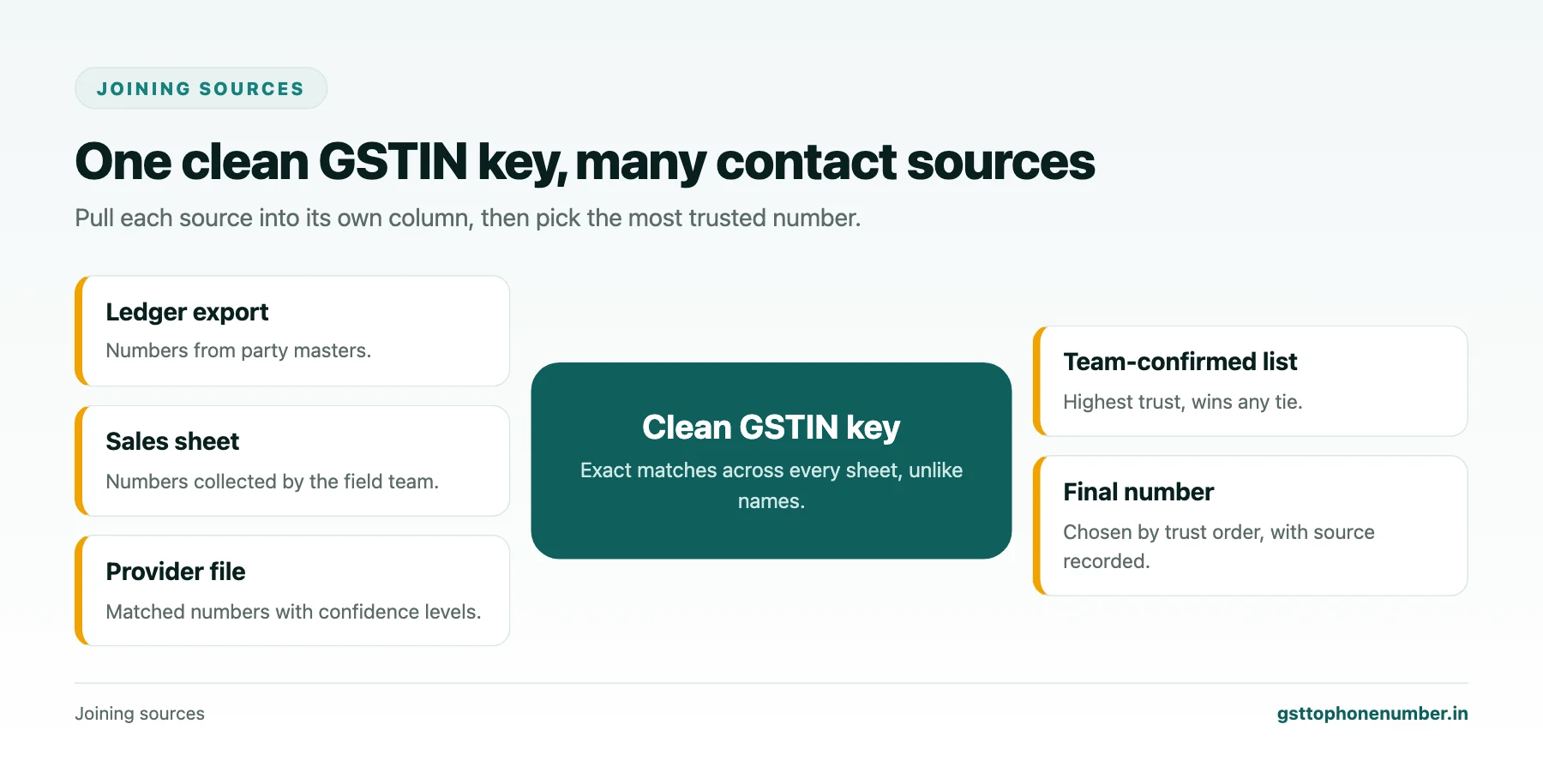
With clean GSTINs in every sheet, joining is straightforward. In your master list, a lookup such as =XLOOKUP(B2,Ledger!B:B,Ledger!E:E,””) pulls the phone from the ledger sheet for each GSTIN, returning blank when there is none. Repeat for the sales sheet and the provider file into separate columns, so you can see where each number came from. Older spreadsheet versions can use INDEX with MATCH in the same way.
Never join on business names. Spelling differences, suffixes and common trade names make name joins unreliable; the cleaned GSTIN is exact.
Step Six: Spot Duplicates and Shared Numbers
=COUNTIF(B:B,B2) shows how many times each GSTIN appears; anything above one is a duplicate row. =COUNTIF(C:C,C2) on the phone column shows how many rows share each number. A phone that appears against many different PANs usually belongs to an accountant or agent, and should be moved out of the business contact column.
Want to see real match quality?See the sample format for your own GST numbers.
Step Seven: Choose a Final Number
With phones from several sources side by side, add a final column that picks one, using a simple order of trust: a number your team confirmed, then the ledger, then the sales sheet, then the provider file. A formula with nested IF statements or the IFS function can apply that order automatically, and a source column records which one won.
Keeping the Workbook Safe and Useful
A workbook that joins every contact source is valuable and sensitive. Keep it in a controlled location, limit who can edit it and remove personal mobiles that are no longer needed. Save the formulas as a template, so next quarter you can paste in fresh exports and get a clean, joined list in minutes rather than hours.
Have a list of GSTINs?Send a few and we will return matching contact fields.
Related guides
Extract Mobile Number From GSTIN Party Ledgers in Your Accounting Software: a related guide.
Check Contact Number From GST Number When Your Systems Disagree: a related guide.
Check Phone Number Using GSTN State Codes and Landline City Codes: a related guide.
Frequently Asked Questions
How do I extract phone number from GSTIN lists in a spreadsheet?
Clean the GSTINs, derive state and PAN columns, normalise phone numbers to ten digits and join all your sources on the cleaned GSTIN.
Which formula cleans a GSTIN?
Something like =UPPER(TRIM(SUBSTITUTE(A2,” “,””))), optionally wrapped in CLEAN for text copied from web pages.
How do I get the PAN from a GSTIN?
Use =MID(B2,3,10), which returns characters three to twelve of the cleaned GSTIN.
How do I normalise phone numbers?
Remove spaces and symbols with SUBSTITUTE, then take the last ten digits with RIGHT, which also drops a leading 0 or 91.
Why not join on business names?
Names vary in spelling and suffixes, and many businesses share trade names. The GSTIN is an exact key.
How do I find accountants' numbers in the list?
Count each phone with COUNTIF. A number appearing against many different PANs usually belongs to an intermediary.
 GST To Phone Number
We help sales, procurement and compliance teams turn a GST registration number into a verified, reachable business contact.
Company
Get Sample Format
Send us a few GSTINs and we will return the matching contact fields so you can judge the data before you buy.
© 2026 GST To Phone Number. All rights reserved.
Disclaimer: GST To Phone Number is an independent data service. We are not affiliated with, endorsed by or connected to the Goods and Services Tax Network, the Central Board of Indirect Taxes and Customs, or any government department. GSTIN verification should always be confirmed against the official GST portal. Contact data is provided for legitimate business use and must be used in line with applicable telecom, privacy and data-protection rules.