Home/GST Contact Search Guides/Get Contact by GSTIN in Your App: Validation and Field Design
Get Contact by GSTIN in Your App: Validation and Field Design
Get contact by GSTIN right inside your software: validate the format and check digit, verify the record, and design contact fields that stay clean over time.
GST Identification Number
27ABCDE1234F1Z0
- Legal nameSample Traders Pvt Ltd
- StateMaharashtra (27)
- RegistrationActive
- Phone+91 98XXX XXXXX
- Emailc****@example.com
Illustrative result. Get sample format for live records.
Reading time 4 min
Last reviewed October 2026
Get contact by GSTIN is a feature request developers hear often: “When a user types a GSTIN, fill in the business and its contact details.” Part of that is possible and valuable. The structure of a GSTIN can be validated instantly, its check digit catches most typing errors, and an authorised verification service can return the legal name, address and status. The contact part is different: no official service returns phone numbers, so your app must collect and maintain contacts itself, and its data model decides whether they stay accurate.
This guide covers GSTIN validation, verification, and how to design contact fields around the GSTIN in business software.
Quick answer
- A GSTIN has a fixed fifteen-character structure that can be validated with a pattern.
- The last character is a check digit that catches most typing errors.
- Verification services return identity and status, not phone numbers.
- Contacts should be collected from the business and stored as separate, typed records.
- Every contact should carry its source, purpose and date confirmed.
The Structure of a GSTIN
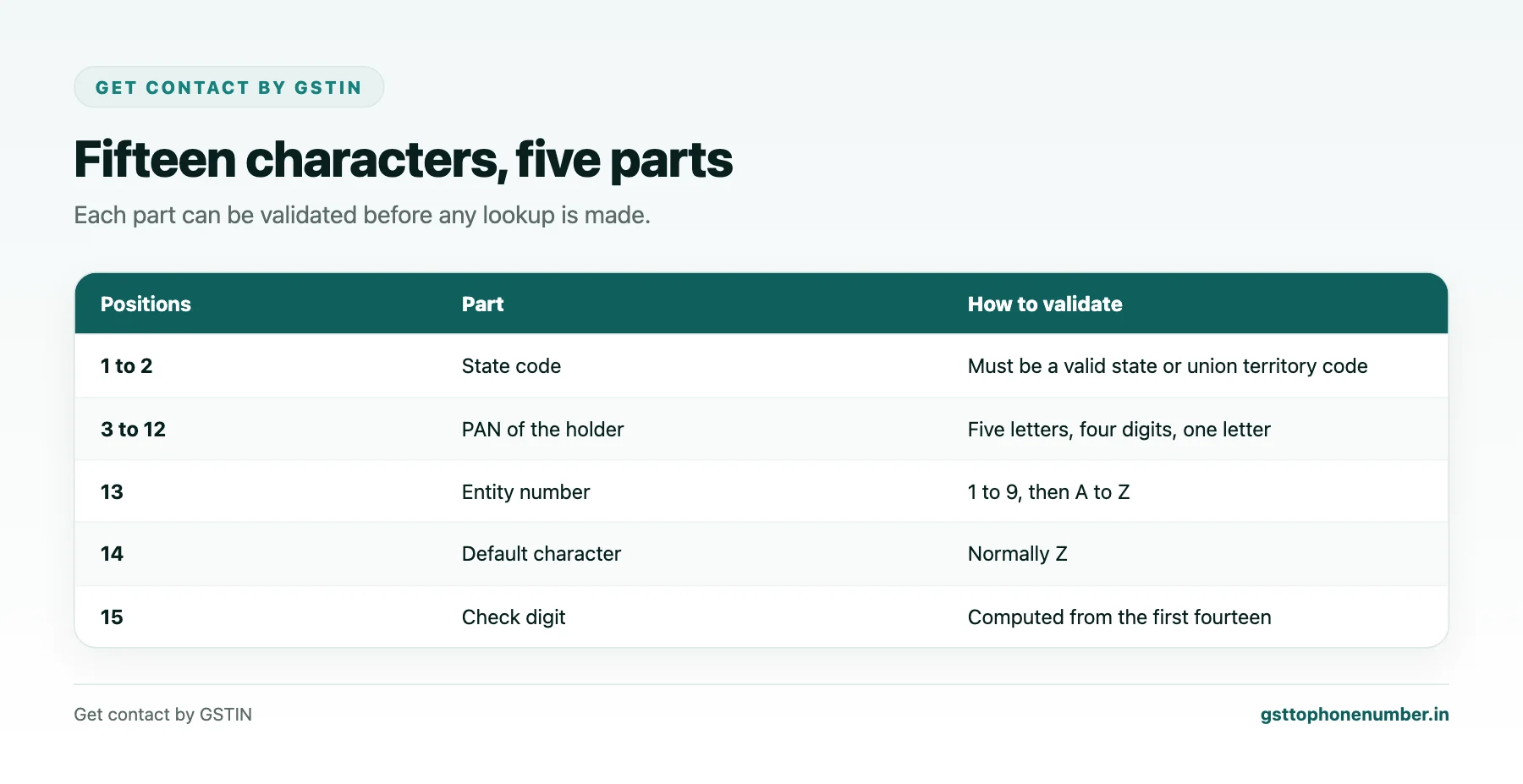
A GSTIN has fifteen characters. The first two are the state code. The next ten are the holder’s PAN: five letters, four digits and a letter. The thirteenth is an entity number for registrations under the same PAN in one state, using digits then letters. The fourteenth is normally Z. The fifteenth is the check digit. Special registrations such as unique identity numbers and some deductor registrations follow different formats, so allow for them if your users deal with such bodies.
Format Validation
A pattern such as two digits, five uppercase letters, four digits, one letter, one character from 1 to 9 or A to Z, the letter Z, and one digit or letter covers regular registrations. Normalise input first: trim spaces, convert to uppercase, and remove separators users paste in. Also check the state code against the list of valid codes.
The Check Digit
The fifteenth character is computed from the first fourteen. Map each character to a value from 0 to 35, using digits then letters. Multiply each value by a factor that alternates 1, 2, 1, 2 starting from the first character. For each product, add the quotient and the remainder of dividing it by 36. Take the total modulo 36, subtract from 36, and take the result modulo 36 again. The character for that value is the check digit. If it does not match, the GSTIN was mistyped.
Need the contact behind a GSTIN?Get the sample format with verified business contact fields.
Verifying Against the Registry
Format and check digit prove only that a GSTIN is well formed. To confirm it exists and is active, call an authorised verification service through a GST Suvidha Provider or an approved data channel. Show the returned legal name to the user for confirmation, store the status and the date verified, and recheck periodically for active parties.
Designing Contact Fields
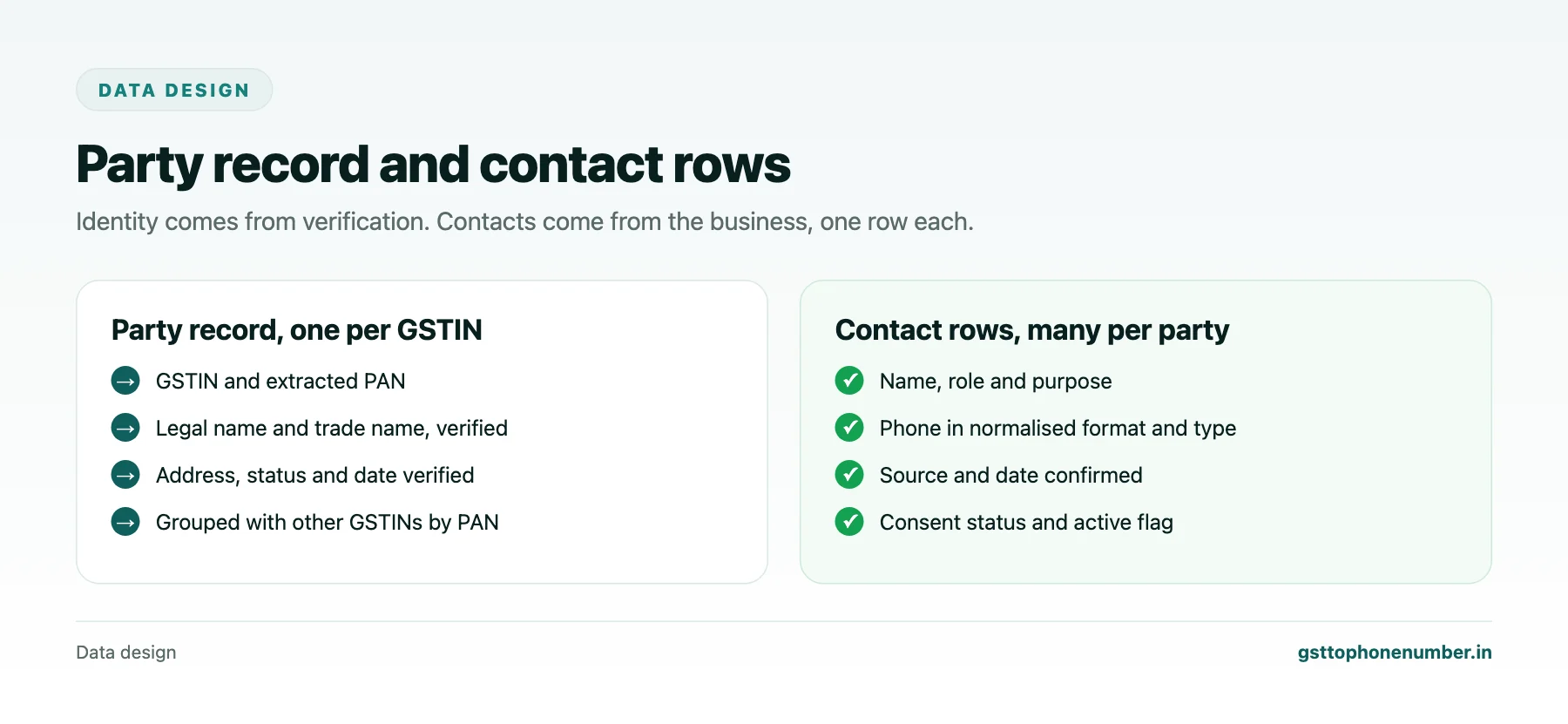
Do not add a single “phone” column to the party table. Create a contacts table linked to the party, with one row per contact: name, role, phone in a normalised international format, number type, email, purpose such as sales or accounts, source, date confirmed, consent status and an active flag. A party can then hold many contacts, each with its own history.
Linking Parties by PAN
Store the PAN extracted from the GSTIN as a separate indexed field. It lets you group a business’s registrations across states, detect duplicates entered under different names, and show users all GSTINs of the same legal entity. Keep one party record per GSTIN and a grouping by PAN rather than merging states into one record.
Want to see real match quality?See the sample format for your own GST numbers.
Privacy and Consent
Contact rows are personal data when they belong to individuals, which is common for proprietors. Record why each contact was collected and whether the person agreed to marketing. Restrict access by role, log changes, and delete contacts that are no longer needed. Never scrape or import contacts from unknown sources into a production system.
Testing
Build a test set of valid GSTINs from your own records, then generate invalid ones by changing a single character or swapping two adjacent characters; the check digit should reject almost all of them. Test lowercase input, pasted spaces, and special registration formats.
Have a list of GSTINs?Send a few and we will return matching contact fields.
Related guides
Get Contact by GST Number to Recover a Delayed MSME Payment: a related guide.
Find Vendor Contact by GSTIN with a Proper Onboarding Form: a related guide.
Frequently Asked Questions
Can my app get contact by GSTIN automatically?
It can validate the GSTIN and fetch the legal name, address and status through an authorised verification service, but phone numbers and emails must be collected from the business.
How do I validate a GSTIN's format?
Normalise the input, then check two digits, five letters, four digits, a letter, an entity character, Z and a final character, plus a valid state code.
How does the GSTIN check digit work?
Each of the first fourteen characters is mapped to 0 to 35, weighted alternately by 1 and 2, and the quotient and remainder of each product by 36 are summed; the check value is 36 minus the total modulo 36, again modulo 36.
Why store the PAN separately?
To group a business’s registrations across states and detect duplicates.
How should contacts be stored?
As separate rows linked to the party, with role, purpose, source, date confirmed and consent status.
Do special registrations use the same format?
Not always. Unique identity numbers and some deductor registrations differ, so allow for them.
 GST To Phone Number
We help sales, procurement and compliance teams turn a GST registration number into a verified, reachable business contact.
Company
Get Sample Format
Send us a few GSTINs and we will return the matching contact fields so you can judge the data before you buy.
© 2026 GST To Phone Number. All rights reserved.
Disclaimer: GST To Phone Number is an independent data service. We are not affiliated with, endorsed by or connected to the Goods and Services Tax Network, the Central Board of Indirect Taxes and Customs, or any government department. GSTIN verification should always be confirmed against the official GST portal. Contact data is provided for legitimate business use and must be used in line with applicable telecom, privacy and data-protection rules.