Home/GST Phone Lookup Guides/Enrich GSTIN With Phone Number Inside Your CRM, Continuously and Safely
Enrich GSTIN With Phone Number Inside Your CRM, Continuously and Safely
Enrich GSTIN with phone number inside your CRM as an ongoing process: lookup triggers, overwrite rules that protect good data, and a clear audit trail.
GST Identification Number
27ABCDE1234F1Z0
- Legal nameSample Traders Pvt Ltd
- StateMaharashtra (27)
- RegistrationActive
- Phone+91 98XXX XXXXX
- Emailc****@example.com
Illustrative result. Get sample format for live records.
Reading time 5 min
Last reviewed October 2026
Enrich GSTIN with phone number once and you have a good list for a few months. Enrich it continuously inside your customer relationship management system and you have a list that stays good. Many businesses still treat enrichment as an annual project: export the accounts, send them for enrichment, import the results and hope nothing important was overwritten. Continuous enrichment replaces that with small, automatic updates triggered by real events, governed by rules that protect the numbers your own staff have confirmed.
This guide explains how to design that process. It covers the events that should trigger a lookup, the rules for when new data may replace old data, how to record where each number came from, and how to keep the process from quietly degrading the very records it is meant to improve.
Quick answer
- Trigger enrichment on events, not on the calendar alone.
- Never let bought data overwrite a number your own team has confirmed.
- Store new numbers beside old ones until one is confirmed.
- Keep a source, date and confidence on every phone field.
- Review enrichment outcomes monthly to catch drift early.
Why Batch Enrichment Breaks Things
The classic batch approach has two problems. Between batches, data decays and nobody notices until calls fail. During each batch, imported numbers overwrite whatever was there, including numbers that salespeople confirmed last week in a conversation. Staff learn that the system cannot be trusted and start keeping their own notes, which defeats the purpose of having a system at all.
Continuous enrichment fixes both problems: lookups happen when they are needed, and rules decide whether a new number may replace an existing one.
The Events That Should Trigger a Lookup
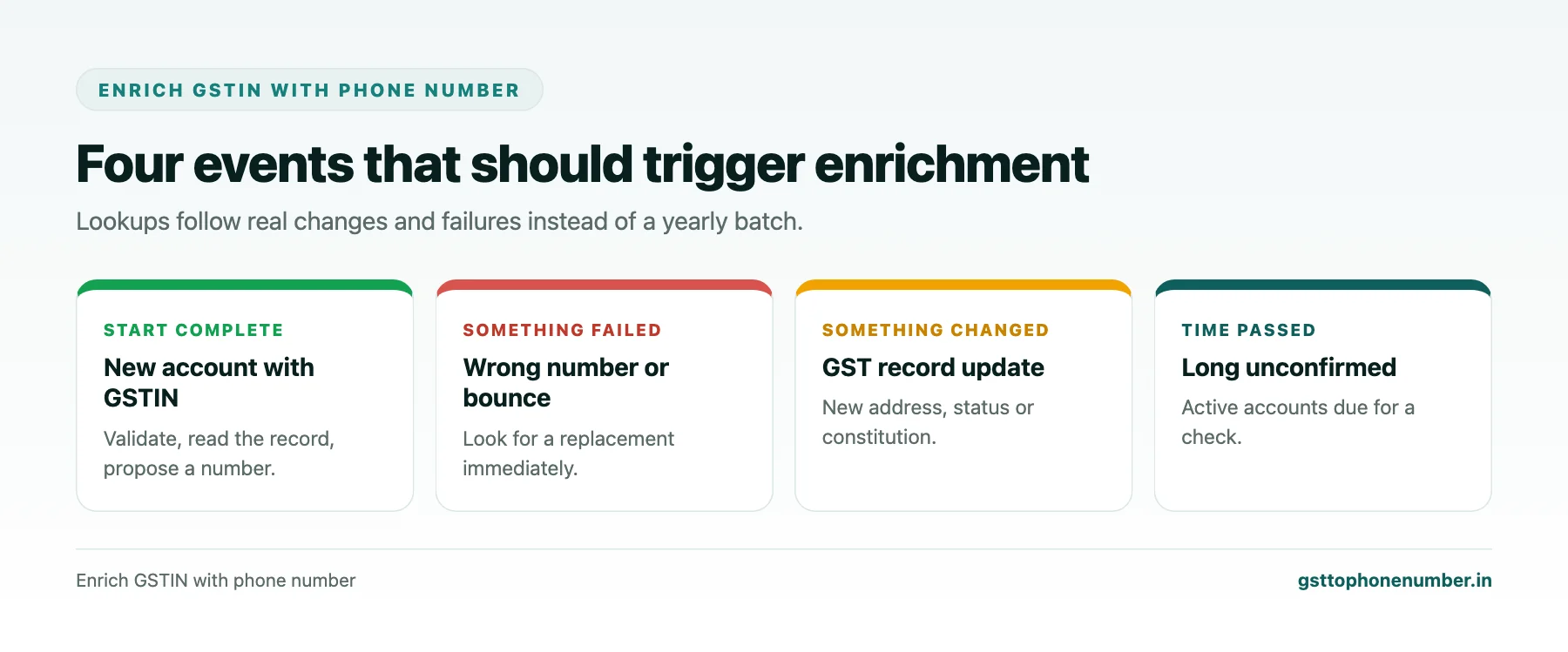
The most useful trigger is the creation of a new account with a GSTIN. At that moment the system can validate the GSTIN, read the registration details and look for a phone number, so the record starts complete. The second is a failed contact: a call disposition of wrong number or not reachable, or a bounced email. The third is a change in the GST record, such as a new address, a cancelled status or a changed constitution. The fourth is time: a number that has not been confirmed for a long period on an active account is due for a check.
Each trigger should create a small, specific task: look up this GSTIN, propose a number, and route the proposal according to the rules.
Overwrite Rules That Protect Good Data
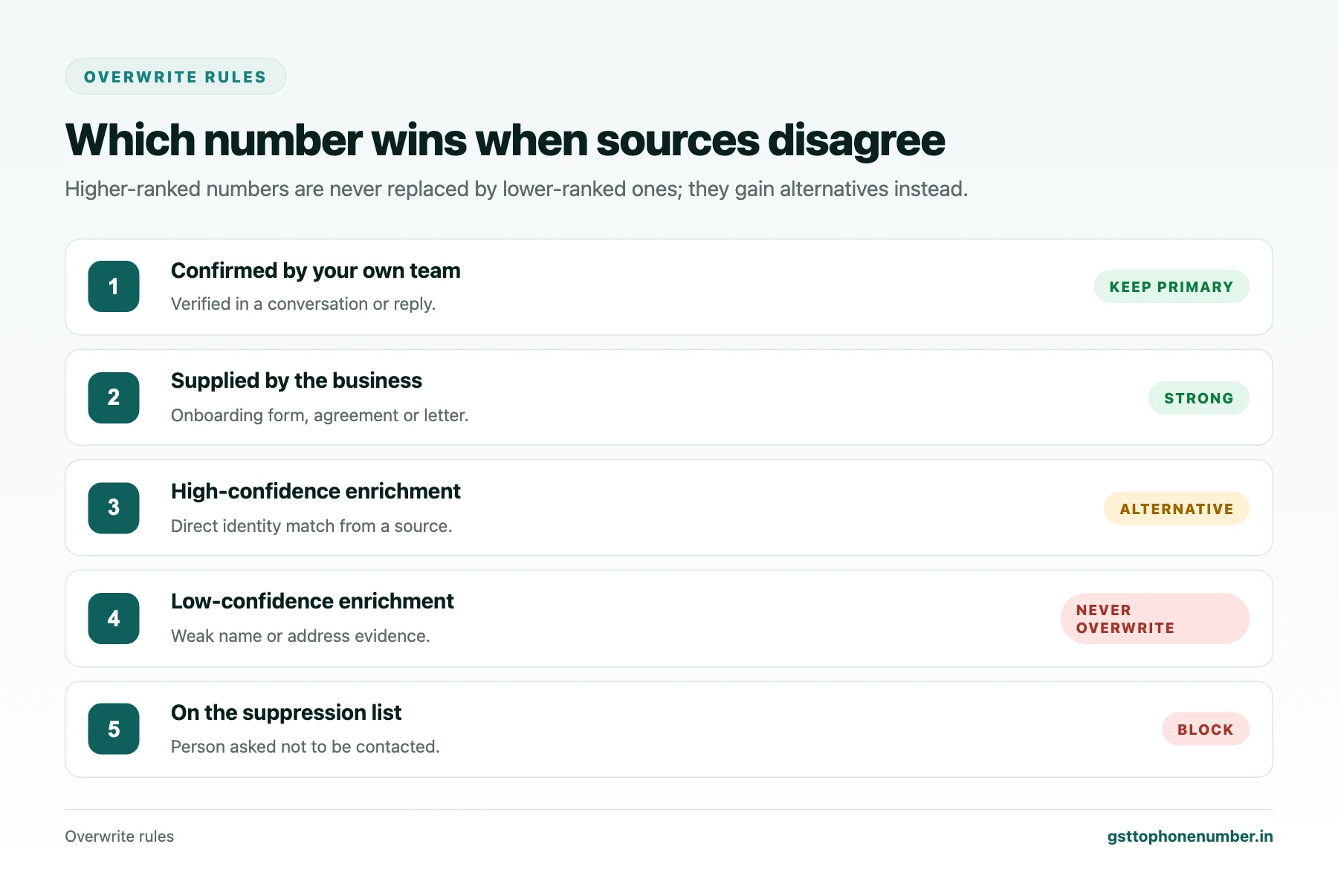
The central rule is simple: a number confirmed by a person in your organisation outranks a number from any outside source. If a salesperson confirmed the owner’s mobile in a conversation last month, an enrichment result must not replace it. It can be stored as an alternative, but the confirmed number stays primary.
Beyond that, rank sources by reliability. Numbers supplied by the business itself, such as on an onboarding form or in a signed agreement, rank next. Numbers from a matched contact source rank by their confidence level. Unconfirmed numbers from weak matches rank last and should never replace anything.
Need the contact behind a GSTIN?Get the sample format with verified business contact fields.
Storing Alternatives Instead of Replacing
When enrichment proposes a number that differs from the current one, keep both. Mark the new one as an alternative with its source, date and confidence. The next time someone calls the account, they can try the primary and, if it fails, the alternative, recording which worked. The confirmed number becomes primary and the other is retired.
This approach turns every call into a small verification step, and it means no information is lost when a source is wrong.
Field-Level Provenance
Every phone field should carry three pieces of information: where it came from, when it was last confirmed and how confident the match was. These let users decide how to use the number and let the rules decide whether to replace it. They also make audits possible: if a batch of wrong numbers appears, provenance shows which source or rule caused it.
Monitoring the Process
Continuous processes can drift without anyone noticing. Review a few measures monthly: how many lookups were triggered and by which events, how many proposed numbers were accepted, how many alternatives were later confirmed or rejected, and the wrong-number rate among enriched numbers compared with numbers confirmed by staff. A rising rejection rate for one source is an early sign of a quality problem.
Share the measures with the teams who use the data. When they see that the system protects their confirmed numbers and improves over time, they stop keeping private lists.
Want to see real match quality?See the sample format for your own GST numbers.
Privacy and Purpose
Continuous enrichment means personal mobiles of proprietors and staff may enter your system automatically. Limit enrichment to accounts you have a genuine business reason to contact, restrict who can see personal numbers, remove numbers that people ask you not to use, and make sure enrichment does not quietly re-add a number that someone asked you to delete. A suppression list consulted before every write prevents that.
Starting Small
You do not need to automate everything at once. Start with the new-account trigger and the rule that protects confirmed numbers. Add failed-contact triggers once call dispositions are recorded reliably, then GST-change triggers. Each step improves data quality without risking the records your team already trusts.
Have a list of GSTINs?Send a few and we will return matching contact fields.
Related guides
Check Contact Number From GST Number When Your Systems Disagree: a related guide.
Enrich GST Number With Phone Number: a related guide.
Frequently Asked Questions
What does it mean to enrich GSTIN with phone number continuously?
Instead of yearly batches, lookups run inside your CRM when events occur, such as a new account, a failed call or a GST record change.
Should enrichment overwrite existing numbers?
Not if your team has confirmed them. Store new numbers as alternatives until a call confirms which is right.
What is field-level provenance?
A record of each phone field’s source, last confirmation date and match confidence, used for decisions and audits.
How do I know if continuous enrichment is working?
Review triggered lookups, accepted and rejected proposals, and the wrong-number rate of enriched numbers each month.
How do I stop enrichment re-adding a number someone asked us to delete?
Check a suppression list before every write so blocked numbers are never added back.
Where should I start?
With the new-account trigger and the rule protecting confirmed numbers, then add other triggers step by step.
 GST To Phone Number
We help sales, procurement and compliance teams turn a GST registration number into a verified, reachable business contact.
Company
Get Sample Format
Send us a few GSTINs and we will return the matching contact fields so you can judge the data before you buy.
© 2026 GST To Phone Number. All rights reserved.
Disclaimer: GST To Phone Number is an independent data service. We are not affiliated with, endorsed by or connected to the Goods and Services Tax Network, the Central Board of Indirect Taxes and Customs, or any government department. GSTIN verification should always be confirmed against the official GST portal. Contact data is provided for legitimate business use and must be used in line with applicable telecom, privacy and data-protection rules.