Home/GST Phone Lookup Guides/Extract Phone Number From GST Number Data on Scanned Invoices
Extract Phone Number From GST Number Data on Scanned Invoices
Extract phone number from GST number data on scanned invoices: read the seller header, tell seller from buyer GSTIN, and route low-confidence reads to review.
GST Identification Number
27ABCDE1234F1Z0
- Legal nameSample Traders Pvt Ltd
- StateMaharashtra (27)
- RegistrationActive
- Phone+91 98XXX XXXXX
- Emailc****@example.com
Illustrative result. Get sample format for live records.
Reading time 5 min
Last reviewed October 2026
Extract phone number from GST number details on scanned invoices and you turn a pile of paper into a supplier contact list. Accounts payable teams in mid-sized companies receive hundreds of purchase invoices a month, many as scans or photos. Each one carries the supplier’s GSTIN and, in the letterhead or footer, the supplier’s phone number. Optical character recognition, or OCR, can read both. The difficulty lies in reading them accurately, telling the supplier’s details from your own, and deciding which reads can be trusted without a human checking them.
This guide walks through an invoice extraction process: where the details sit on a typical Indian tax invoice, how to separate seller and buyer GSTINs, how to pick the right phone number from the header, how to handle OCR errors and how to design a review step so mistakes do not flow into your vendor master.
Quick answer
- Every invoice carries two GSTINs: the supplier’s and yours.
- The supplier’s phone usually sits in the header or footer near its GSTIN.
- OCR confuses similar characters, so every extracted GSTIN must be validated.
- The QR code on an e-invoice confirms GSTINs but carries no phone number.
- Send low-confidence reads to a short human review queue.
Where the Details Sit on an Invoice
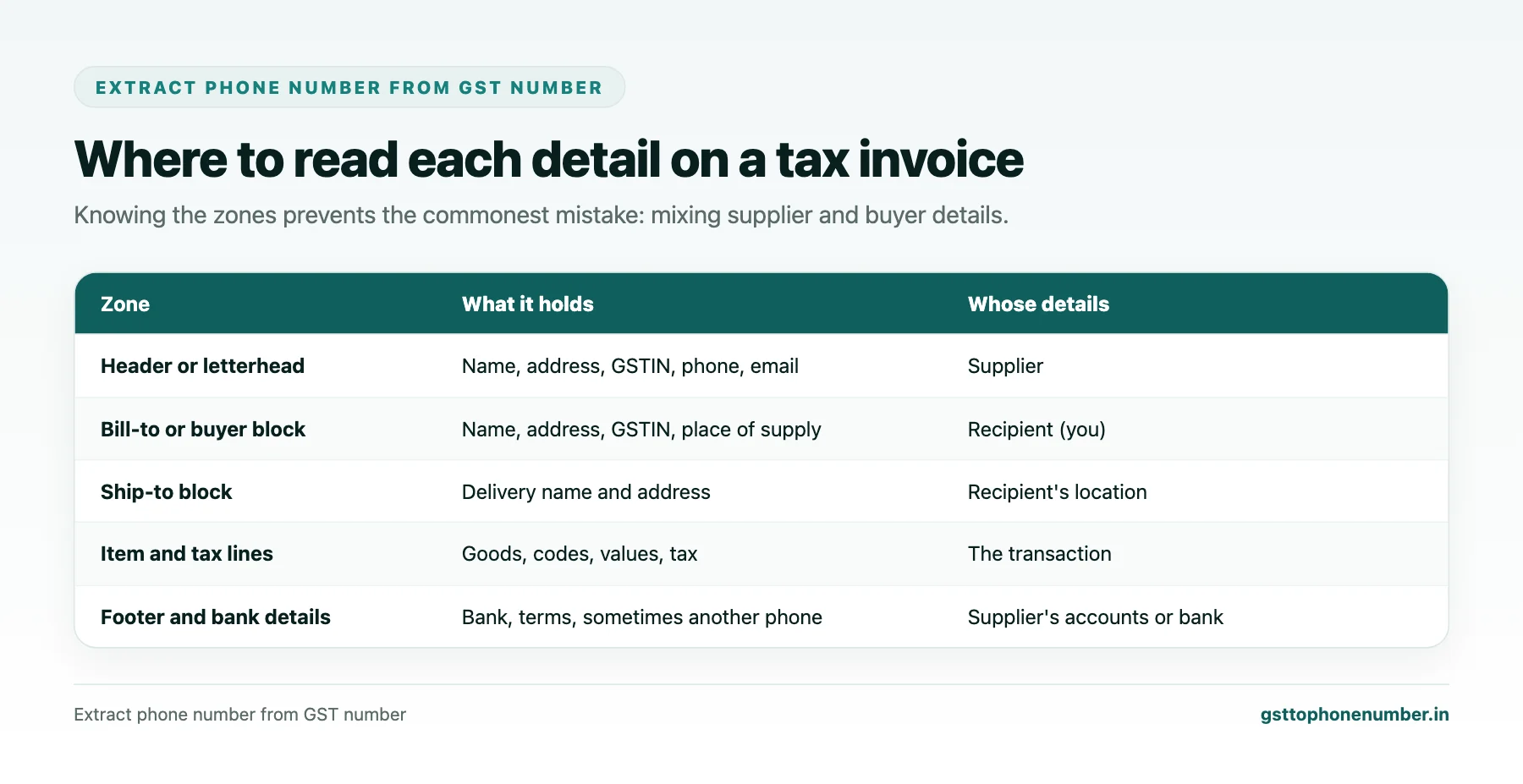
Most Indian tax invoices follow a similar layout. The top carries the supplier’s name, address, GSTIN and contact details, often as a letterhead. Below that sits a block for the recipient, labelled bill to, buyer or consignee, with the recipient’s name, address and GSTIN. Then come the invoice number and date, the item lines, the tax summary and, at the bottom, bank details, terms and a signature. Some suppliers repeat their phone number in the footer.
Knowing these zones is the key to accurate extraction. A phone number in the top zone almost always belongs to the supplier. A GSTIN in the bill-to zone almost always belongs to you.
Telling the Supplier's GSTIN From Yours
The commonest extraction mistake is attaching the supplier’s phone number to your own GSTIN, or yours to theirs. Avoid it in two ways. First, use labels and position: the GSTIN in the header or near words like supplier, seller or from is the supplier’s; the one near bill to, buyer or ship to is the recipient’s. Second, use what you know: your own GSTINs are a short, fixed list, so any GSTIN on the invoice that is not one of yours must be the supplier’s.
The second method is simple and very reliable for purchase invoices, and it works even when the layout is unusual.
Picking the Right Phone Number
The header may contain several numbers: an office landline, one or two mobiles, a fax number and sometimes a toll-style service number. Prefer numbers labelled phone, tel, mobile or contact; ignore those labelled fax. Check the landline’s city code against the supplier’s address. Where both a landline and a mobile appear, keep both with their types rather than choosing one.
Phone numbers in the bank details or terms section usually belong to the bank branch or to a collections desk, so treat them separately.
Need the contact behind a GSTIN?Get the sample format with verified business contact fields.
Dealing With OCR Errors
OCR handles clean, typed invoices well and struggles with low-resolution photos, stamps over text, handwritten invoices and decorative letterheads. In GSTINs, the classic confusions are zero and the letter O, one and the letter I, two and Z, five and S, and eight and B. Because the GSTIN has a fixed pattern and a check character, many of these errors can be detected and some corrected automatically: digits are expected in positions one, two and eight to eleven, letters in positions three to seven and twelve.
Every extracted GSTIN should then be confirmed with the public taxpayer search, and the legal name returned should resemble the supplier name on the invoice.
Using the QR Code on E-Invoices
E-invoices carry a QR code containing signed data such as the supplier and recipient GSTINs, the invoice number and date, the value and the invoice reference number. Reading the QR code gives you the GSTINs with certainty, avoiding OCR errors entirely. It does not contain phone numbers, so you still read the phone from the header, but you can be sure it is attached to the right GSTIN.
Designing the Review Step
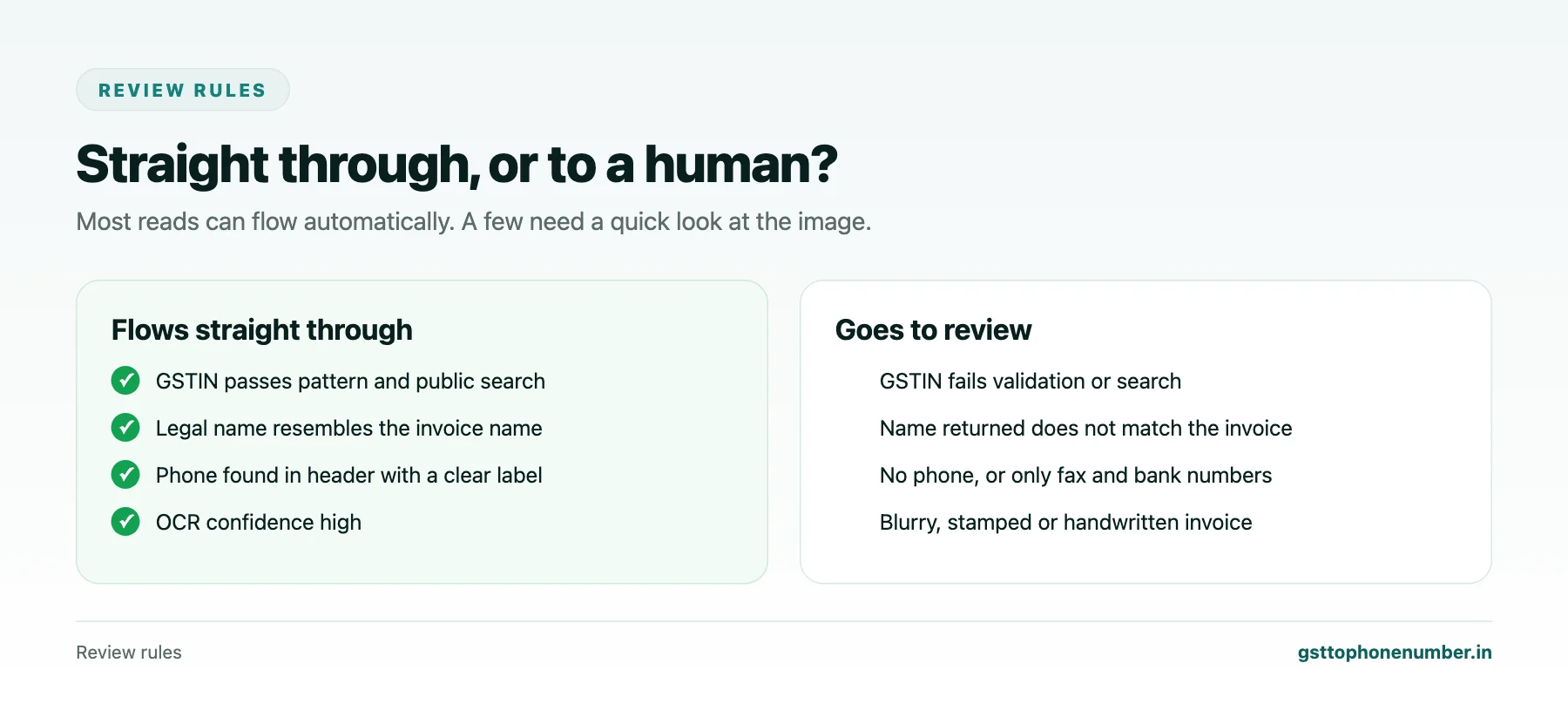
No OCR process is perfect, so build a short review queue. Send a read to review when the GSTIN failed validation, when the legal name from the public search does not resemble the invoice name, when no phone was found, or when OCR reported low confidence. A reviewer looks at the image, corrects the fields and approves. Everything else flows straight into the vendor contact record.
Track how many reads go to review and why. If one supplier’s invoices always fail, ask that supplier for a cleaner format or an electronic copy.
Want to see real match quality?See the sample format for your own GST numbers.
Starting Without Special Software
You do not need an automation platform to begin. Many scanners and phone apps produce searchable PDFs with a text layer. A clerk can copy the header text from each PDF into a sheet, where formulas find the GSTIN pattern and the ten-digit numbers, and a second column flags whether the GSTIN is one of your own. Even this manual version, run once a week on new supplier invoices, steadily fills gaps in the vendor master.
As volumes grow, the same rules carry over into an automated pipeline: zones, the not-one-of-ours rule, labelled phone numbers, validation and a review queue. Getting the rules right by hand first makes the automation far more reliable.
Feeding the Vendor Master
Approved extractions should update the supplier’s record in your vendor master against its GSTIN, with the phone number, its type, the invoice it came from and the date. When a new invoice shows a different number, keep both and flag the change for confirmation. Over time, each supplier’s record reflects the numbers printed on its most recent invoices, which is usually exactly what you want.
Have a list of GSTINs?Send a few and we will return matching contact fields.
Related guides
Extract Mobile Number From GST Number Details in Chats, Order Forms and Cards: a related guide.
Extract Company Mobile From GSTIN-Linked E-Invoice Data You Already Hold: a related guide.
Extract Contact Number From GST Number Records Hidden in Your Own Mailbox: a related guide.
Extract Phone Number From GSTIN Lists With Spreadsheet Formulas: a related guide.
Find Contact Number With GST Number to Recover Missing Input Tax Credit: a related guide.
Find Vendor Contact by GSTIN with a Proper Onboarding Form: a related guide.
Frequently Asked Questions
How do I extract phone number from GST number data on invoices?
Read the supplier header for the GSTIN and phone, separate it from your own GSTIN in the bill-to block, validate the GSTIN and record the phone with its type.
How do I avoid mixing up supplier and buyer GSTINs?
On purchase invoices, any GSTIN that is not one of your own belongs to the supplier. Use labels and position as a second check.
What OCR errors are common in GSTINs?
Confusions such as 0 and O, 1 and I, 2 and Z, 5 and S, 8 and B. The fixed pattern and public search help catch them.
Does the e-invoice QR code include a phone number?
No. It carries signed data such as GSTINs, invoice details and the reference number, which confirms the GSTIN but not the phone.
Which reads should a human review?
Those where the GSTIN fails validation, the name does not match, no phone is found or OCR confidence is low.
How should extracted numbers update the vendor master?
Against the supplier’s GSTIN with type, source invoice and date, keeping old numbers until a change is confirmed.
 GST To Phone Number
We help sales, procurement and compliance teams turn a GST registration number into a verified, reachable business contact.
Company
Get Sample Format
Send us a few GSTINs and we will return the matching contact fields so you can judge the data before you buy.
© 2026 GST To Phone Number. All rights reserved.
Disclaimer: GST To Phone Number is an independent data service. We are not affiliated with, endorsed by or connected to the Goods and Services Tax Network, the Central Board of Indirect Taxes and Customs, or any government department. GSTIN verification should always be confirmed against the official GST portal. Contact data is provided for legitimate business use and must be used in line with applicable telecom, privacy and data-protection rules.